Try this first…. Open Scrivener on your Mac and from the Files menu select Sync then “with Mobile Devices” and see if that recovers what you wrote on your iPad. I’ve had luck with that sometimes in a situation like you describe.
Next thing to try is to close Scrivener on your Mac, wait for Dropbox to update, then open your iPad and look in the Files app. There should be a Scrivener heading in Favorites, in that tree look for the Backups folder and you should find a local copy of your project that might have a different timestamp than Dropbox, in which case you should be able to open the backup and recover your work. Scrivener will ask if you want to save the file on your iPad or Dropbox. I’d select on your iPad until you can see if it has what you need, in which case it should be easy to transplant the missing words to the needed project.
Past that, lets see what Support says. I can offer a really nasty ‘last ditch’ option if everything else fails.
As for why Scrivener does not use iCloud…. I cannot speak from authority, but the ability to sync between Mac and Mobile was designed and implemented before iCloud started offering sync-able cloud storage APIs. When it came out, DropBox was all there was. The L&L folks are rather scrupulously against fixing things that currently work.
This seems like it might be my best option. Thanks!
I was pretty frustrated when I wrote that post yesterday, so if anyone cares, here’s a more coherent explanation of my frustration:
I have ADHD, and the more clicks there are involved in a process, the more difficult it becomes for me. That’s why I was on about iCloud. I’m an educated man in both humanities and radio communication science, but I know next to nothing about cloud network architecture.
So this has nothing to do with whether or not Dropbox is better than iCloud, or whether or not it’s technically feasible to sync with iCloud or not. The bottom line is this: I, the end user who needs his creative workflow to be seamless, couldn’t figure out how to easily sync my work from my desktop computer to my iPad. My pain point is the GUI on the Mac version. On the iPad, there’s a big blue button that says “Sync with Dropbox” and it has the Dropbox logo on it. For five or so years, when I used the mobile apps only, I rarely if ever had issues with syncing. But since I’ve started using the MacOS version as well, the process has been very frustrating.
For one thing, in none of my menus was there an option that said “Sync with Dropbox.” The only sync options I saw were “Sync with mobile” and" “Sync with disk.” I tried both. Neither worked. That’s when the frustration kicked in, and I spent the next hour or so trying to figure out how to get my work synced up.
My issue is simple. I don’t find the current sync system with Dropbox to be effective for my needs. You, @Dain, are the first person to give me something I haven’t already tried. Thank you for that. I’ll update you if it works.
In either case, until the syncing process between the MacOS and iOS platforms becomes more conducive to my brain’s needs, I will likely just use Pages from here on out.
That’s because, on the Mac, the Dropbox software does all the work. Mac Scrivener just opens the project from the local disk and should have very little involvement with syncing. (Mac Scrivener can also be used with services other than Dropbox, and behaves in the same way regardless of the service you use.)
Install Dropbox software on the Mac. Make sure it’s logged into the same account you use on the iPad.
Allow Dropbox to sync. Confirm that it has done so. (The Dropbox software will indicate this.)
Once you’ve done that, it should “just work.” Make sure to close Scrivener on the Mac and allow Dropbox to sync before opening Scrivener on the iPad, and vice versa.
The “Sync with Mobile” command is the one to use if you forget to close Scrivener on the Mac. It reloads the project, ensuring that what you see in Scrivener reflects any recently downloaded changes.
I understand this pain. Especially since the sync on iPad is far more satisfying, and you know when it’s finished.
I think it is Ironic that the mark of a good cloud storage provider is that you don’t notice that they work. Dropbox (and iCloud for that matter, but the less said about OneNote the better) try to stay out of your face and tidy up behind you.
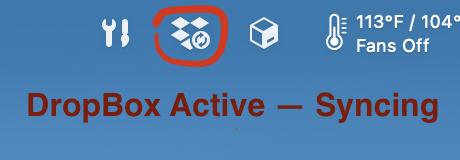
On MacOS, normally the only indicator that DropBox is doing anything is the DroxBox bug on the tool-ribbon:
The process is far more satisfying if the DropBox folder is open in Finder. You can see exactly what files or folders are syncing and which are still in the queue. So it might be a good idea to get in the habit of closing Scrivener and opening the DropBox folder in Finder and watching that to see when Sync finishes when your in a hurry.
For what it’s worth, I’ve been switching between my Mac and iPad for Scrivener ever since Scrivener arrived for the iPad. I’ve had my teething troubles with it too, and my ADHD brain rebels at the need to slow down and give DropBox time to finish up after I close out Scrivener on my Mac. That said, the portability is a boon worth the occasional frustration. Though if you find Pages suits your needs better, by all means use what works for you.