I think we scared Adam off 
I think he’s just ‘thinking’. Only trouble is, with what confusion thinking’s fraught, I sometimes think he’ll think no more. For when he spends much time in thought, he unthinks things he thought before.

I’m new to Scrivener, and I do a lot of non-fiction/academic writing. I’ve been using Timeline to manually create timelines for various articles and books. However, I can imagine a situation where BDT auto-generates timelines from Scrivener text as being incredibly useful. For example, I am working on an article that deals with various immigration laws, and if BDT could generated a timeline from the dates I’ve entered in the text, it would be a great timesaver. I don’t know if it’s possible for Scrivener/BDT to tap into the Apple Data Detectors, but I’d be happy to “tag” dates so it’s easier for both programs to find the data I want.
What I need in a timeline app at the moment is something a little bizarre – I need to keep track of when various things happened in the MC’s life, and I want to date everything from the year she’s born. I don’t want to set her birthdate in a particular year. I want to refer to her birth as Year 0. Not Year 1, because then I have to subtract 1 from all the other dates on the chart. So basically I want a number line with negative numbers and positive numbers, all centered around 0. (Doesn’t have to be actual negative numbers. Just some way of indicating what was before and what was after.)
In terms of what I’d like to happen btw Scriv and BDT: at the very least, I’d like it to be easy to export a PDF of the timeline to the Scriv. file.
@Diane: it sounds like the “character age tracker with configurable dates” that was suggested in the other Timeline thread would do what you’re after. The bad news is, no such app yet exists. The good news is, we’re all trying to encourage someone to develop it 
I have many, many ideas for timelines as they relate to fiction, many of which I’ve posted around the forum. I think I’ve even posted some of them on the Bee Docs blog 
At any rate, if Timeline and Scrivener could communicate via index cards, that would be amazing. I generally envision an event (on a timeline) as a scene (one scrivening). The title and description of the event could be the title and synopsis of the screen. For date information, being a plaintext+markup kind of person, I would be perfectly happy if you just read a date from between square brackets [16 March 2008] out of the synopsis text or something like that. Unfortunately, I’m not sure how to handle bi-directional updates; what I describe seems more suited to a one-time, one-way thing than anything.
Now as for what the timeliner itself can do… well I have a long list of things that I currently do in my head and on paper that sadly fall out of sync with the story far too easily.
I have started to develop it… I am aiming for something that does what was described in the other thread.
But I am waiting to see how much of it Adam picks up… because obviously if Bee Doc’s does it, we won’t need me to do it anymore. And then I won’t 
What I suspect, however, is that it will be too niche for Adam to implement, so it might be that he concentrates on Timelines for presentation, I do the writer version and make it free, and then will find a way to export to Bee Doc’s if anyone needs a more presentation friendly version of some of the data.
But then, if Adam picks up most of the stuff (different ages, multiple story-arcs/character lives, associating different people with events [and some way to tag whether they participated, observed, etc.], and all the rest) then I will happily drop my project and use his instead.
If mine does go ahead, at the moment I am playing with a way to drop events into a narrative to actually outline the story (and tagged as whether they are current action, flashbacks, or just reflections, etc.) itself, whilst keeping that independent of where they appear on the timeline.
That way you could do your timeline, quickly drag the events into a narrative order, export that narrative order to Scrivener as index card outlines (because lets face it, you need to be able to export them in story order, not just chronological order), and then do your thing with Corkboard to expand out the top-level notecards into a deeper structure.
But if Adam wants to get there first… that is more time for my writing, so I am all for it
Matt
I’ve been assuming the same thing, to be honest - as I’ve said before, I’m the first to admit that the sort of app we’re after is a niche product, with very specialised demands - but I’d be delighted to be proven wrong 
Adam, I use OmniGraffle to make things like this:
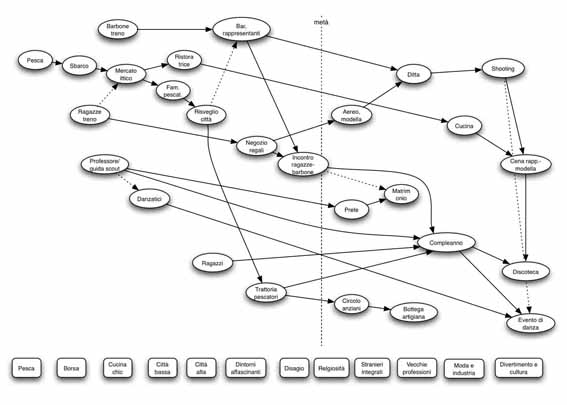
As you see, time is implicit and not shown, but it should be. Length of events is not shown, as well, but it should. Running under the timeline is also a linear “concept map”, that is another layer of development that (in some narrations, like documentaries) must run parallel to time and events.
After discovering your app, I tried to replicate it with a concept mapping application (CMap Tools):
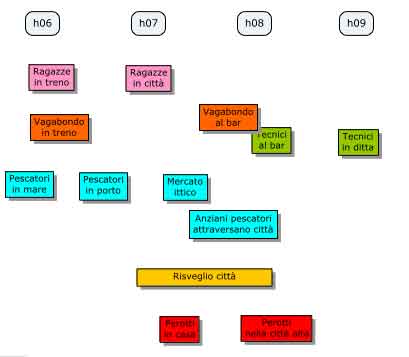
My idea is that events in a timeline must be linked to “hotspots” in Scrivener’s index cards. Hotspots must be numbered according to the events’ timing. So, you might have the following two cards:
“[1] John goes to the office, and [3] meets Mark.”
“While John goes to the office, [2] Eric leaves for the station.”
Whatching at the hotspots, you understand that during John’s trip, something else is happening. A hotspot browsing function in Scrivener (maybe a HUD) could led you to the missing hotspot, and let you dynamically fly through time events.
Now, move Eric’s leaving before John’s leaving in the timeline, and numbering will be rearranged:
“[2] John goes to the office, and [3] meets Mark.”
“While John goes to the office, [1] Eric leaves for the station.”
By watching at the hotspot numbering in the index cards, you understand that something has changed in the timeline, and you must rewrite the synopsis and rearrange the cards:
“[1] Eric leaves for the station.”
“While Eric leaves for the station, [2] John goes to the office, and [3] meets Mark.”
Paolo
I need timelines for biographical work.
I’ve read through the thread here and it seems to me that the suggestions are very narrow in the user-base they’d attract. But hey, I have not before thought about an integration between my writing tool and a timeline app.
After spending this morning (in -34°C on some desolate biological station FAR FAR away…  ) I started thinking about at least one setup that would be very useful for me (and perhaps MANY MANY MANY more…?)
I want something as simple as this:
In Scrivener, I type along, and come to a key point in my subjects history and I want to include it in a timeline. I add a “timeline” tag and insert the timeline data needed. This could be implemented with some kind of graphical slidebar-interface or something, for easy placing in the currently selected Timeline-timeline or something. I guess this could be integrated with the index-card feature…make-this-synopsis-a-timeline-feature!
A straightforward insert-selected-text-in-timeline-feature.
Has this been said before? I blame your poor presentation skills…errr…I mean, I blame my numb brain…
f.
The suggestions here are narrow because we’re talking specifically about how a timeline could be made useful to fiction writers. Timeline software for real-world events already exists, and the eponymous Bee Docs Timeline is at the top of the heap.
So we’re not suggesting an app that will only appeal to a small number of users, per se. More that we’re suggesting something that will already have the functionality of something like BDT, but also contain the functionality that fiction writers want.
Well, the thread was initially about integrating Bee Docs’ Timeline with Scrivener (as the thread heading suggests…), to avoid making a new app in scrivener. But anyway, my “narrow userbase” comment wasn’t meant to be negative, i just wanted to get back to the initial request for ideas & suggestions from keith.
As I see it, these features would be a very useful two-way integration of Scrivener and Timeline, for both fiction/non-fiction users alike, within the limitations imposed by Timeline as it is today:
In Scrivener:
- Insert timeline point: You select some text in scrivener, select “insert time line point” in a meny and voila, a new Timeline dialogue pops up (still in Scrivener) where one in various ways selects time and more info.
- Indexcard-to-Timeline: In corkboardview, one should be able to make an index-card a Timeline entry.
In Timeline:
- Export-to-indexcard: Simply exports a timeline to a pile of index cards filled with the title & info of the timeline. This could be to a new Scrivener-project or, more complicated, scatter the indexcards into an existing Scr-project, interspersed between already existing Timelined indexcards…
Does this make any sense?
I would use this all the time…
f.
It seems to me the simplest way is to add start and end date/time to each text document’s metadata, visible in the inspector.
Of course it would be nice to put timeline elements as text run attributes, but that is adding a lot of complexity. Similarly, parsing the synopsis sets a precedent.
One advantage of putting things in metadata is that, in search views (or smart folders if those appear someday) we can sort scenes in chronological order, edit scrivenings and hence read scenes in chronological order, even if that is totally different from the document order.
Unrelated to BeeDoc integration, but I believe worth mentioning.
In terms of BeeDoc integration, it would be nice if the vertical display order of elements were respecting the document order, irrespective of chronology.
Cheers
Of course, this is a starting point and inevitable, but without an appropriate interface, simply nobody would use these fields. Just because it’s too abstract, to much work to insert all these dates/times - and too few advantages out of it. I have come across applications that provide fields like this, but they’re of not much use without the possibility to define the values via dragging and moving - this is what you intuitively want to do, and you should be able to do it.
So it is this interface that has to be defined.
Basically, I imagine a timeline view for Scrivener as a very variable grid. From top to bottom, there would be rows for the items selected in the binder, in that order (no matter of their order in time). Every item would be represented by a rectangular shape, maybe with its title in it and coloured according to its label. Its horizontal position would be defined by its starting date/time, its length by its duration.
If you move the rectangle to the left, you set the start date/time earlier, to the right later. If you drag it longer, you augment its duration.
There would be controls to change the scope of the timeline. Because stories differ wildly (there are thrillers that tell the story of one single evening, and there are epic family stories that span centuries), there will be the need to measure in minutes as well as in years. Plus, there should be a button to zoom the timeline in order that all items in it are included in the view.
A particular question is how this timeline should handle folders. My idea in the moment is that it would be best if the Timeline View basically behave in the same way as the Corkboard View: If you select a folder, all items in it are displayed as cards on the Corkboard: So, if you chose Timeline View, they would appear as a kind of GANTT-diagramm.
 OK. I’ve dreamt enough for today. Back to work now.
Hi,
Just to bring this back on-topic a little, as it has inevitably drifted, this topic is about what users would like to see in terms of integration between Scrivener and Bee Docs’ Timeline. That is, in terms of how you would see stuff getting exported out of Timeline and into Scrivener.
There are no plans and are unlikely ever to be plans for Scrivener to have a built-in a timeline. A timeline (just as with a mind-map) are waaay out of Scrivener’s scope. What we are looking at here is a better way for an existing timeline application (Bee Docs’) to work with Scrivener.
I can’t emphasise this enough, though: There will be no timeline or mind-map feature built into Scrivener.
Hopefully we can return to suggestions for Adam in terms of an export-to-Scrivener feature.
All the best,
Keith
Today is not my day, it seems…
Don’t take it personally. The above wasn’t directed only at you - I just wanted to make it clear that there will be no timeline or mind-mapper in Scrivener, just as there is unlikely to be a spreadsheet view in PhotoShop.
All the best,
Keith
Keith,
This is perfectly fine to me. Interaction between different applications is the key concept, here. Let each program do what they excel in.
From time to time, I play with the Timeline View in StoryMill and StoryLines, just to go back to OmniGraffle every time. Simply, there is not the kind of interaction between dates and scenes that I like.
What I’m looking for in a timeline, is a different way to see the story progressing. Enters the classic distinction operated by the Russian formalists: where the Scene order is the Sjuzhet (the way things are narrated), the Timeline should be the Fabula (the chronological order of things).
They cannot be directly interconnected, and this is the problem I find with the Timeline View in both StoryMill and StoryLines. StoryLines has the additional minus of not allowing to resize the blocks, preventing an effective way of representing duration.
So, enters a third element: the Event. Both Timelines and Scenes can contain Events. Events are the blocks or events shown in a Timeline, and are the various sentences contained in a Scene. For example:
- Scene 1 (“Martha quarrels with John, and is forced to leave. When she leaves, John calls Michael and tells him what happened”) could be separated into the following Elements:
– Element 1.1: Martha quarrels with John.
– Element 1.2: Martha is forced to leave.
– Element 1.3: Martha exits the office.
– Element 1.4: John calls Michael and tells him what happened.
In Scrivener, this could be shown as follows in a synopsis:
“[1.1] Martha quarrels with John, and [1.2] is forced to leave. When [1.3] she leaves, [1.4] John calls Michael.”
Now consider this case, where the Sjuzhet is different to the Fabula:
“[1.4] John calls Michael, and tells him that he [1.1] quarrelled with Martha, and [1.2] forced her [1.3] to leave.”
The Scene and Timeline are still linked, with chronological events correctly numbered according to a clock.
Edit what I previously called the “Hotspots” (i.e., links to Events, shown as outline numbers above), so that they have a beginning, end, and duration, and you have a way of exchanging data between Timeline and Scrivener. Export from Scrivener, and you have a Timeline chart ready. Import from Timeline, and you have Events grouped into Scenes, based on their outline-style numbering.
Best regards,
Paolo
Hu, and colors, too. I would like that colors associated to Scrivener’s Scenes are exported to Timeline Events (and vice-versa).
Paolo
I’ve never been one to think one app had to do it all, but at the same time I do (sort of…) lament the demise of the Linkback idea. It would be nice to view a Bee Docs’ Timeline in Scrivener, note a change in the story line and have it show up back in the Timeline doc itself. Since that’s not going to happen, I don’t see any other option other than to use Timeline’s PDF export and pull that in Scrivener for reference or (and this is what I do) keep the Bee Docs’ Timeline app open and switch to it when a change appears. If I was a more sophisticated user, I might use Spaces for this, but I’m not, so I don’t.
The one notion about this that I did have was along the lines of a MultiMarkDown-type of notation that could be interpreted by the other program. I don’t code, so any suggestions I make will no doubt look more foolish than wise, but there it is.