Thank you for this. I think it would take me some time to get used to the dictation box, but that may be my only choice, now that my Dragon 15 Pro won’t work directly in Scrivener 3. It used to actually do a bunch of things that Dragon did elsewhere (like “delete that” etc.) right in Scrivener. 
1 Like
Just before I responded to your message
Hi sarralev,
This is very interesting.
Earlier, just before I responded to your message, I quickly opened Dragon, and checked the procedure I had originally gone through in order to be able to use Dragon with Scrivener, and then related that information to you in the message I sent earlier.
I did not try to dictate into Scrivener at that point, because I had been able to do that as recently as a few weeks ago, so did not think anything was wrong.
However, after receiving your reply, I did open Scrivener and found that I had same experience as you – I could not dictate into Scrivener without using the Dictation Box, and I was still able to successfully dictate into Word, and into my Yahoo email without using the Dictation Box, and I have dictated this reply to you using Dragon, without having to use the Dictation Box.
I have no idea what is going on, as this is the first time in several years that I have not been able to dictate from Dragon directly into scrivener (, i.e., without using the Dictation Box).
I have spent much of the last hour going through various tests – opening Dragon, then opening Scrivener, then closing both, and opening the programs in the reverse order (making sure to reboot my computer between those tests).
I also tried a few other things, such as creating a brand-new Scrivener project, and other things.
I am very curious about why this suddenly does not work, and it is pain for me to now have to use the Dictation Box.
I will be experimenting with things over the next few weeks, and if I have any success at getting things back to how they used to be, I will post back in this thread.
All the best.
1 Like
I have dragon 16 and does work directly in scrivener, but not have all the dictation commands. ( windows 11 pro)
I’m both relieved that it’s not a “me thing,” and sorry it’s also plaguing you. Please do keep posting if you find a solution!
Thanks!
I will definitely post again here if I find a solution.
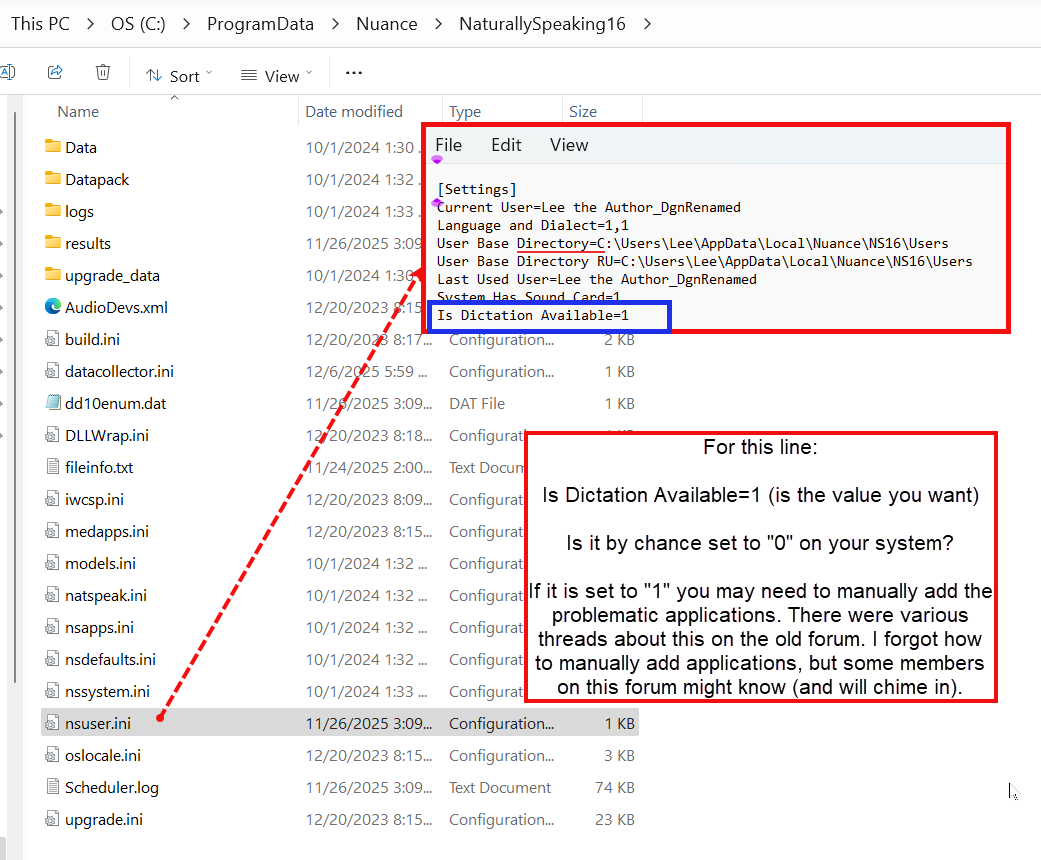
I think the answer lies in inserting a reference to Scrivener in the nsuser.ini file, and making sure there is a ‘1’ setting there, as discussed in this discussion
I have been trying various permutations of changes, starting with just re-naming the nsuser.ini file to nsuser.bak, to regenerate the nsuser.ini file, but do not really know how to make the code point to Scrivener specifically.
But nothing has worked so far.
This morning, not even the dictation box is working. It opens, I dictate, I press transfer and it acts as if it is transferring, but nothing appears in Scrivener. Sigh.
This can happen if, before you start dictating, the Scrivener text field has not been selected. If it’s not selected, Dragon has no way to know where to paste the dictated text.
I hope this helps.
Thanks for the immediate reply, but it is, sadly, selected.
I’m sorry this didn’t work. This very thing happened to me a couple of days ago, and that’s what solved it.
You could try the ol’ universal fix: reboot. 
Just an idea close every active program besides Scrivener and Dragon. Maybe a program is stealing the dragon focus. See if that works and if does, you know it is a steal issue and can close programs one by one till find the “thief”
1 Like
Thanks. Tried. No go.
Out of curiosity, does it work with other programs, such as Word?
I found this information about the user ini file.
Here is an image to it and below a suggested solution from 2024
-
Something must have changed in either Windows or Dragon about 3 to 4 weeks ago to cause the problems I’m experiencing. If that’s true, there ought to be a way to identify what changed and undo the change. No?
Matt sent me to your Quick Tips link, and there I found you had provided the perfect answer: rename nsuser.ini to nsuser.bak and reopen the profile to re-create the ini file. That fixed everything right up immediately.
Thanks a lot everyone. I had this same issue going on and I did the solution of renaming my ini file and that fixed my issue!
I suggest if consider trying this, save the user profile first. copy the ini file to the desktop then follow the suggestions, so if an issue can reload latest backup and replace the ini file with the original.
I have not done personally.
I’m a bit late to the party but on one of my machines running Windows 11 Pro I have Dragon 16.
I can dictate directly into Scrivener (Version: 3.1.6.0 (2862669) 64-bit - 02 Sep 2025) provided I go to (in the dragon bar)";
Settings - Miscellaneous - then just under ‘Put the microphone to sleep’ after…’ UNTICK the box (ie make it empty) ‘Use the Dictation Box for unsupported applications.’ Click apply then OK.
I have not made any changes to it’s .ini files or anything else and I can voice into any Office app.
Hope this is useful to somebody.
PS It’s 0700 hrs Sunday morning in my part of Australia and I have just been dictating in Scrivener without drama.
[Edited for clarity]
I get that some prefer not to use the dictation box. It’s just that, though Scrivener might be able to accept basic dictation without it, the author will lose the full ability to dictate commands (unlike, say, using it with Word). At least, that’s how it was with my version 15. Has that changed with version 16?
I have 16 and do not have all dragon commands.
1 Like
I guess it comes down to preference. I rather like the dictation box, as it isolates what I’m dictating and lets me make corrections using oral commands. Then, when I’m ready to drop the text into Scrivener at the cursor, I just say, “click transfer,” and voila, it’s now in Scrivener. Even if I preferred dictating directly into Scrivener and not using the dictation box, I would not want to give up the ability to speak commands and have Dragon execute them without my having to touch the keyboard.
Everyone’s mileage will differ, I’m sure.
I am still unable to dictate directly into Scrivener, (as was the case the other day when we exchanged messages about this), but I am able to dictate into Scrivener using the Dictation Box, and I am dictating this message directly into this thread without having to use the Dictation Box.
I also can still successfully dictate into my webmail, and into Word, without using the Dictation Box.
Sorry – for both of us, and for anyone else here experiencing this problem: I cannot for the life of me work out why I was able to use Dragon 15 to dictate directly into Scrivener for years until sometime over the last few weeks.
I have tried generating a new nuser.ini file, and other solutions I have found on the net, but all to no avail.
I also tried the new ini file, and although it didn’t work, the post was so funny I burst out laughing, so it was worth it. Will try re-installing dragon.