OK, fair enough, but it’s a little unrealistic to expect that a technological problem foisted on people by politics won’t be discussed in terms of both the technology and politics.
2 Likes
And that is precisely and entirely why there is no Linux version at the moment. Although I will say, now that my daily-use Mac days are coming up on five years behind me now, I don’t as much feel that friction that you speak of. One learns to make do, and over time that becomes your baseline. With some things though, I will definitely never get over it (for example, how bad keyboard navigation is, with the focus getting lost constantly; something that you would likely feel the impact of as much as I do. I’m not sure how important that is to 99% though, that use the mouse for everything down to copy and paste).
A native Linux version would be simpler because then you may not need the complication of Wine, but it doesn’t really affect the equation much: it’s more than good enough on Wine.
It depends on what you consider important. Someone that uses audio/video heavily would be disappointed to find it doesn’t playback in the editor. I’ve never put that kind of stuff into my projects anyway though, and would rather use a fully featured player. Text to speech doesn’t work, for those that like having an integrated reader.
For me the main positive impact it would have is the Processing pane opening up. True, you have wine cmd if you tweak the registry to allow it (as I understand it), but you have to fix it every single time Wine updates, last I checked, so I’ve never messed with it. I can do basic stuff with it, Pandoc.exe is easy enough to install and that does a lot, but installing Ruby, or LaTeX into Wine? Ugh.
So I do a lot of manual CLI work on raw compiled data instead of single-click output like I’d want to. It’s a little annoying, but no big deal.
Unlike with DEVONthink and Tinderbox, where there are no viable Windows / Linux alternatives.
Definitely, both of those are Mac-only gems that have no direct equivalents. There are some near hits though.
For DEVONthink, the closest I’ve found is a Windows program called Zoot. I once gave an older version of it a very serious go, and I did like it quite a lot, it has some excellent ideas. It is the very definition of quirky passionware though, and I don’t know how well it runs under Wine (neither does WineHQ’s compatibility database).
For Tinderbox, there is one that isn’t too far away, so long as what you use it for is entirely on the side of outlining, automating within the outline and exporting from it: LEO Editor. But, if part of what draws you to Tinderbox is its visualisation views, it has none of that, that I am aware of.
Funnily enough LEO is what I used for writing and even website publishing, way back before I became a Mac user. While it runs on a Mac[1], it’s kind of out of place on it, so in fact I found Tinderbox when looking for native alternatives to it. The concept of a self-programming outliner aside though, the developer also reminds me a bit of the developer of Tinderbox. One guy with a vision that has been plugging away at it consistently for decades. Documentation is the main struggle with it.
you’ll note the installation instructions for Mac are for “10.7 Lion and later”, which isn’t terribly encouraging. ↩︎
4 Likes
@brookter I get your point, but unrelated venting doesn’t matter or help here, either.
Yes - this is a huge problem for me with both Windows and Linux! My fingers are hard coded for Ctl-n / p / a / e etc etc and it is intensely irritating that they keep opening new Firefox windows and printing them etc instead of doing What Nature Intended…
Thanks for the pointers to Zoot and LEO: I’ll check them out. Another possibility for DT could be Nota Bene, I suppose, which already has a Crossover version (to enable it to work on the Mac), but that only really covers a small fraction of what DT does.
Definitely would depend on your environment of choice. I have found that KDE’s global keyboard shortcut management works pretty well for asserting your habits in some ways, and in most software. But while those cursor movement keys do work that way in some contexts—some text editors and the CLI of course—overall it probably would be a huge effort to adjust simply because Ctrl is what Cmd is on Mac, so why wouldn’t it be Ctrl-A to select all?
That aside, once I did get my fingers working the way they needed to (and it did take some months), I have found keyboard shortcut accessibility to probably be the best of any other system available. Windows is the worst, by far, as it hogs the Meta key for itself making it risky to form a habit on its use (witness the people over in that thread using macro software to restore a shortcut Win11 took over, rather than learn a new one). Mac is obviously a lot better as it has a whole extra modifier key you can use, but it also puts AltGr on both Alt/Opt keys, meaning you can’t ever use Alt+Base, or Alt+Shift+Base shortcuts, as those are solely for printing extended characters. On Linux you have both of those pairs, and the Meta key is entirely up to you. For me that means a wealth of high level system/window management shortcuts (like move this window to desktop #3, or make this one drop to the bottom of the window stack), and lots of room for individual programs to have as many as I need.
But to clarify my point, I was speaking not of the above, but how the Windows version of Scrivener falls flat on its face when you navigate through the outline with keyboard shortcuts. For example, if you use the QuickSearch shortcut to jump to another section, the cursor ends up in the void and you have to then follow it up with the shortcut to focus the editor. If you so much as hit the Back in history shortcut, you have to follow it up with the shortcut to focus the editor (or whatever other part of the UI you were in, which might then also mean having to subsequently tab or arrow key around. It’s almost easier to just use the mouse at that point. 
But as you’ve probably seen in $NewThing, we’re working on that, and we are back-porting where we can.
3 Likes
I refine many of the extended character keys ( on alt) using a mixture of Karabiner-Elements and Keyboard Maestro, so that, for example opt-t is my shortcut for my Keyboard Maestro Text Palette in Scrivener:
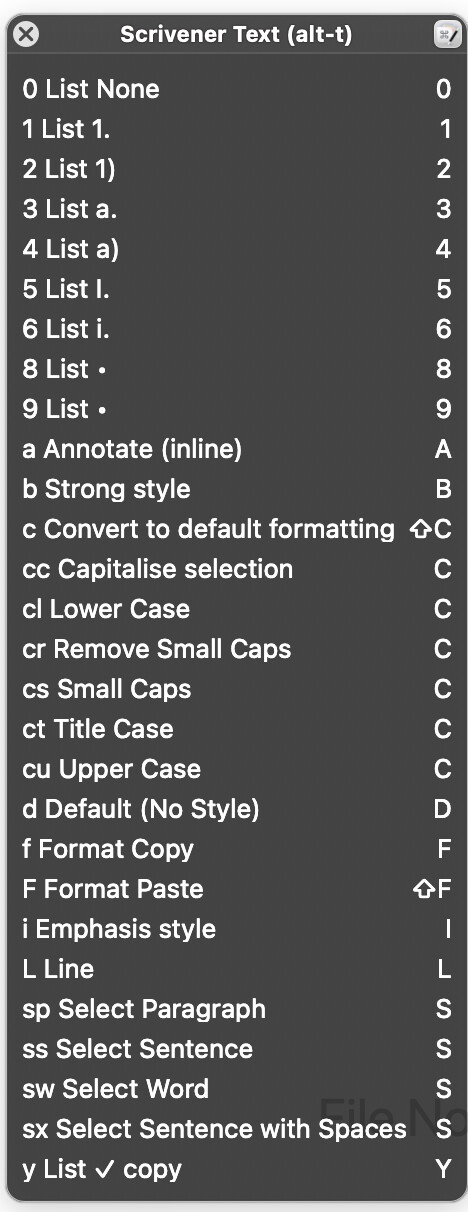
I’m highly unlikely to use † in anger, so this isn’t a problem. I also swap the right alt and right cmd keys round to get better typing rhythm, and overload both Caps Lock (press for Escape, hold for Control) and Return (press for Return, hold for Control) etc. I can also do some of this in Linux (xcape + modmap in X, keyd for Wayland, so at least typing isn’t too painful apart from the murder of the Emacs keys…
The problems with the shortcuts on WinScriv is one of the ‘rough edges’ I was talking about – but as you say, every OS has its rough bits and you get used to everything eventually.
1 Like
@memwright I’m a professional software dev for 20+ years, working within Linux environments through choice. Don’t be so blinkered, just use Lutris, it works a treat.
A bad workman will always blame his tools…
1 Like
Thanks for the insight and that’s fair. I don’t want to understate how far Wine/Proton have come. They’re genuinely impressive, and it’s clear you’re speaking from real daily use, not theory.
Where the friction still shows up for many of us is less about whether it runs and more about the accumulated edge cases: UI scaling on high-DPI laptops, font rendering inconsistencies, input quirks under GNOME, window focus issues, clipboard oddities, and the general “death by a thousand papercuts” that come with running a paid productivity tool through a compatibility layer. None of those are show-stoppers, but they are the kinds of things that add ambient friction over time — especially on laptops, where GNOME + Wayland + scaling tends to surface the rough edges fastest.
So yes, we can get to work right now - many of us do - but the request for native support is really about reducing long-term operational risk and friction, not impatience or entitlement. It’s the difference between “this works” and “this is something I can rely on for years without thinking about it.”
I genuinely appreciate the insight you’ve shared here, especially the transparency around logistics and focus. It’s also reassuring to hear that Linux writers are very much on your radar. Windows 11 has been a tipping point for a lot of people I know, and Linux adoption, particularly among technical and professional writers , is no longer hypothetical.
For what it’s worth, speaking only for myself: I’d happily pay a four-figure price for a native Linux version and stand by that decision without hesitation. I don’t think I’m alone. Even if the answer remains “not yet,” it helps a lot to know the door isn’t closed. DM me if you’d like the credit card number (and can get me a license for a linux version.  ).
).
1 Like
Ah yes, I don’t have much experience with that combination of factors. As a Debian 12 “desktop” user, with a standard resolution 27" monitor, KDE and still plunking along in X11 for now (maybe Deb13 I’ll finally make the switch); there is maybe less potential for weirdness.
So yes, we can get to work right now - many of us do - but the request for native support is really about reducing long-term operational risk and friction, not impatience or entitlement.
I never thought that in the least bit, sorry if that’s the impression you got. I meant what I said more with a pep talk vibe than a wagging finger. 
Thanks for the kind words, and the feedback in general. As I’ve posted before we always appreciate hearing it.
2 Likes
Just thought I’d check back in the forum to see if the thoughts about linux had changed. I started with Scrivener way back when the official (abandoned) linux version was available. Later, I tried to get Scriv working under Wine but I wasn’t up to the challenge so I bought a Windows Scrivener licence and a W10 box just to use Scrivener.
I’ve since upgraded to W11 but Scrivener is really the only application I use on that box. My regular workhorse is a desktop running UbuntuStudio LTS versions which recently has meant KDE Plasma and it suits me fine.
Except I would love a native Scrivener appimage for linux, and I would happily buy another license for it.
1 Like
I’m not L&L, but pretty certain there won’t be a native Linux version any time soon.
Meanwhile check this thread.
@adgalloway has done an amazing job making using Scrivener Win under Linux as painless as possible.
The other alternative using it under Lutris, I’ve found pretty easy.
1 Like
Thanks RuffPub for those remarks. I’ll look up those threads.