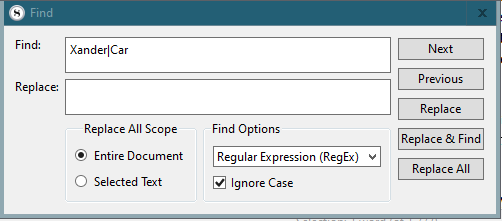
Search within one of the results docs for the complex with Xander|Car still hit “care”, etc.
Of course the regex could be refined but it’s too much compared to (the theoretical ease of ) just typing multiple words in the box with an All Words option
(I couldn’t quickly see how to search multiple selected docs in the initial results, and this apparently simple Q is now taking too much time to explore every variation and workaround, though I will bear your suggestion in mind for times of greater need )
That looks like an OR , I need AND, and AFAICT (though no expert!) there is no AND operator… it’s implicit in some way, hence my original (semi-accidental) regex
when tried found both words on a page. I hear you, but if run search will have all scenes with xander in it and can quickly search with xander and the word car highlighted. Or search just for car and make new collection of just scenes with car in them and then search for xander and car with reg ex in that collection and would narrow search considerably to only scenes with car and highlights should narrow quickly. You are right get a hit if any of words are in the scene. Two layer approach might help as then would see both words highlighted closely together if that happened in a scene.
I am very fed up with the fact that “All Words” doesn’t do what it should. One might be able to use regexes but it does not seem straightforward; I appreciate the suggestions so far but in the end I had to do it outside Scrivener (see below)
Questions
For clarification: when does Scrivener start a regex search? I’m sure I set one up, ran it, realised it failed and started editing but Scrivener went off and tried to execute again before I’d finished, making it unresponsive and impossible to complete the editing for 5-10 minutes.
(Any more ideas @drmajorbob@AntoniDol since you know regexes?) What is the simplest regex I can use that will find documents that contain n distinct words (case sensitive/insensitive switch would be nice) with the least typing, i.e. one “match group” (?) per word. (I really don’t want to have to type words in all possible orderings because whilst that is practicable for two words, it is not for 3 or more; and the less typing, the fewer typos.) Highlighting of hits within documents is unimportant, I just need to find e.g. the scenes in which e.g. Characters A, B and C discuss X.
Dismal Failures So Far
I came up with a pattern that got closer to what I want but it’s not good enough… I tried “repeat this as many times as necessary”
(?:.*\bWholeWord\b)+?, e.g. (?=.*\bflight\b)+?(?:.*\bCrew\b)+?
It’s clumsy and inadequate. It finds documents – but only if the words are in the same case, same para (I can’t work out how to ignore whitespace, e.g. \n) and in that order; I also think it worked better in some other flavour of regex, but not so well/?at all in Scrivener
Effective But Completely Excessive Workaround
It’s non-urgent for me since I have now written a Jupyter Python notebook that
Parses relevant parts of the .scrivx XML
And creates dicts for custom metadata lookup, for future use
Iterates over all content.rtf files in the Manuscript
Converts the rtf to text
Removes residual stuff in Scrivener tags, and then
Uses multiple passes of a simple regex to find matching documents
Finally lists matching document binder paths (via list or pandas dataframe)
which of course any author who finds the All Words search lacking would be able to do It takes ~10s to search 155k words in ~200 documents reading from SSD storage.
p(All Words Search Fix)?
I think that for a writing tool, such capabilities are essential, and I’d really like Scrivener’s “All Words” search to be fixed.
@AmberV It should not be difficult since all one really needs to do for “all words” is loop on a very simple regex (that’s what I did). Do you think it likely to get fixed?
The “All Words” operator is working precisely as it was programmed to work. You might have a differing opinion on how it should work, but that does not automatically mean the software is wrong and does not do what it should. These two All|Any Word search operators are meant to be partial matching as that is how most people will be expecting them to work. So no, that isn’t going to be “fixed”, no matter how easy it might be to do so.
I wouldn’t use regular expressions for this, for the reasons you noted with ordering issues. It’s perhaps okay for two terms, but quickly gets out of control if you have more—it’s not really what regex was meant for either and will be slower than more optimised algorithms.
If I need multiple precise whole word matches then I just run multiple searches, as I believe someone mentioned above (though they perhaps made it sound more involved, by bringing Collections into it). It’s really not that difficult to do:
Search for Word1
Select all results with Ctrl+A and Reveal in Binder.
Search for Word2 with the Binder Selection Only setting enabled.
Rinse/repeat as necessary.
Most often though, I just tend to look past chaff and go on to the next search result. I don’t often expect or require search tools to be 100% accurate, and most in fact are very inaccurate (intentionally so) and require a lot of weeding stuff out. I do believe this is how most people approach word and phrase oriented search results in their heads, as we don’t see many people grumbling about the fact that if they type in “philosoph” into the search field, they find “philosophers” and “philosophies”.
If you need to do a search often, save it somewhere. I use TextExpander or Keyboard Maestro for the purpose; I can type a shortcut when I need an involved search string.
OK, I can see how my request could be misinterpreted, but in the context of “All Words” it was supposed to mean “that contain each of n words at least once”, i.e. all n must match.
If I read that regex right (and I tried typing my own example to confirm it) it does match each word but they’re OR’d, which I would have done with an “Any Word” search.
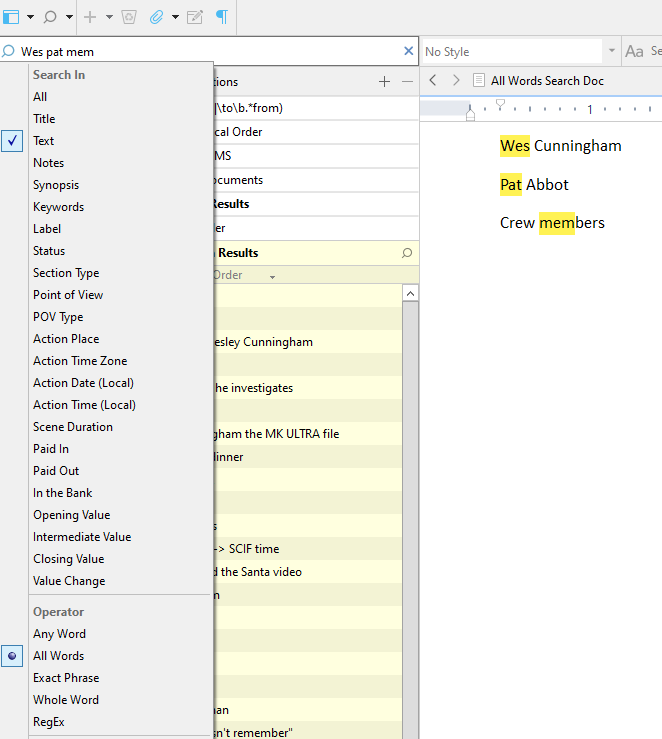
I posted an example of the failure as an image above - it shows that it is doing substring matching, and the search setting used, for the avoidance of doubt.
OK, I have re-read the manual and I agree that is indeed how it is apparently supposed to work, but I would point out that this was only apparent from reading the description of Whole Word search, which comes after All Words.
Whole Word: unlike any of the above search methods, the term supplied will only match whole words. A search for “Jo” will only return documents with that word, not documents that also contain “Jocelyne”.
I didn’t think I needed to read further, given the natural meaning of “word”., which is by default surely (?) whole word, but maybe it was judged that “word” was more accessible for for a non-technical audience than “string/substring”. (I’d have preferred “philosoph*” to deal with philosopher, philosophy etc.)
Perhaps the documentation could make the explanations of Any, All, etc. self-contained.
That said, the iterative refinement should be viable. Thanks.
See my reply to AmberV below; I was mistaken about the meaning of “word” (though I did contrast it myself with substring earlier the error was not noticed then)
@drmajorbob Amusingly, Windows notification showed me the essence of the deleted comment - no worries
I was coming here to add that perhaps overfamiliarity had blinded me to the fact that Whole Word is a visible search option, and I might have asked myself why it was necessary if the others already dealt with whole Words.
OTOH, MS Word, which I have been using for >30yrs, searches for a single substring by default, and doesn’t switch to treating whitespace as a separator when multiple “words” are entered.
In other words, I was deeply confused… but I’m better now.
For my part, I too was deeply confused, having spent too little time trying to figure out exactly what your issue was. I thought you were complaining because not all the words you asked for were matched, but finally I realized substrings were matched, not words. Now I totally get your initial position. The interface shouldn’t call it “all words” if it means “all substrings”. I didn’t know it worked that way, and now I do, but the interface should be accurate when possible.

 )
) It takes ~10s to search 155k words in ~200 documents reading from SSD storage.