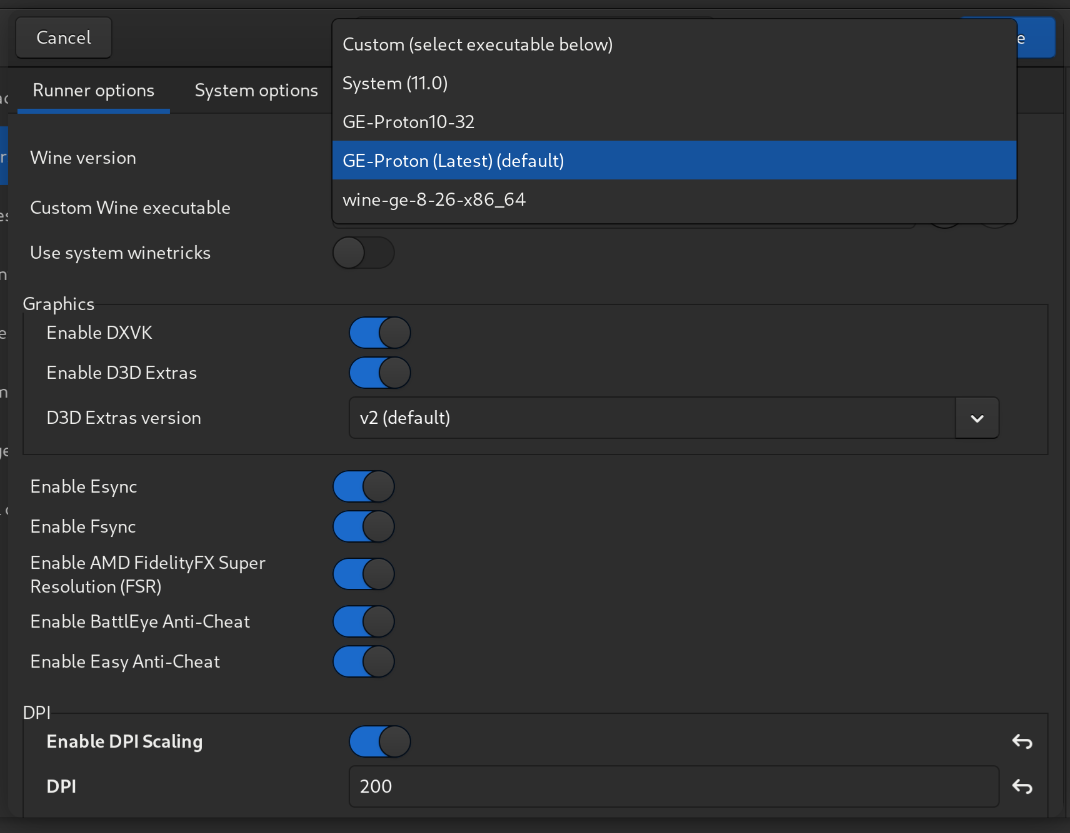
I’m not entirely confident that it will retain the file locations. It’s not been consistent for me.
I get that Lutris is free, and I’m grateful they have a scrivener installation at all, but they really screwed this up. I even looked at rolling back to the previous version, but I couldn’t figure out how.
I’m so new to Linux, I assumed everything was a me problem, so it’s a relief to find out we’re all on this raft. Really lovely to know there’s a community here to commiserate and troubleshoot with when the next issues arise. Fingers crossed that’s a long way off!
This is really typical Linux stuff, actually. There’s no one to phone, so we talk to each other and find solutions. I’m still really new, myself, but I’ve experienced this cycle a couple of times, mostly at a distance. This is the first time I’ve been the direct recipient of someone finding a solution. Now, to complete the process, I should “publish” these results…
I just put that fix into Bluesky and Mastodon, and then realized I should have asked if you’d like to be cited as the person who found it. I could append your online handle if you’d like.
I’m still getting regular comments on the Lutris Youtube tutorial of people having successful installs. I’m planning to make an updated video soon where I’ll attempt to pull all known methods into a single video so if folks have a problem with one method they can move on to the next. Some people are still reporting success with Bottles instead of Lutris.
What I would really like to do is find a competent programmer who could take Lutris or Bottles and write a much simplified fork just for Scrivener. We could name it something cool like Scrivenix (Scrivener for Linux). It could already have some DPI adjustment built in, include Windows Core Fonts, take care of symbolically linking the Windows directory to the corresponding Linux folders, and apply the Scrivener icon.
I really don’t think it would be a huge undertaking for the right person.
It has been a few years since I’ve tried to do a direct install using only WINE. I may give that a go. I’m also interested in Crossover by CodeWeavers. It ain’t free, but it might provide a more polished experience.
This is a fantastic idea: a custom Wine installation in one app. Ideally, a little GUI interface could walk you through adjusting the Wine config settings for DPI and that sort of thing.
It would need to be maintained across versions of Scrivener as well as Wine. It wouldn’t be a one-and-done thing.
I wish I had the skills to help with that kind of work.
It occurs to me that somebody at Lutris made their custom installation. I wonder if that’s a place to start? I can’t help with programming, but I’m a pretty good organizer.
It would require maintenance, but the good thing is that if it were specific to a single application we wouldn’t be in any hurry to update to a new version of WINE until we verified doing so wasn’t messing things up. With Lutris being designed to run thousands of various software and games they don’t have that luxury. Although, I think there is a way in Lutris to specify a specific version of WINE for an app to utilize? Am I making that up? I know in Steam you can specify a specific version of Proton for a game to utilize.
I had a free Crossover license from my Apple days. I’d tried it at the time (5 years ago) but found it wanting. It’s probably on one of my backup disks for one of the machines I had at the time. Unfortunately they are in storage while the never-ending house build goes on.
In theory the bricks for the foundations start today, floor joists next Monday.
Anyhoo, add it to the list of things to look at when there’s a moment spare.
I started working on a lightweight Flatpak last night that would basically create the Wine Prefix and directory, download the install files directly from Literature and Latte, and install them. I’m also trying to make it automatically link the “My Documents” folder in the dummy Windows directory to the Documents folder in the users Home directory so folks don’t have to go hunting for their files.
I got the program to successfully install on my local machine last night, though I’m still working through a bunch of launch errors I am hopeful I can actually make this work. I named it Scrivenix and used the Scrivener icon as one of the complaints I get from people is that when they use Lutris or Bottles the icon and program name on the taskbar is one of those programs not Scrivener, so it doesn’t feel like a native app. I’m not sure if I’m actually allowed to use the Scrivener Icon when/if we get to the point of trying to upload this app to Flathub. I think it would make things more seamless for the user, but I also don’t want to get a letter from the L&L lawyers. Does anyone know what the rules are about icons? If I can’t use the Scrivener icon I wondered if I could make an icon with the Linux penguin holding the Scrivener symbol in his lap or something. Even that may be some kind of violation. I don’t know.
Please picture my jaw on the floor. That’s a huge amount of progress in a very short time. Thank you so much!
Is there a way to flag a mod/L&L employee to okay that use of the logo? They seem fine with us putting Scriv on Linux since we still have to pay for it regardless. I would hope that they’d be okay with encouraging more sales, even if we aren’t a major portion of their business.
I know people have a lot of feelings about this, so I’ll post this information here, and you can decide for yourself:
Short version: there is some “AI” code in Lutris, now, generated by Claude. That link leads to a write-up by someone who’s not okay with it, and it contains a pretty thoughtful response by a developer who used Claude to generate some code.
For myself, I think the developer does make a good point about the tech being different than the industry and about individual vs. systemic solutions, but IMO, he’s also way overestimating how ethical Anthropic is, as a company, and his “solution” is to hide whether his code is “AI” generated.
Personally, this makes me want to get off Lutris, but also, open-source is awash in “AI” code already, from the kernal on upwards, so I don’t know what difference it makes. In any case, I am doubly grateful to @adgalloway’s efforts to make a standalone Flatpak launcher.
Orion, I don’t want to mislead you, so I’ll say upfront that I’m pretty tech savvy and know some about bash scripting, Linux command line, configuring WINE etc, but I have leaned heavily on Google Gemini in working through roadblocks in this project. So you may not want to use this one either if AI assistance presents an ethical issue.
Today I finally got it to successfully create the environment, retrieve the install files from L&L and install them. I had to manually delete the TexttoSpeech folder to get a successful launch, and I’m having trouble with tiny fuzzy fonts that seem to plague all Scrivener on Linux installs. I’ve adjusted DPI via WineTricks and it doesn’t seem to be making the changes inside Scrivener at the UI level as I would have expected. I plan to sort out those issues before I even tackle license activation. I’m actually encouraged that it installed and launched. For the first time I’m feeling confident I might be able to pull this off.
Once I have it as good as I can make it, I plan to ask a relative of mine who is a world class programmer if he will review every line of code and make sure I haven’t, in my ignorance, done anything compromising. The last thing I want to do is hand out something that causes problems for others.
If I get that far with this project the next hurdle will be making sure everything is compliant with Flathub requirements so I can make it available on their Beta channel. At that point I’ll be testing it myself on various distros and probably looking for some volunteers to do the same.
Anyway, I just wanted to be fully transparent about the process. As an author I won’t let AI touch my writing, and I don’t want my books to be used to train AI, but I do use it to help me solve tech problems fairly regularly. Although, I was a little amused when it fed me one of my own Youtube videos last night in answer to one of my questions along with the comment, this youtuber seems to have the answers you are looking for…
At this point, it would be deeply inconsistent to refuse to something that has any “AI” code in it. I mean, the Linux kernel does at this point, Debian does, etc. And you’re doing it the responsible way by getting someone who knows code to check it afterwards.
I do appreciate the head’s up, though. It’s nice to know that the extremely gentle persona you have in your videos is the kind of guy you are. : )