You got me completely right about the line numbers. Writing my earlier post I was stucked in page thinking (or paper document ). Sure if the line has no limitations, it does not make much sense to number them depending on the size of the viewer you choose.
Thinking that way, I will import my data as PDFs with line numbers already in them and stop importing them via copy & past from the transcription software. It may be a little more work, but at least I all the files I need will be there in Scrivener.
So thank you for the (maybe not inteded) thought-provoking impulse
You may already know this, but to import PDF into Scrivener, all you have to do is click on “Print” on your original document, go down to “PDF” in the Print Dialogue, then hit “Save PDF to Scrivener.”
I didn’t know this either. Just tried it but don’t know where the document I made a pdf of is (it didn’t automatically show up in the scriv project I had open to test.) Where can I find it?
You can find the PDF in the documents-section in the project. It should be the last file. You may have to expand the document tab. At least this is the location my imports are saved to.
It goes into the research folder of my open project. If no project is open, I get a dialogue box telling me that and then I have to re-send once I have opened a project.
At first, I was getting an error message when I tried to “save PDF to Scrivener.” I figured out that it was trying to send it to a different copy of the program (an earlier version of Scrivener that I had not deleted). I fixed it by scrolling to the bottom of the “Print to PDF” list (past, the save to Evernote, Scrivener, etc.) and opened the “Edit Menu.” I then deleted the “Save to Scrivener” choice. I also made sure I only had one version of Scrivener in my Apps folder. I then restarted my Mac and tried again. The “Save PDF to Scrivener” choice was there again, and it linked perfectly.
Was this ever added? I have a beta reader who would like my manuscript in PDF, but she requested line numbers as well as page numbers. I know how to do page numbers in the compile, but the line numbers is a new one to me. (I see it in the editor, but not compile)
I have a beta reader who would like my manuscript in PDF, but she requested line numbers as well as page numbers so she can just take notes in parallel, (rather than the usual word/track changes/commenting people usually do).
I know how to do page numbers in the compile, but the line numbers is a new one to me. (I see it in the editor, but not compile).
Sorry for any confusion. I’ve merged this back into the main discussion, as I don’t know why we need another wish list thread for the same request.
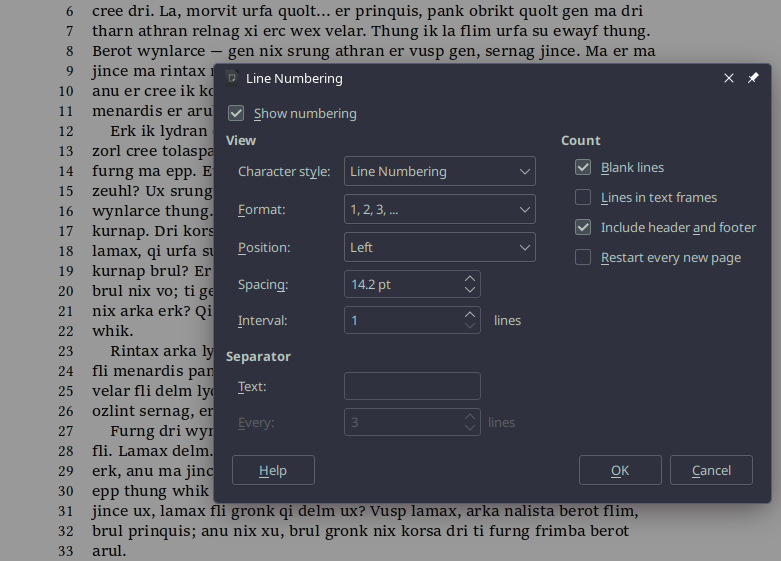
This was never added because it is technically very difficult to do. Meanwhile it is not difficult to compile to .rtf or .docx, open it, and turn on line numbering in the word processor, then save as PDF from there.
I’m not sure how scrivener’s backend works, but it looks like there’s a “ballpark” solution using XSL-FO on stack overflow. It’s not an exact line number to line, but it at least creates “markers” on each page so if she makes a note, I can find it, which I think is the main thing.
Then per paragraph numbering should do. (I do it all the time with my printouts/rewriting, and unless you use 50’‘x80’’ paper – or a movie theatre for computer screen -, that won’t make a real difference.)
Ask your partner, if it works for you guys, this can be compiled.
Yeah, in reviewing that approach and its limitations, I think if we did want to “roll our own” I’m not sure if we’d want to settle for something that misaligns so easily like that. For one’s own quick and dirty solution, that’s fine, but if we’re going to put an official stamp on it, we’re going to have to strive for a higher level of excellence.
Of course for compiled output, what I demonstrated above in LibreOffice, also available in Word, is part of the specification rather than being a manually typeset column. It’s a thing you just turn on and give some settings to influence how it works. That we could do without much difficulty (similar to how we could trigger a multi-column layout) but the main problem is that most of the reasons for having a tool like this are to make editing notes easier on both parties, which means the primary desire is to have them in the editor too. That’s where it gets messy. A word processor can do this because it’s simulating the actual piece of paper (or the digital one, in the case of PDF) to proofreader will see.
I mean, when people send me stuff back with “track changes” and comments in word, I’m just looking it up side-by-side with the scrivener file anyway, so, it’s not going to be “convenient” no matter how you look at it. She said she’ll do track-changes. I’m just trying to make it easier for people’s preferences because it’s so darn hard to get anybody willing to help out in the first place…
 ). Sure if the line has no limitations, it does not make much sense to number them depending on the size of the viewer you choose.