Markdown questions

  1. Can I I work in markdown – that is the stored file is .md – but display in rich text?

Yes. I know I’m working with a subset of rich text. The idea is that a line that starts with pound sign is displayed by whatever that project uses for H1. And that marking something “Bold” will wrap that expression in

**bold**

when it saves, but will show it in bold in the screen. (It’s hard to talk about markdown in this editor…)

And when I type carriage return to start a new paragraph, it will display it whatever style I designate as markdown text, but will save it as plain text, and put two carriage returns in.

  1. Can I convert an existing project to markdown? NOT compile it to markdown. Convert. I want the stored format to be MD, and not rtf.
2 Likes

I’m tied up at the moment, but if you will search for one of the threads I started where I talk about syncing Scrivener to Obsidian you will see that it is indeed possible effectively to have Scrivener duplicate your writing as markdown text files (which, in my case, I read in Obsidian).

I’m sure others will chime in with something helpful here.

Take a look at this thread: Scrivener, Obsidian, and Aeon Timeline...Oh My!

You can disregard the Aeon Timeline aspect of the discussion. Hope this helps.

Simple answer “No”. Scrivener’s native format is RTF. You can easily compile the RTF to Markdown; or you can type in Markdown Code, but it won’t be converted to RTF as a display; or you can type your Markdown using another editor like Obsidian and then import that into Scrivener where it can be converted to RTF, but it will no longer be accessible as Markdown.

Someone tell me I’m wrong.

:slight_smile:
Mark

2 Likes

My goodness. Something just jumped off that page and smacked my brain a good one, and I went looking with Google’s aid and will copy something into this post:

Yes, this statement is accurate. While a Scrivener project saves externally as a .scriv file package (or folder), the actual underlying text of your manuscript chapters and scenes is written, edited, and stored internally as individual Rich Text Format (.rtf) files .

Must state that my experience with rtf as . . . Well, I find the use of the rtf format a very uncomfortable platform.

A flood of questions are ganging up on my feeble ole’ brain as to that use of rtf in this program. Seems I’ve just been handed a surprise homework assignment*!*

BUT, a quick question that got to the front of the gang is if there has been thought/discussion given to change?

_______ Q: Why can’t I get that exclamation punctuation mark into an italic format?

A writer who wants to write in pure markdown (I’m one, btw) can set up a Scrivener sync file that copies the content (scenes and chapters, in my case) to a shared folder. Scrivener can be set to share the files as text/.md files, which is just what we need. If that shared folder happens to also be inside an Obsidian vault, voila, you can write in markdown in Obsidian while Scrivener syncs back to its own files.

The cool thing is that changes to a document in either Scrivener or Obsidian will sync back to the other. I used this method for quite some time with great success, particularly since Aeon Timeline syncs to Scrivener syncs to the sync folder. It works great, if that’s what floats your boat. :slight_smile:

1 Like

Of course you can write pure Markdown, or Typst or LaTeX for that matter, in Scrivener, but the OP was asking if s/he could type Markdown and have Scrivener display it as it does RTF, so # Blah blah would appear Blah blah formatted as whatever H1 styled text is formatted as in RTF including font, weight, font-size etc., and when s/he typed **something** it would show as something in the editor… as would happen in Obsidian preview and in many other Markdown-specific editors’ preview panes.

And the answer to that is No; and, from the blog post about Lit&Lat’s new app suggests that it will be the same there, for the simple reason, that KB, whose brain-children these are, likes Rich Text and not any Markdown-type input system.

:slight_smile:
Mark

1 Like

As others have said, you can write in Markdown syntax very easily in Scrivener, though the underlying files (which you will never see in normal usage) remain RTF.

If you need to see the rendered effect as you type, then Scrivener works well with the Marked app, as this screenshot shows.

HTH.

You can if you use a Scrivener sync folder to write in markdown and have things like markdown bolding or italics show in Scrivener as RTF bolding and italics.

Edit: I was wrong, and correct myself below. In a nutshell, markdown bolding or italics written in the .md file in, say, Obsidian, does not convert in Scrivener to RTF bold or italics.

But anyway, if one really wants to work with markdown, maybe look into an app such as Obsidian.

Automatically? How? :face_with_monocle:

2 Likes

I remember now. Let me correct myself: Scrivener’s sync function strips such formatting (and I wrote about this in the thread I referenced). For me, that wasn’t an issue because I just used markdown for bolding and italics (the only ones I needed for my novel) in both apps, and I didn’t mind seeing asterisks around an italicized word in Scrivener. For those of us who actually like the simplicity of markdown, this is perfectly okay; but for those who are bothered by this, well, this isn’t going to be a workable approach.

Replying with some additional info/thoughts.

A possibility that would be fairly easy (I think) to implement:

==> Make a configuration choice so that the sync folder has a file structure that echoes the binder.

Early on I experimented with sync, but I got discouraged when I discovered that it created a flat file system. Prepended numbers didn’t help much. I have folder three deep in my project for good reason.

Thing is, Scriverner doesn’t TRANSLATE.

I don’t want to type asteriskWORDasterisk. Or maybe I do. But In scrivener I want to SEE it as italic. Format is one of my biggest aids in navigating a large document.

I want styles that have names that correspond to Markdown to do the right thing. e.g. a single hash tag renders as Scrivener’s Header 1,

One of the biggest issues is that Scriverner to sync folder does not put a blank line between paragraphs.

Obsidian works well this way. I can switch between MD format and rendered format.

BUT

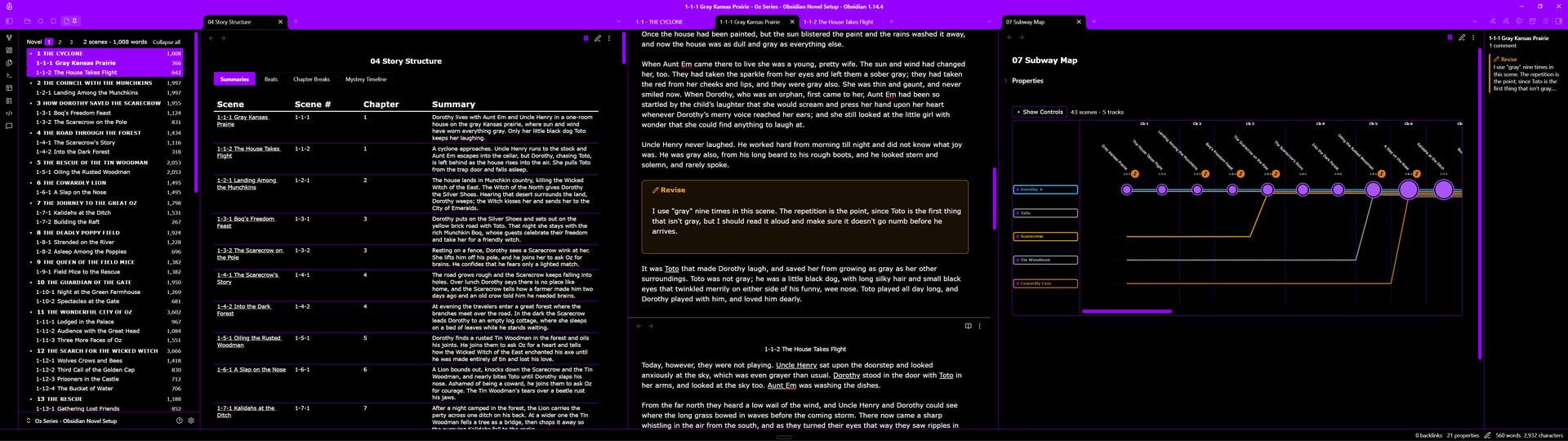
Obsidian doesn’t have the binder, the notes, the keywords, the synopsis, the dual editors.

And Scriveren has pitiful formatting. I cannot create a print ready document.

At present I use scrivener because when I’m on a tear, I can write 15,000 words in a day. It’s not good wrting. But it gets it out of my head and on a screen fast. Obsidian keeps getting in my way. (It was a 20 hour day of coffee and visits to the john to drop off used coffee….)

I use scrivener beause I can cater to my adhd and work on 40 different files in an evening.

1 Like

@SCN Thanks for the update. I thought you’d maybe discovered some secret two-way conversion. The closest I’ve ever come to that was using Fountain (which is a rather bad idea if you’re not writing a screenplay).

1 Like

True. You can place your sync folder inside an Obsidian vault, install the free Obsidian community Linter plugin and set it to fix paragraph spacing. When you open in Obsidian a particular .md file that was synced from Scrivener, it will instantly fix the spacing. As I recall, this didn’t cause an issue for Scrivener when syncing back to Scrivener, in case you were wondering.

It’s been a while, wasn’t the “ Automatically convert plain text paragraph spacing” (in the sync dialog) supposed to help with that?

1 Like

Mine does, and considerably more.

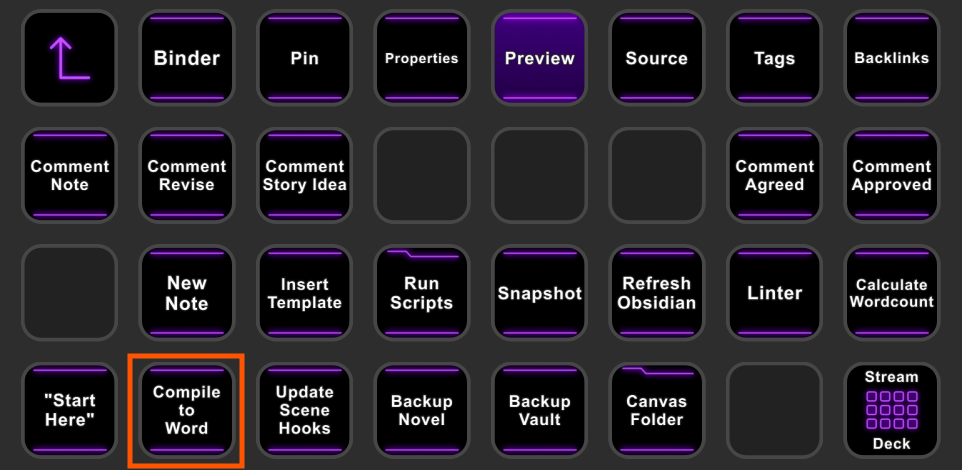
I can compile into any kind of document I want, which is typically just .docx. There are no doubt community plugins that focus on formatting. In my case, I have a script that does this with the press of a button on Stream Deck:

Does it do it out of the box? No, though there are quite a few useful free community plugins that extend its capabilities. In my case, I leveraged the free community plugin Datacore to do nearly everything you see here. (We discuss all this in another thread, so I won’t belabor it here.)

So if you like markdown, but want to see it rendered as actual italics, bold, headings, and so on, Obsidian does that out of the box. If you want to have some features, such as a Scrivener-like binder, there is a plug for that or, as I did, you can roll your own.

There is a cost, of course. You have to devote yourself to the learning curve to get things working the way you want. It might not be worth it, but for me, with a massive seven-novel fantasy series to write, it was.

That rings a bell, haha. Now that I think about it, I think I solved it with Linter before I learned about that simple checkbox. Scrivener is so incredibly deep and well-crafted that it’s constantly surprising me with solutions for problems as I encounter them.

1 Like

I don’t consider Word as suitable format for anything beyond 3 pages. But tastes differ.

HOwever you do interest me with your mention of plugins.

FWIW, we have always anticipated that users would turn to other tools for final publication.

3 Likes