I’m a Windows user of Scrivener (up to date), and I’m currently learning the software as I write a short story. I’m trying to export it now, but no matter which settings I change, however I alter the compile format, section layouts, anything of the sort, the title of the document (NOT its document name, but the one displayed before the document name in the tab, as well as in the “Title” field when viewing the metadata) is consistently “First Page Header”
I would like to use the front matter, as the pre-formatting of the template is useful; but this is truly a nightmare. For this document, I can edit the metadata manually, but I would very much prefer a more direct solution to the problem.
Editing the title of the “Front Page Header” document in the project file does alter this value, but I would prefer to know why this happening and stop it than using that makeshift solution.
I have assigned the document a title in its own metadata in the export settings, which as far as I can tell doesn’t appear anywhere in the PDF data.
Anyone know why this happens?
EDIT: To be clear, when I compile without including any front matter, the ‘title’ field of the PDF just fills with the name of my main manuscript document. It seems to be the “first” document name, though “first” by what metric I am not certain of
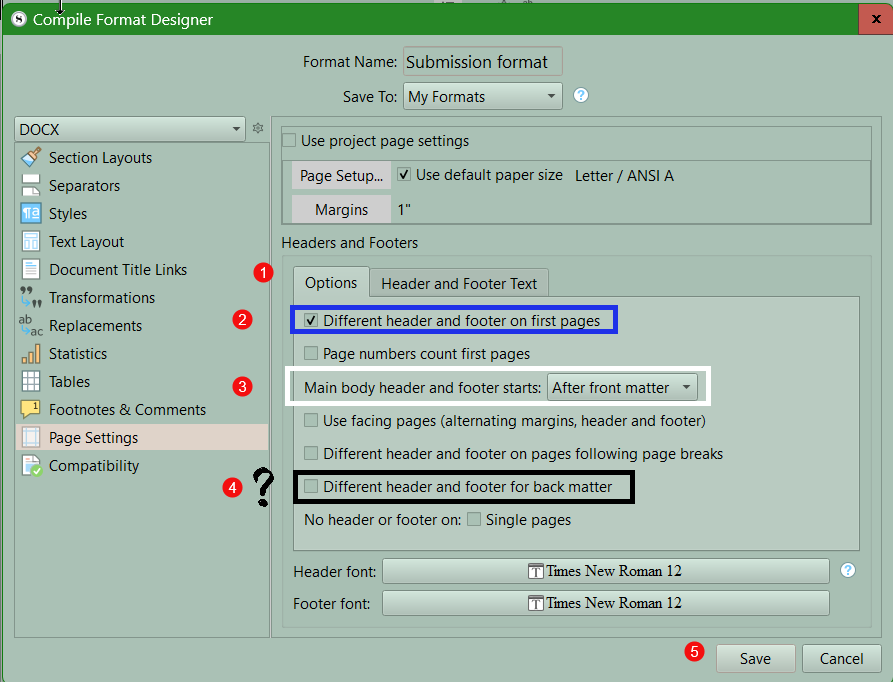
You need to edit the page settings in the Compile Format Designer to get what you want. see the image.
- Pick your compile format
- You should see a preview of how it will appear with section layouts displayed in the middle panel.
- Double click the compile format to open the Compile Format Designer.
- Click on page settings.
- Choose First pages and edit the Header.
- You can use different placeholders to number the first pages differently from the rest (in example small roman numerals)
- Click save to save the changes.
Now look at Options tab on Page settings
- Click Options Tab on Page Settings
- This should be checked to achieve what you want.
- Usually have the page count for the book start after the front matter.
- This is an option for your back matter. your choice
- Remember to click save to save the changes.
I hope this get you to where you want to be.
1 Like
Unfortunately, you’re in the right spot to edit this—the PDF metadata should be pulled from the metadata tab in the compile pane, using the title, author, etc. specified there, but that all seems to be getting ignored currently.
I’ve written up a bug report for this, but I’m afraid in the meanwhile you’ll need to edit the PDF’s metadata post-compile (or use your current document-rename workaround). Alternatively, you could route compile through another format that is correctly retaining the metadata from the compile pane, e.g. compile to DOCX, then export a PDF from Word.
2 Likes
Gotcha, makes sense. I’ll definitely be doing that for this one, so that I can start submitting it, but thank you for submitting the bug report