FWIW, I use the MS Office one-off. It includes Word, Excel, and PowerPoint for (currently) about US$150. I typically upgrade whenever they cut off support for the old versions, which is typically every five years or more. Mostly I use it because clients want to send and receive Microsoft-compatible documents.
Every so often I look at alternatives, but I haven’t found anything that justifies the learning curve for my (relatively modest) non-Scrivener needs.
Not my experience. Office 365 Word and Excel all work just fine off-line.
Yes, they put help and some of the obscure templates online, but I rarely use either. For sure I don’t shop around with different templates. My focus is on doing my writing and perhaps final formatting in Word. You may be able to bend LibreOffice to your will, but the world uses Word and if you seek help here or elsewhere, more likely Word will be in use.
If you need to shop for templates that are not offline, perhaps get copies of those you want when you are online and put them into your local template folder for Word. You can probably fill it up a lot of templates.
And as @kewms reminds us, buy the one-off versions if you don’t like the subscription model.
Full disclosure: I’ve used Word since DOS days, so my muscle memory is in Word. Even in my consulting gigs which had nothing to do with using Word, I ended up giving seminars in how teams can use Word better and effectively because that lack of using Word in “good” ways was hampering the projects I was hired to lead. The projects progressed much easier when we got Word “out of the way” but exploited. [Too many excuses about how bad Word is/was were getting in the way … saw through that and fixed it, numerous times]
Exactly. You can use online versions of their apps if you have a subscription, but by default it’s a native application stored on your local drive.
I’ve not used libreoffice, but looking at a few screenshots it is trying sooo hard to be MS Office, and somehow managing to look dated in the process (perhaps a bit “Vista” era?). Why not stick with the original and market leading (for a reason) that you know so well?
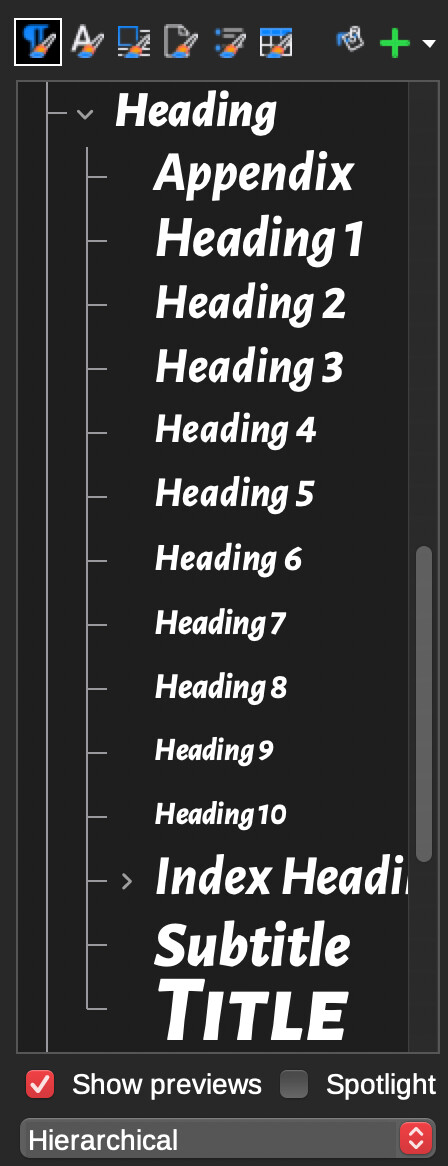
See @AmberV’s post above for an example. In fact there are a bunch of reasons like this about the underlying style model. For example, LO better distinguishes paragraph and character styles, paragraph styles are hierarchically organised (so you can change all headings by editing the root header rather than one by one). This is just better engineered than Word (Styles anyway). The PDF output is way way better too.
As for the GUI — yup you are spot on, it looks like a dated Word. I’m no fan of Word (I do have it thanks to my University), but the UI is certainly crisper (as much as the ribbon is a UI clusterpluck). It annoys me that even LO’s SVG icons are all blurry and organising the toolbars is harder than it ought to be. But at the end of the day, LO is better engineered in the actual features that matter [to me] and clunky icons are not the end of the world[1].
[1] LO used to have a display kerning issue on Retina displays, where individual characters would be shifted by a pixel here and there, it was awful and it did stop me from ever wanting to work in it, but this got fixed a couple of years ago.
Scrivener and Scapple are probably the only software use-case overlap that @AmberV and I have. He is much more of a power user than I in most things. Even the post on LO was too long for me to comfortably read, let alone want to use software that requires that sort of effort!
Give me software that just works and plays nice with others, please. If I have to look something up in a manual or seek advice on the internet, your software UI is wrong (for me).
I, for one, am glad that LibreOffice has not followed the GUI updates of Office. Was forced to use it working for a client when MS introduced the ribbon bar. That monstrosity stole almost 25% of the screen real estate making it ever harder to see the document being written. If LibreOffice sticks with the minimal approach then good on them.
Sure, it was a shock for about an hour and a half, but it’s proved pretty solid and a useful grouping methodology over the years, especially since screens have gotten larger and resolutions more, err, resolutey?
@rms@pigfender Just to clarify, I was looking for the pros and cons of Libre itself as an alternative. I stated from the start that it was time for me to ditch MS office.
fwiw, I do agree with many of your pros of Word/Excel, but it’s just not an option for me at this time. I do appreciate your input. Thank you!
Well, one persons potato is another persons artichoke. LO is as easy to use as Office if that is what you are used to (I suspect LO is “easier” to use for someone coming from a pre-ribbon office). You get used to something and that is what is easiest for you. If Word’s UI works well for a user, perfect and a great reason to pay for it! IMO, both Word and LO are probably total overkill for 90% of most needs, where people want to just write stuff without a zillion ribbons or buttons that do everything under the sun. That is why hopefully everyone will all soon be using that new fangled L&L software…
You are right, in that there technically is inheritance, but Word seems not to use this hierarchically (i.e. Heading 1 in Word inherits from the generic Normal style, Heading 1 in LO inheris from Heading). Probably we can set up a normal.dot templete that makes all styles more hierarchical, and perhaps there is some historical reason Word doesn’t use inheritance by default?
LO, clearly identifies which styles are children of which parent in the Styles pane (it also allows you to separately identify page, character, table and other styles, Word doesn’t offer this level of visibility):
Not when other clients (who also use Word) are running a different version and I had to switch between them several times in the same week. Please I will never get used to a program that steals screen real estate as that ribboned Word did.
No, I never had time to investigate that option. Thankfully I no longer do the type of consultancy work that requires using Word for clients. Maybe minor for some but not for those like me who have Scotopic Sensitivity Syndrome.
Hardly a problem these days, even with the desktop version you can hide the ribbon (permanently if need be). Hide you Taskbar or whatever it’s called on your setup too for added screen real estate. The ribbon is there for (most) people who still struggle to open and save apps or print, and who tell their family and friends, “I work on computers, you know.”