Help please! Am I missing something? I am still getting the ‘not responding’ and freezing on my project despite having followed the advice in the linked articles below, i.e. my ‘live’ project folder is now saved locally on my device’s hard drive, with only my backups going to OneDrive now (with those folders/files not marked to store locally). I have plenty of local drive space too, by the way. I end up having to just close it down, with the risk of losing work, as it doesn’t seem to recover itself. Any advice appreciated, or is there something I have overlooked? Thanks.
One project or all of them? You copy and paste the project folder to your desktop. Open scrivener, now will have nothing to open. Can you open a new project, if so import something, backup and close then reopen. If can then project is issue. Could try file> import > import scrivener project. Let us know
Thanks for this GoalieDad. I only have one project, so will create a couple of new ones and see if it happens with those. It doesn’t happen straightaway so I could be away some time testing this…
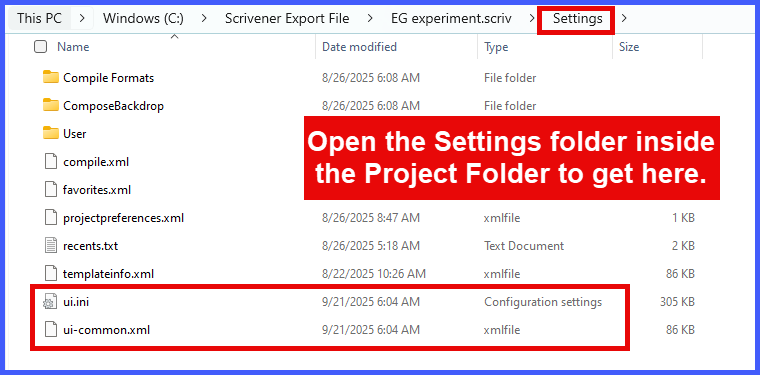
Open the Project folder(where your project is now) and then open the “Settings” folder.
Delete the “ui.plist” and “ui-common.xml” files. When you click on the .scrivx file to reopen the Project, these files will be regenerated. Sometimes they can get corrupted. Deleting them forces Scrivener to regenerate the info.
The path should be too your project folder or it may be on the desktop as we discussed before.
I deleted the UI files as suggested. Doesn’t seem to have worked.
I narrowed down the problem occurring to when I am moving between files/folders on the binder, as though it is struggling to open it/them. And it’s now freezing right from my first action in the binder.
Is it possible that my file path to my project file is too long, i.e. too many subfolders?
I have downloaded DebugView to try and pinpoint if a certain file is causing a problem, but don’t really know what to look for. Would any of that be useful to pinpoint the problem?
GO File >options>general>warnings and click an internal log which may help L&L support figure out problem. Also try File >Save and rebuild search index.
I had a go to the above, unfortunately it stopped responding 20% into rebuilding search index. Will raise a support ticket with L&L to see if they can shed any light. Thanks for your help so far GoalieDad, much appreciated