Ok, thanks. I’m just trying to understand the optimal settings and process for Compile and syncing (which I don’t yet understand as it applies to Google Docs), to ensure that it’s a seamless process, and to prevent against technical glitches. Does that make sense?
No, if you can/want to work with individual documents in the binder, then Sync with External Folders is likely the best fit. You can sync several files from the binder to the external folder all at once.
If you need to work with the entire book/paper, then compile the entire book/paper with the links is a decent option.
1 Like
Ok, I think I follow you. Forgive me, but based on how I’m trying to set up this Scrivner-Google Doc collaboration – i.e., syncing files, conversations, track changes, etc. – which seems like the better approach?
That is, would you suggest syncing individual files or working on the entire book/paper, and compiling the entire book/paper with the links?
Thank you…
That is entirely depends on you and your collaborators. Are you working on the entire thing in one long period, or are you sharing a chapter or two at a time with them? Let that be your guide, after you’ve experimented with both features on your own to see how they can help you get changes back into Scrivener, and after you’ve talked with your editors to see if they have any preferences/requirements.
Gotcha.
Well, these editors view the text as a single article (perhaps divided into sections, based on Scrivener’s structure with files and folders), and yes, we’d be working on it, cumulatively, over a long period – editing and commenting on it over time. Does that make sense?
Thank you…
How many collaborators are there, and do you expect them to agree on most things?
I once worked on a project involving six different contributors from three different companies. Giving them all access to a single draft would not have worked, as they often disagreed. I had to put Version A and Version B side by side and tell them “I’m just the ghost writer. You guys need to resolve this among yourselves.”
2 Likes
It’s just one editor and me. Thankfully…
Please do keep in mind that I’m making suggestions from a hypothetical place; I’ve never collaborated with an editor, period, let alone trying to round-trip modifications from Scriv->Gdocs->back to Scrivener.
That said, this is what I’d do:
- Compile your article using the feature that inserts links back to Scrivener (which I’ve never used myself, mind you)
- Import that into Google Docs and share it with your editor.
- Check if you can open Google Docs and your Scrivener project on the same computer and make use of those links to make Scrivener display the relevant section.
If that all works for you, then …
- Let your editor know the gdoc is ready for them. Make sure they know not to edit/delete the links, and that they won’t be there in the final version.
- Once they/you are done with that phase of editing, review their suggestions. Accept/reject them as you see fit.
- Take a “before editor suggestions” snapshot of that binder item.
- Use the links to open each modified section/document, and then copy from the g-doc and paste over the original text of your Scrivener binder document.
Remember, there’s no one way to do this sort of thing, so if you find the above too complicated, just think through how you want to keep up with changes to your article and do that. Maybe you complete the article in Gdocs, and then import it and trash the original documents it was derived from. It’s up to you.
1 Like
Thanks so much for all of your help, and suggestions! At this stage, I just have two quick questions – just to ensure I’m following along properly…
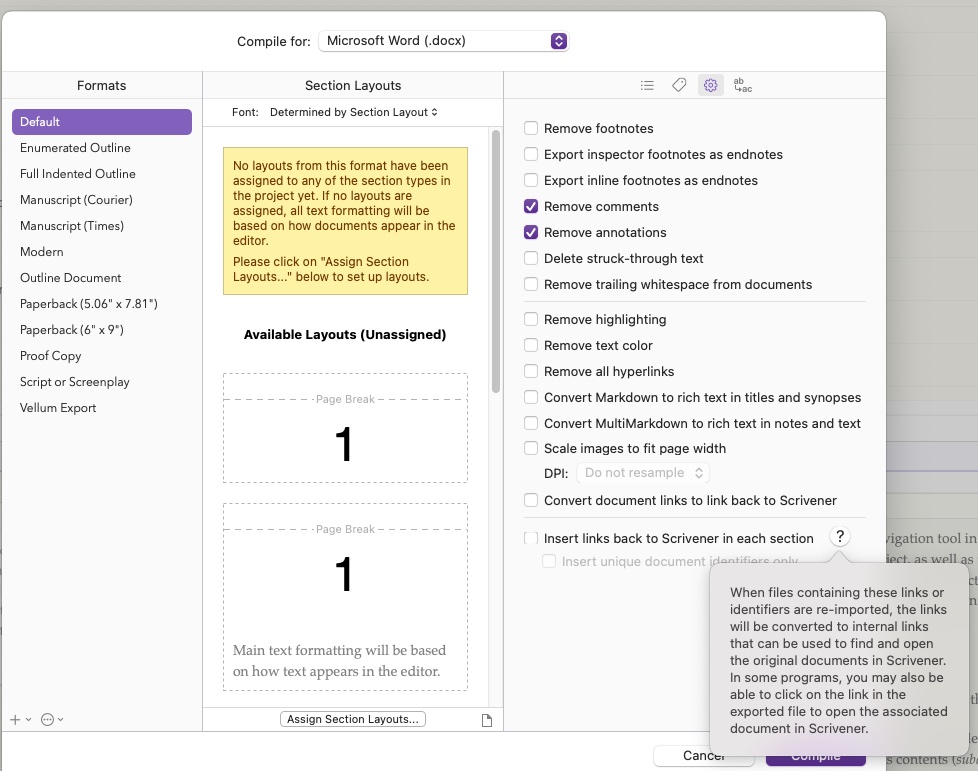
Re: #1, which option do I select to ensure that I’m “using the feature that inserts links back to Scrivener” ?
Re: #2, I understand that I’ll import the Scrivener document into Google Docs, but would I also be doing so via any kind of Sync with External Folder set up?
Thank you very much, again…
When you compile, it’s a one-way path. There’s no syncing the changes made to that document back to Scrivener-- only copy & paste.
Since you’re working with multiple binder documents that are to be compiled into one article, Sync with External folder won’t work for you.
2 Likes
Ok, got it. Thank you.
Re: the Compile options, I now see what you mean – that I should be selecting “Insert links back to Scrivener in each section.”
Does it matter if I’m selecting Compile for .docx or .rtf when importing/converting from Scrivener to Google Docs?
Thanks again…
That I can’t tell you. Try both, see which one works best with Google Docs.
1 Like
Will do. I’ll try a few test runs, and report back on how it goes. I’m hoping it’ll help the Scrivener community, and that we might be able to build on a more efficient process for all users. Thank you again, @Rdale – I greatly appreciate all of your help!
Thanks to all for this discussion. I use both Scrivener and Docs almost every day, the latter in working with editors (when I’m being a writer) or with writers (when I’m being an editor), so I’m sure I’ll benefit from what you learn in this process.
That said, I don’t think I’ve ever found it necessary to return to Scrivener once I’ve exported a story, or a book chapter, to Google Docs. In some cases I’ve split my screen with each app in one side, so I can fetch or refer to info from the Scrivener project.
It of course depends on your particular situation, but you may find that it winds up not being worth the trouble to continue working on a piece in Scrivener after a certain point. I found the same to be true in working with book editors and a coauthor in MS Word.
Thanks to help from this forum, recently I was able to switch one of my coauthors over from collaborating with me in google docs to using a shared scrivener project. We’re both much happier with that arrangement, but I’m afraid it’s a rarity. I love working in Scrivener so much I wish I could live there full time, but when collaborating, it seems google docs is the standard now, and there’s only so much Scrivener’s developers can do to make the two apps play nicely together. I look forward to seeing how it goes for you. Good luck!
1 Like