I don’t know if this is specifically why you need to do this, but you’re stating an excellent case for using Section Layouts to generate chapter heading formatting and numbering automatically, rather than having them manually typed into the text editor like one might with a word processor.
So what I’d be doing is running a regular expression to nuke all instances of ^chapter \d+$ (or whatever the pattern would be) from the text, and then build up from there with compile settings.
Automation using third-party tools. Alfred, BetterTouchTool, Keyboard Maestro, probably even Apple’s Automator or Shortcuts will do.
Create an H1 style in Scrivener and assign a keyboard shortcut to it, let’s say F1.
Create a workflow / script in your tool of choice, executing the following commands: Simulate keystroke combination ⌘G → Delay 250 ms → Simulate keystroke combination F1 → Delay 250 ms. Assign a keyboard shortcut to this workflow, let’s say F2.
Select your root folder in Scrivener (whatever contains all those books), in Scrivenings mode, so the Editor loads everything.
⌘F using @auxbuss’ RegEx [1] to find the first occurance. Close the search dialog.
Hit F2. About a million times.
Get physiotherapy for your index finger.
(Step 5 could also be automated in a loop, to avoid step 6, but I don’t like that. Don’t ask.)
Does the “normal” search support this? I’m not at the Computer right now to check. ↩︎
Yes, the pattern I showed begins and ends a line with a chapter and a number, if it continues, say with “Chapter 12: The Weeping Budgie”, then you could either:
Use a pattern that leaves everything after the colon+space on the line, and then do some automating/manual labour with the Documents ▸ Auto-Fill ▸ Set Selected Text as Title command.
If the item is already named “The Weeping Budgie”, then just use a different pattern that takes out the stuff after the colon+space, too.
Whatever the case, the main point I’m driving at is that if you’re going to spend a lot of time fixing something, you might as well aim for the design of the software, rather than making a lateral fix that will leave one without too much of a functional improvement (though at least with Heading 1 you can change all 100 books’ heading formatting at once, it still would strike me as better to make it so each book can have its own formatting if it wants, or that one can switch to Roman numbering without days of manual labour, etc.).
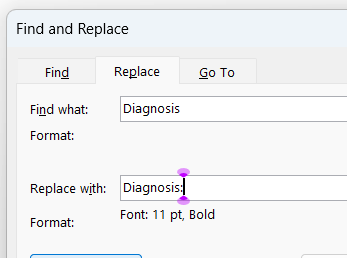
Hi, not sure if I have posted this correctly but here goes: How can I search and replace across all documents where I search for a no-style text e.g. ‘Design:’ and replace it with a formatted text ‘Design:’ or even a total New word or phrase with other formatting ‘Diabolical’. Like in MS Word?
 I’m not at the Computer right now to check.