I’ve just compiled a book to docx and am getting unusual results.
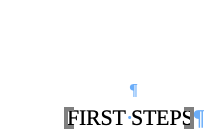
All chapter and section headings display grey square brackets in Word (there’s also a couple in seemingly randoms spots elsewhere), and the TOC has solid lines between the name and the page number.
I think these are bookmarked regions in your docx.
In Word > Prefs > View, you have Show Bookmarks switched on. These show as slender brackets.
Why these spots are coming out of Scriv bookmarked, I don’t know. If the text in question is generated from placeholders, maybe this is just part of Scrivener’s way.