I use Scrivener on IOS, windows and now on Linux.
I have it installed on a Fedora 44 with Lutris. Everything worked fine, but.
I’m Portuguese and I write mostly in English.
When I’m stuck, I write in Portuguese and then I tell the AI to translate before pasting on another part of the file/book, manual or whatever I’m writing at the time.
The issue is, if I write any one of the accented characters, let’s say ã, it will stay stuck for every accented character I try to write after.
Meaning if I try to write õ, it will write ã.
But if I change apps, let’s say terminal, and them return to Scrivener, the ‘special’ character is clear and I can choose another one.
I tried ibus, no success. Funny or not, it only happens with composed characters. Meaning if I use ç or € it frees those. So it’s not a casa of all special characters or dead keys.
Else, I think it is more of a case concerning your OS. Like a buffer that needs to be purged. Try to copy (but not paste) anything from your project not containing an accented character after you paste your content back into your project, and then type “õ”, just to see. [A guess.]
Anything, really. Just double-click a word and Copy. (?)
The issue is not with the paste, is while writing.
The paste works fine. I have several formatted paragraph styles and case per case I sometimes have to change the format.
If I‘m writing some documentation, I use several of them.
I think is something with wine/scrivener.
Because I don’t drink wine, maybe I cannot grasp the problem.
Again, thanks for your support and suggestion.
Best regards,
JRA
This isn’t a problem I’ve run into. Somewhat rarely I will hit a case where a deadkey accent doesn’t work properly, for reasons I’ve never quite figured out, but I can usually get around it thanks to my layout having direct keys for most of the accented letters that I need. I’ve never had an accent get stuck, like you describe.
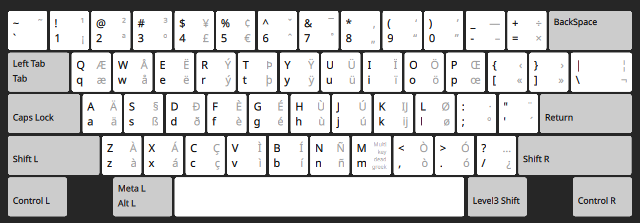
So maybe it’s worth looking into another layout. I use the EurKEY layout, which looks like this:
Most often I use AltGr (or Level3 Shift as it is printed here) on the quote key, to apply an accent to a subsequent letter. Like I say, if that doesn’t work I can press AltGr+f = è though, for example.
It is a good layout if you also program, or write with Markdown, as all of the extended punctuation you need is easy to input. But given how it uses the QWERTY-US key positions, it might not work for everyone.
I understood that.
The point of my reply was that if it has something to do with the copy/paste buffer, doing so could flush it.
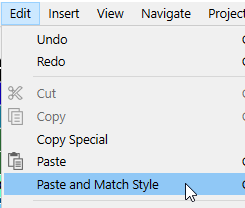
And also, pasting content from elsewhere in your project without using Paste and Match Style can carry in formatting issues (and other undesirable mishaps) that aren’t visible and don’t necessarilly manifest themselves right away. Such as –perhaps– your issue.
AmberV, tried the EurKey and although the keys are in other places, it works.
It will take sometime to find where the keys are, but it might be quicker than dragging the mouse around.
Vincent, the issue is inside Scrivener, while writing the text in Portuguese, just because I like to write inside Scrivener, even if I’ll copy it to another folder/page.
I’ll have to read more about the mapping of EurKEY to this keyboard, why it’s not mapping like the picture.
Maybe because my default keyboard is Portuguese.
But for now, I’m wanting more to write than to read.
Thank you both for your help and suggestions.
Best regards,
JRA
Yes, it might be some keys are in different places physically, so the picture won’t match. Are you using KDE? The picture I posted is from System Settings: Keyboard. Click on the ••• to the right of the layout, then Preview. I wonder if would change the picture to show where your keys physically are.
Well if it doesn’t work well, there might be something similar to that, aimed at your key layout, something that has more direct input options (or maybe just the deadkey setup works better, because that almost always works for me in our software).