Hi there. I’m hoping someone has an idea. I was trying to rethink something in a mind-map with about 75-100 nodes. I wanted to disconnect them all and start fresh, but I accidentally connected every node with every other node (not a metaphor for my brain, really). Anyway, now the poor thing is hung when I try to do anything with it. My desire would be to select all and delete all connections.
After it crashed, I did manage to reopen it. I thought perhaps I could select one node and start there, but it has been sitting with the spinning wheel icon for about 10 minutes, so I’m not hopeful. Help?
Hi.
Quit your Scapple project.
In Windows Media Explorer, duplicate your project file under a new name. (This will preserve your original, in case my advice turns bad.)
Open the new version of your project using Notepad. (Right-click, open with, Notepad)
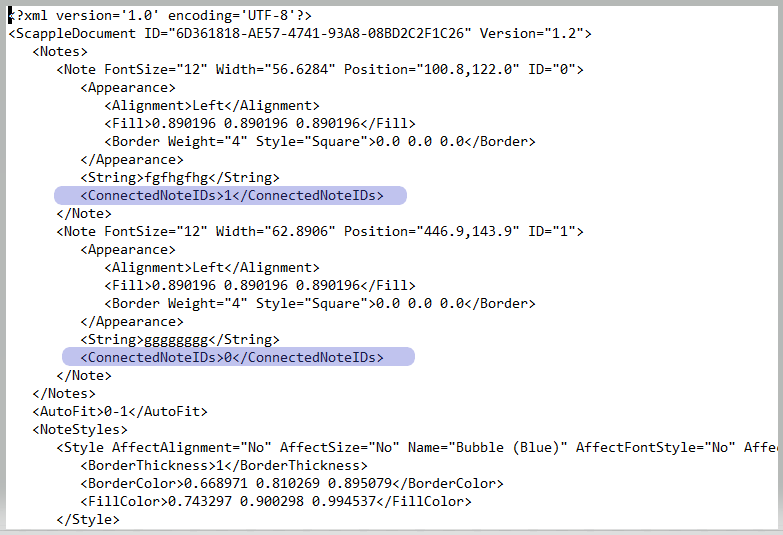
At the top you’ll have a list of all your notes.
Delete all of those lines (in blue) for all of your notes in the list :
–> My demo project only had two notes. You’ll have one line to delete per note.
(You may delete the content and leave the line blank. No need to format anything as if the line was never there. Scapple will later fix the formatting on its own upon your next save of the project.)
Save and exit Notepad. Double-click that file and Scapple should load it without any connections between notes.
. . . . . . .
WARNING: to anyone else, don’t go messing in your project’s guts like this unless you absolutely have to and have – beforehand – secured a backup version. This above is, generally speaking, ill advised.
(Not sure LL’s staff would quite approve.)
6 Likes
Oh my goodness, thank you! That worked. I had no idea the .scap files were XML. The fix worked brilliantly. I so much appreciate you taking the time to reply.
1 Like