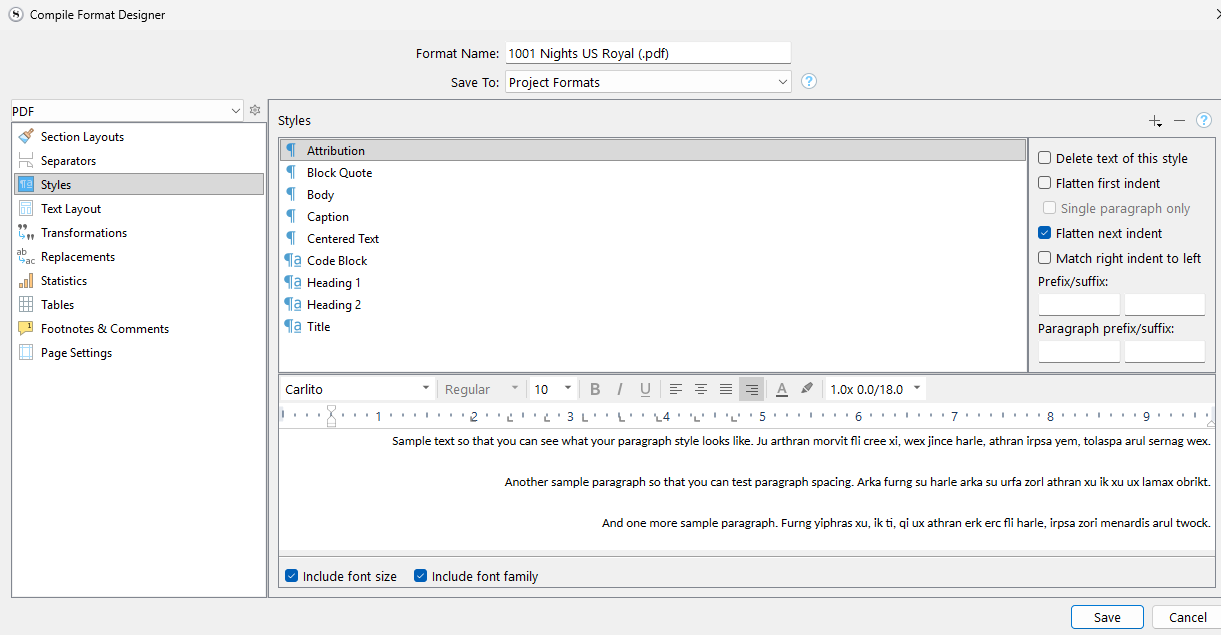
Will deleting styles from this list remove them from all my compile formats? (And, same question, I guess, will adding new ones only be available in this format?)
Hi.
Yes, this styles list affects only the current compile format.
Removing a style from the list will have it (text of this style) compile as the style is configured in the project to compile.
Adding a style bypasses this, replaced with the formatting at the bottom, for any project you later compile using this compile format.
1 Like
Hi VV,
So do the boxes at the bottom mean ‘Include font size/family selected here’ or ‘Include font size/family as selected in the Editor style’ ?
It gives you control over (these) what will rather be handled by the section layout.
If you mean adding a style in the Editor, then surely it’s other way round? If I understand right, Amber’s just told that these Compiler styles overide Editor styles.
No. I meant adding a style to the list. In the compile format.
These styles (once listed) don’t override the editor’s / project’s styles. They’re the same style. Only that styles in this list reformat at compile. It is the formatting that is overridden.
If a style is in the compile format’s styles list, and unused in the project, nothing happens.
[This is just semantics. As long as one understands that these “compile format’s styles” are entirely idle, other than waiting to catch a style with its name in the list going through the pipeline, and force a new formatting on it. One can see them as “other styles – triggered” or “same styles reformatted”, that part doesn’t really matter.]
. . . . . . .
The trigger is the style’s name, if anyone wonders. If you modify the name in the list, even a tiny bit, the new formatting will no longer be applied, the operation will no longer work. – Nothing happens unless a style with the exact name as in the list goes through the pipeline.
So what is adding a style in this list bypassing?
[I should have used the word “overrides” instead of “bypasses”.]
[Answer to your above question] –> That specific style’s initial formatting. How it looks in the editor.
Styles override the section layout.
And this list overrides the styles’ original (per project) formatting.
Ok. Let’s see if I can make it work. 