I am new to Scrivener. I’ve just finished writing a play. How do I number the pages? I searched the Insert option on the menu. There is an auto number listed as an option, but I don’t think it refers to page numbering.
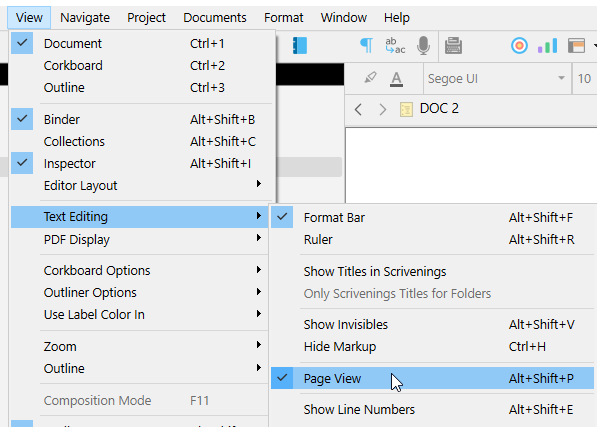
This is an approximate reference. One that will likely change at compile. (Compiling reformats the content, so the pages won’t entirely match. +All your documents will display in the editor starting on a “Page 1”.)
. . . . . . . . . .
If what you want is for pages to be numbered at compile, this isn’t in the menus, but rather in the compile format.
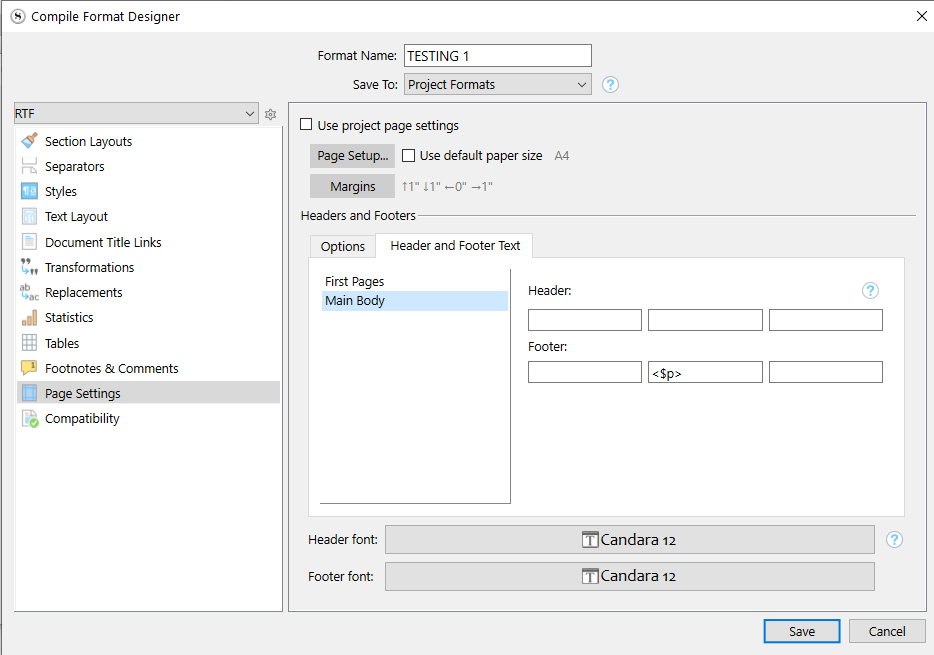
If your chosen compile format doesn’t already compile page numbers, you need to clone it [the first time] and edit it, then add <$p> in the header or footer :
(You can put that placeholder – <$p> – in any of the 6 slots, depending on where you want the page numbering to appear post-compile. Header/Footer ; Left-aligned / Centered / Right-aligned.)
. . . . . . . . .
For your output (Compile): If you used Scrivener’s scriptwriting mode to write your script (and help you put it in a standard script format), then you will probably be wanting to Compile using Scrivener’s built-in ‘Script or Screenplay’ compile format to output it. This basically outputs your script formatted “as is” and is already set up to put page numbers on your pages.
For tracking (approximate) pagination as you go along within Scrivener, there is a Page Layout mode (which was specifically designed for scriptwriters) that will show you your script in a page-by-page way. (This is only meant to be approximate.)