After Writing Three Million-Word Novels with Scrivener: Thoughts on Its Document Model

After finishing three novels, each over a million words, using Scrivener, I’ve developed a deep appreciation for its strengths—especially its document structure—but also a growing sense of friction in certain parts of my workflow.

One feature I absolutely love is the outliner editor. My typical setup is to keep the outliner open on the left, while placing the editor on the right in Scrivenings mode. This allows me to read through an entire chapter continuously, while still being able to jump to specific sections by clicking individual documents in the outliner.

Before I start writing, I usually spend time planning. I outline the chapter structure, break it down into smaller sections, and arrange pre-written materials under the current chapter. I reorder them to establish a logical flow and assign them to specific sections. Outside of dedicated writing time, I often capture ideas on my phone—quick notes, fragments, or inspirations—and later organize them on my computer. These ideas don’t always belong to the current chapter; sometimes they are for future parts of the story.

For me, all of these are essentially TO DO items. I typically write them as short titles, and if needed, expand them with a synopsis.

However, when it comes to turning ideas into actual prose, Scrivener’s document model starts to feel slightly inconvenient.

The issue is that these scattered ideas ultimately need to be integrated into a coherent narrative. This often requires merging documents. At the same time, narrative effects—such as character development, foreshadowing, or thematic reinforcement—are rarely isolated. A single passage might serve three to five different purposes simultaneously.

Because of this, I can’t simply write each “effect” in isolation and then stitch them together later. Instead, I have to implement them collectively within a single document. Once done, I summarize the achieved effects in the synopsis and delete the original placeholder documents.

Similarly, some narrative effects need to be repeated across multiple sections to reinforce the reader’s impression of a character or theme.

As a result, my workflow constantly involves:

  • rewriting synopses
  • moving documents around
  • and deleting temporary documents

Many of these deleted documents never become part of the final text. They exist purely as intermediate structures to help me think and plan, but because their intended effects are interwoven into actual scenes, they never survive into the manuscript.

This made me realize something:
what I might actually need is a document model with built-in TO DO functionality.

If each narrative “effect” could exist as a TO DO item within the document structure:

  • I wouldn’t need external tools to track them
  • I wouldn’t need to create and delete placeholder documents
  • I could simply check them off once implemented

Completed items could be automatically hidden or shown based on preference. Some TO DOs that don’t yet belong to a specific section could remain at the parent level, and only be moved into a section when I’m ready to write. In some cases, they might even temporarily exist as their own “logical section” before being merged into actual text. These TO DO items could also be easily moved across different documents and folders as the structure evolves.

In short, instead of managing documents, I would be managing intentions—and letting the writing naturally absorb them.

I’m curious if others who write long-form fiction in Scrivener have run into similar issues, or if you’ve found alternative workflows or tools that better support this kind of process.

1 Like

So… each of your novels is twice the length of War and Peace? :face_with_raised_eyebrow:

4 Likes

I also have some other short stories, and in terms of quality, they are even better. However, on Chinese online platforms, million-word novels are nothing unusual—they are extremely common. Many authors update between 5,000 and 10,000 words every day, and in order to qualify for full-attendance bonuses, some even maintain uninterrupted updates throughout the entire year. I have no choice but to adapt to this environment.

Scrivener has helped me strike a relative balance between writing speed and story quality. Although I can’t write 10,000 words every day, the Outliner allows me to plan and pre-write outlines for around ten chapters in advance. It also enables me to shape characters through a psychoanalytic perspective, ensuring consistency in their behavioral logic and preserving the thematic core I want the story to convey.

2 Likes

If I am understanding correctly, you want a special kind of document that lives in the Binder along with your text docs and folders, and this special sort of doc is a single to-do item.

I myself would not like this because it would quickly clutter up my Binder.

However, I see no reason you could not achieve this effect with Scriv as it is. Make a template document which uses a checkbox for its icon, and which is set to Not be included in compile, and maybe for good measure set a label color to tint it in the binder for more distinction. Assign a key command to make calling up a new one of these easy.

Now such to-do docs can live free floating in the Binder or be made subdocs of a text doc if they pertain to some particular document. By default they never appear in compiled output.

“Checking off” could be as simple as deleting them. Or if for some reason you want them to hang around switch their Binder icon to the checked-checkbox icon.

This seems to do all that you were dreaming of for a specialized to-do doc. It does not address every friction you mentioned, but neither would a specialized to-do doc type.

But perhaps I have misunderstood your idea.

4 Likes

I’m not really complaining about Scrivener’s functionality—in fact, I can already use it quite well for my writing, and I’ve tried the approaches you mentioned before. However, for someone like me who needs to produce a large volume of text quickly, this means I often have to deal with one or two hundred documents in a single day. That workflow is still somewhat exhausting. Moreover, since these items can’t really function as independent documents, the “document” aspect of them is completely useless to me, and they end up appearing as a pile of empty files in Scrivenings, pushing my actual content further down.

I simply feel that if documents could have native, interactive to-do components, writing efficiency could be improved further. For example, to-dos could appear under the title like the synopsis, with options to show only incomplete items or just the 3 to 7 tasks that currently require attention, automatically refreshing based on my progress. This kind of interactive experience isn’t something that can be achieved through subdocuments.

Since my main profession is software development, I took a look at the scrivx structure and came up with two possible approaches. One is to treat TO DOs as document metadata, similar to Keywords, and then adapt the Outliner and Corkboard so they can display the to-dos within each document.
The other is to continue using BinderItems but introduce a new TODO type alongside Documents and Folders. This type would not include a contents.rtf file, and its icon could be turned into an interactive checkbox, making the implementation relatively straightforward. In Scrivener, it seems that everything is treated as a document—even folders have associated documents—but in reality, BinderItems like Draft, Reference, and Trash do not have documents. Therefore, restricting certain types of BinderItems from having associated documents would not pose any technical difficulty. Under this approach, TODOs and documents can also be easily converted back and forth between each other.

1 Like

Right, I may be oversimplifying this, but why not just add a new field in the project metadata?

Then each document gets a TODO item?

3 Likes

A good idea.

Seems now I need to do is find a way to prevent the subdocuments from appearing in Scrivnings.

Mmmm. :thinking:

Someone a bit more knowledgeable can probably help you with this because I’ve never tried it.

But I think you need to create a binder collection that filters out all the documents that have a todo item that is true/false.

There’s an Include in Compile tick box at the top of the metadata tab.
You could also work on a “rough draft” document above your current scene and give it an eye icon so you’d never be confused. Even include it as a template always with the tick set to off.
It’s how I write: have 20 ideas to include in a scene, start pulling each idea into the narrative, shuffle and check until the rhythm makes sense.

3 Likes

Okay, so these are more like online serials?

Anyway… I suspect you can get somewhere close to what you’re after using a combo of existing metadata options and collections.

1 Like

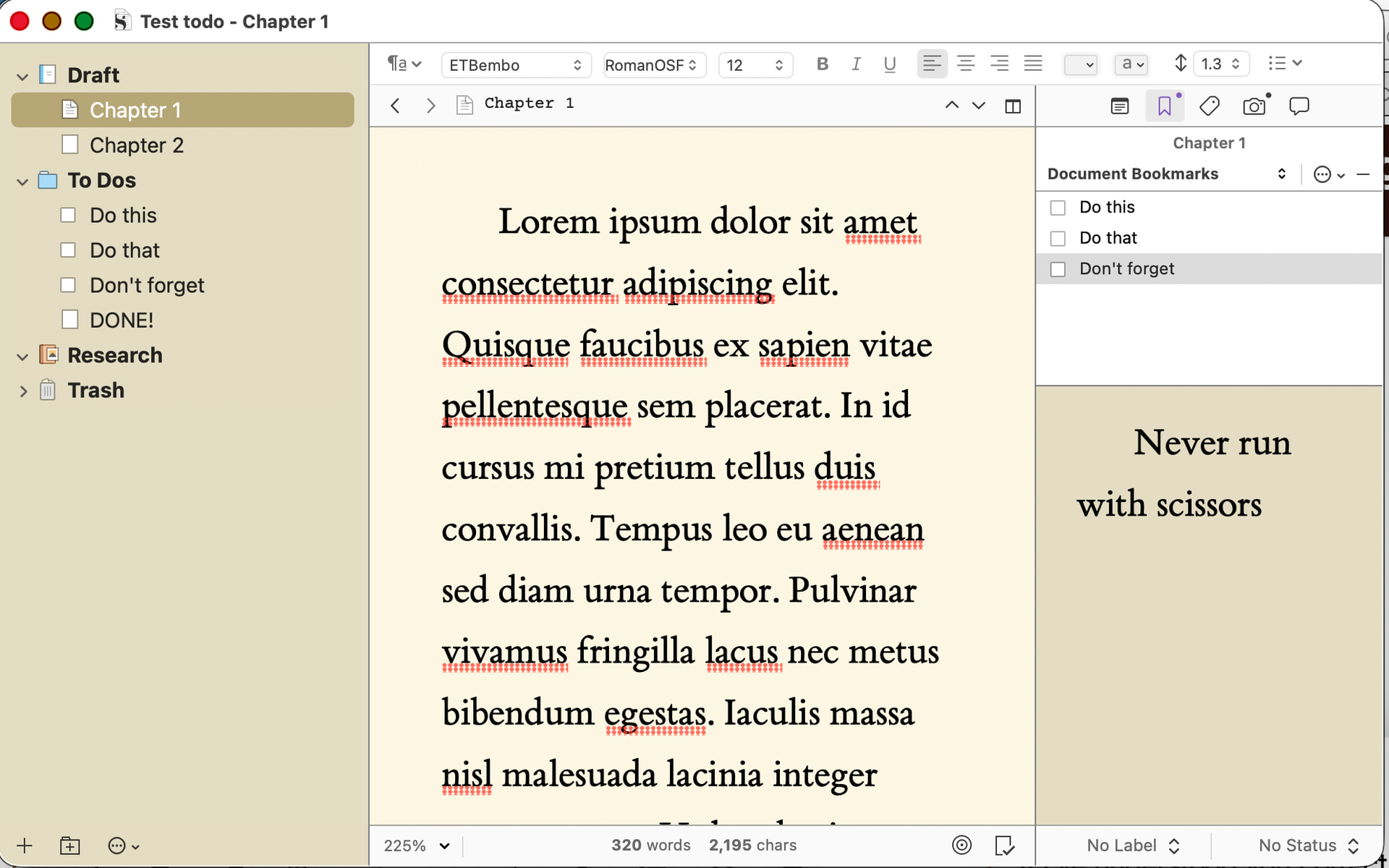
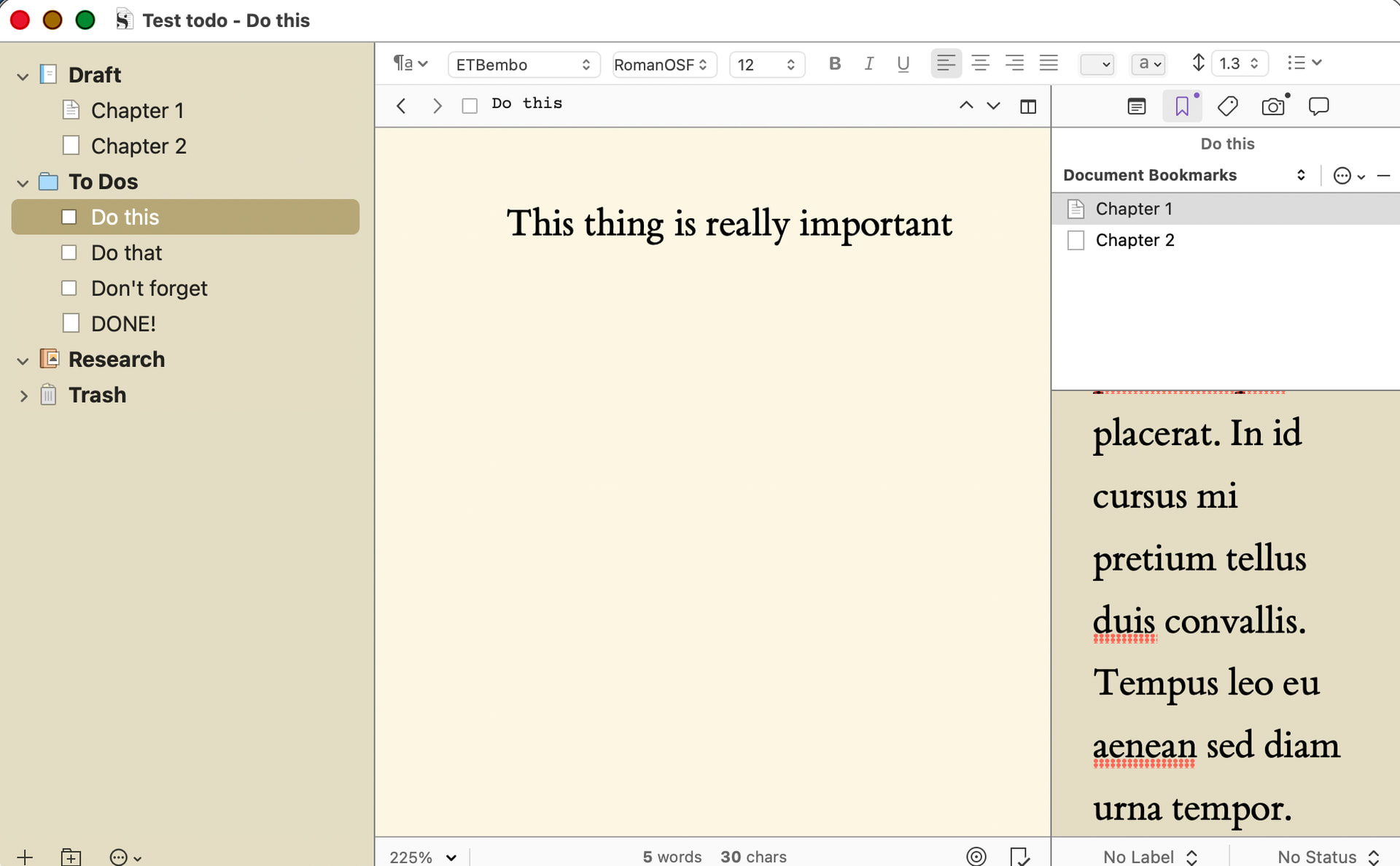
If I’ve understood you correctly, one approach you could try it to have a separate folder for all your TODOs, then link each todo to the relevant document using Document bookmarks.

E.g.

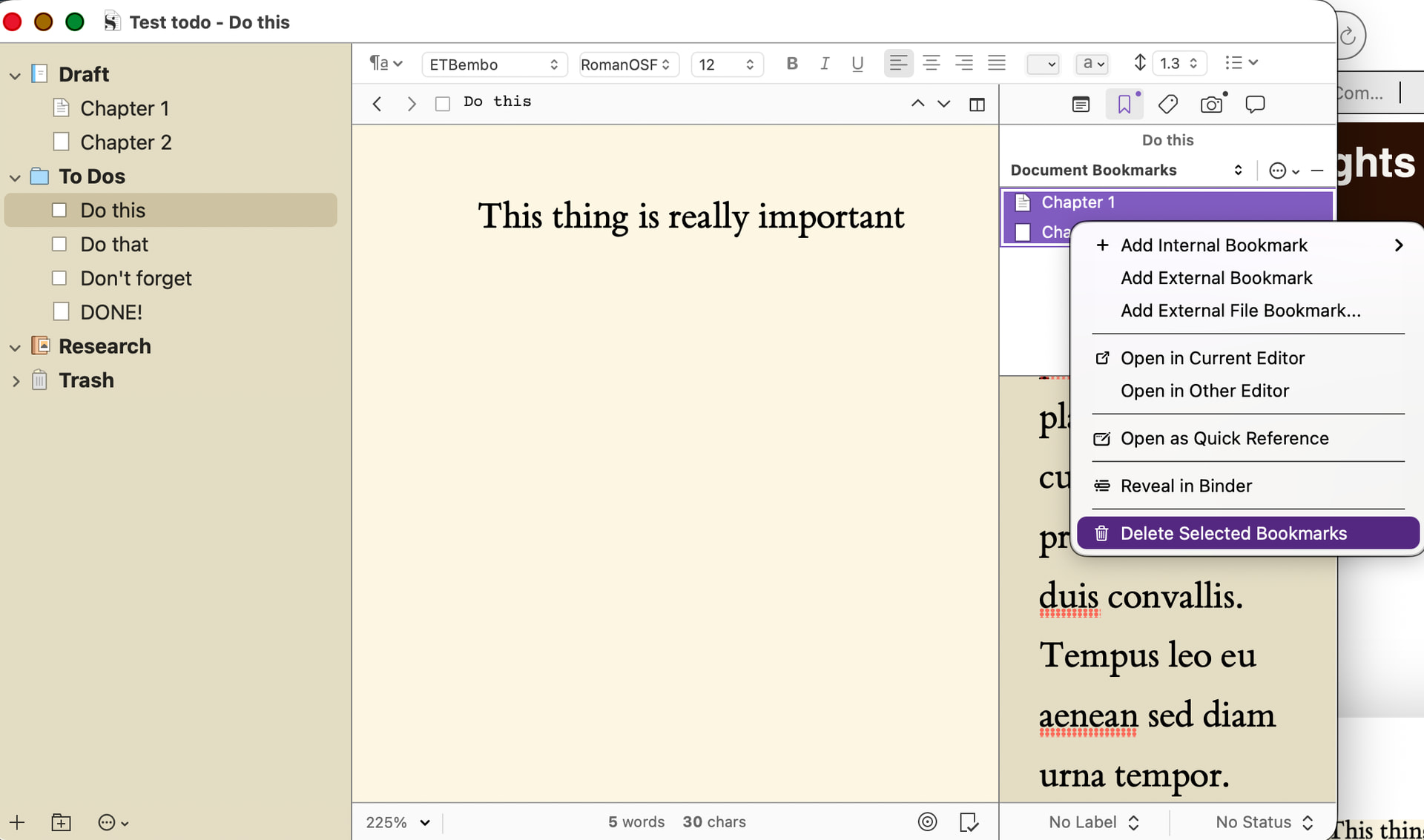
This means you have can have multiple TODOS for the same chapter etc, and each TODO can be assigned to multiple chapters. Both ways are visible in the Inspector.

This gives you the flexibility to work through all the TODOs in one document, or on all the documents relating to a single TODO. When it’s been completed, simple delete the relevant bookmark (not the TODO binder element, of course…).

Would that be of any use to you?

3 Likes

I may as well drop a link to this post, describing how I manage todos in larger projects. It sounds like you already approach things from a very similar angle, so there may be some techniques in there that help you glue things together a bit better. Also, scroll up from the linked-to post, for the other technique I use heavily, for smaller one-off fixes. I prefer to embed the “todo list” right into the content itself when I can, and use collections to help list where they occur.

For matters of binder clutter, this approach of using the outliner to organise what you need to do doesn’t get in my way because I keep all of these notes in a separate area of the binder that is always collapsed. They are then often organised even further into “milestone” or “revision” folders. So when I click on the main ticketing container, I’ll see a list of old and new milestones, and can drill down from there into the actual todo lists.

I don’t think I mention it there, but a couple of tricks that can make a current milestone group handy:

  • When you create a link to a new document, such as when typing [[Something I need to do]] (in an inline annotation for example, or within the Document Notes sidebar), the last folder you targeted will be remembered across sessions, so often you can just hit Return after the dialogue comes up.
  • The Project Settings: Special Folders tab has a setting for where new project bookmarks should be created. You can then use the Quick Reference window’s sidebar to seamlessly create new notes into this folder, which can be set to the current milestone. Of course if you use the project bookmark list for other things, that might present too much clutter and overhead in the list. The one-click advantage of rapidly filing a new todo in a clean separate window might be outweighed by having to more often clean out the project bookmark list.

But say you really do want to keep the todo items nested below the manuscript text they related to. That’s perfectly fine to do and Scrivener is well equipped to work that way. A document template for these items, which perhaps uses a special icon, has “Include in Compile” disabled, maybe its own Section Type assigned so you can easily gather them in search collections, is all you really need.

To keep them out of Scrivenings (or any view mode for that matter) when you wish to focus on the core text, then familiarise yourself with instructions in §12.4, Viewing Only Compilable Items.

There are definitely advantages to keeping notes and todos “beneath” the text editor. Ctrl3 toggling to bounce between notes and text, for example, is quite efficient. But as you can see, overall I do prefer to keep these kinds of notes separate, but perhaps in my case, more because my todos tend to be interrelated to multiple, sometimes many multiple, sections of the draft, given how detailed I outline. If a todo only relates to one singular chunk of text in the draft, I’m using inline annotations with “TODO//” in it, or similar.

3 Likes

Maybe if you gave a screenshot of what your setup looks like it would be easier.