If you install AutoHotKey2, you can run these two scripts simultaniously in Scrivener 3 to select a first and a second dictionary using Ctrl+Shift+1 and Ctrl +Shift+2 respectively: SelectDictionaries.zip (1.3 KB)
These are slow, annotation versions that may help with the steep learning curve of AutoHotKey2. To speed up these scripts, place semicolons ( ; ) before the MsgBox lines.
The script assumes only two dictionaries are installed: a first and a second.
It also relies on the Options window called “Options”.
May I ask how it works? I mean, since there is no assignable shortcut?
Also: would it be possible to implement a third shortcut to toggle “check spelling as you type” for when working with Lorem ipsum files? (I am thinking of all those times when I “have” to come up with a screenshot.)
Anyways, that’s great.
I’ll set it up first chance I get.
Thanks again.
This is the script for Toggling Check Spelling as you type in AutoHotKey Version 1:
; Toggling "Check spelling as you type"  in Scrivener 3
SetTitleMatchMode, 2 ; Match part of the string of the title of a window
CoordMode, Mouse, Options ; mouse click relative to Options window

^+3:: ; start with this key combination: Ctrl+Shift+3
WinActivate, .scriv - Scrivener
WinWaitActive, .scriv - Scrivener
Sleep, 1000
Send, !fi ; select Options
Sleep, 1000
Send, {Click 380 50} ; click the Corrections button
Send, {Click 45 110} ; click the Spelling tab;
 MsgBox, 0,,Toggling Check spelling as you type now...
Send, {Tab} ; Select "Check spelling as you type" checkbox
Send, {space} ; Toggle the checkbox "Check spelling as you type"
 MsgBox, 0,,Check spelling as you type is toggled!
Sleep, 1000
Send, {enter} ; Click OK to close Options
return
When you trust the script to work, place a semicolon in front of the MsgBox lines to stop showing them.
I just tried, but I can’t get it to work.
Is this something that would switch the dictionary on the fly ? (Or is any manipulation required in – or related to – Scrivener ?)
(And, btw, it is not compatible with AHK 2.0, which is what you get from AHK’s website. One needs to rather download and install the legacy 1.x)
Oops, didn’t know. I’ll update and check it’s functioning.
New version for AHK 2.0. Always nice when someone pulls the rug from under your feet.
Save this to an .ahk-file in Notepad, Activate Scrivener and press Ctrl+Shift+3 to toggle the setting.
You can uncomment the MsgBox statements by removing the semicolon “;” for debugging purposes.
It relies on the Options window named “Options”
This works on my machine. Please let me know if it doesn’t work.
#requires AutoHotkey v2.0
SetTitleMatchMode 2 ; Match part of the string of the title of a window
CoordMode "Mouse", "Window" ; mouse click relative to Options window
^+3:: ; start with this key combination
{
    WinActivate ".scriv - Scrivener"
    WinWaitActive ".scriv - Scrivener"
    ; Sleep 1000
    Send "!fi" ; select Options
    Sleep 3000
    ; MsgBox "Activating Options"
    WinActivate "Options"
    WinWaitActive "Options"
    ; MsgBox "click the Corrections button"
    Send "{Click 380 80}" ; click the Corrections button
    ; MsgBox "click the Spelling tab"
    Send "{Click 45 140}" ; click the Spelling tab;
    ; MsgBox "Select Check spelling as you type checkbox"
    Send "{tab}" ; Select "Check spelling as you type" checkbox
    ; MsgBox "Toggle the checkbox Check spelling as you type"
    Send "{space}" ; Toggle the checkbox "Check spelling as you type"
    Sleep 1000
    ; MsgBox "Click OK to close Options"
    Send "{enter}" ; Click OK to close Options
    return
}
Now I’ll have to update other - more complicated - scripts as well…
I followed your instructions, copy pasted the code above to a new AHK script, ran that new script, launched Scrivener, and then Ctrl-Shift-3.
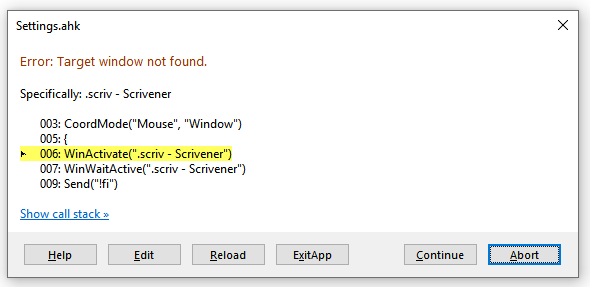
I got this error message:
What should I do now ?
(I ran it with the beta. Would that be an issue?)
[Edit] I ran it this time in 3.1.4 and didn’t get the error message. But Ctrl-Shift-1 & 2 still don’t change the dictionary…
[EDIT2] I reran the scripts, this time all five of them (just to see) and got the error message posted above in 3.1.4.
Prior to that, I would get a message saying “activate Scrivener” when hitting Ctrl-Shift- 1 or 2…
All scripts in this post should work with AHK2.
They should start with: “#requires AutoHotkey v2.0”.
The scripts are three separate files with three separate keystrokes, but can be run simultaneously.
Did you have a project open in Scrivener? “.scriv - Scrivener” should be part of the window title.
Does the beta 3 version show something different in the window title? No it does not.
Maybe you had two windows with the same (partial) window titles?
Looks like you really didn’t have Scrivener running when you attempted to run the scripts.
I just realized the clicks have specific coordinates from the top left of the Options window. The script could fail when you’ve set different heights for the left menu in the Options window. Clicking the large buttons at the top of the Options window should be alright. But actually, this is something only Theme Builders would manage to do…
I’ve set my options to display the project’s full path in the title bar and now it works.
Interestingly enough, I have three dictionary in my list.
The script for the second actually picks the last from the list, and the script for the first picks the second to last from the list.
Which turns out to be fine for me just the same. (I have two English dictionaries, Canada and US, but there is so little of a difference, that those scripts are just right for my needs. – By alphabetical order, French is the third, so the scripts either picks the English US dictionary or the French one.)
Perhaps that’d be a better idea. Because: if the project has changes not saved yet, the (*) prevents the scripts from working…
And… not to be a killjoy, but it doesn’t work in the beta. (I suppose it could be a naming things thing…? Perhaps once the beta is no longer a beta it’ll just work. – In the beta, it does as if to tweak the appearance of the binder, then just exits, and finally inserts carriage returns in the editor.)
I am currently running AHK 1.x and AHK 2.0 at the same time, no problem…
It takes 0% cpu, and I strongly suspect the memory usage is exactly the same as if I was running all 2.0 scripts. So, perhaps you don’t have to inflict yourself the pain that upgrading all of your scripts involves…
Just now as I was testing your scripts, the dictionary ones were ran by AHK 1.x and the “Check spelling” one was by AHK 2.0
(I installed the legacy 1.x when I first got the error message saying the scripts were not 2.0 compatible.)
Hi @AntoniDol
Have you tried the scripts in the new release?
They were working fine in 3.1.4 (and a great idea, a nice share), I think they only need some minor tweaking. (?)
Don’t give up on it, hey? (I’d be happy to use them )
I was sitting the new version out until most issues are resolved. So, I haven’t tried the scripts yet.
On my computer the 2.0 scripts worked fine in the beta. I guess the will work in this new version.
Btw, I don’t think this was a point release. Should have been 3.2 at least, for the changes in the new version of the development platform are significant.
 To speed up these scripts, place semicolons ( ; ) before the MsgBox lines.