I would really like to have an auto-numbering option for Binder and/or Scrivenings titles. I use Scrivenings in place of a bullet list, and I like seeing the hierarchy in the Binder. I use Scrivener to write a humanities PhD, so both the Binder and the text are loooong. I would love to see at which level a certain file is with just a quick glance. Auto-numbering is possible in the Outliner view, is it technically impossible to translate this feature to Binder and Scrivenings titles? I have seen many requests over the years about this, and I think it will really improve Scrivener’s usability.
PS: I am not talking about auto-numbering in the compile mode.
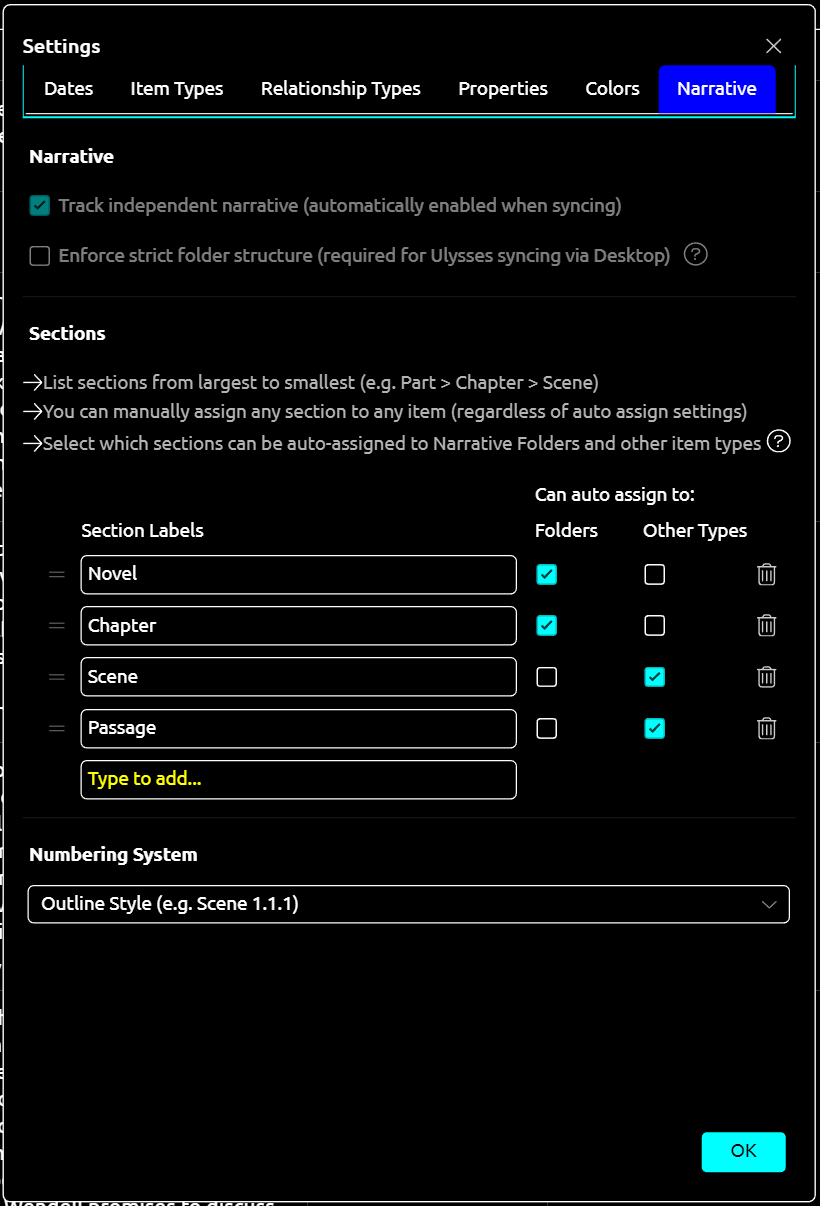
I know from other discussions on this that it’s unlikely such a feature will be introduced for Scrivener. My solution is to utilize the auto-numbering function of Aeon Timeline, which syncs with Scrivener.
But you could use any taxonomy you want for your hierarchy, presumably one suited to an academic writing project.
Though Aeon Timeline is a timeline app, its narrative tabs are free of date or timeline constraints, making them ideal for auto-numbering in any writing project.
In my writing workflow, I have Scrivener and Aeon Timeline side by side on an ultrawide monitor.
I think that in a way we have kept these numbering options out of titles and the main sidebar precisely because of your caveat above—they aren’t about compiling, but having them in the titles in the editor would pretty strongly imply otherwise I think.
The binder, I could definitely see more of a case for the outliner hierarchical numbering option being allowed there. The main reason it does not is the overall design principle we’ve stuck with since from the start: the binder is for the dirt basics, all the frills should be done in the outliner. It’s a bit arbitrary, but it is a thing.
If you haven’t come across the notion yet, something I do a fair bit of is hiding the binder entirely and using the outliner instead. It does mean one less split, but with Copyholders these days, that isn’t as much of a setback as it used to be.
This screenshot shows an example from a workflow description, where Scrivener is in fact nothing but an Outliner, the narrow dark brown column on the left, and everything else is a coding editor.
Lastly, if you’re thinking high level navigation would be crippled without the binder, here are some tips on editor navigation, which can make your daily usage of Scrivener more efficient even with the binder still open. (You can probably skip past all of the “Scrivener is an outliner!” stuff, as it sounds like you are very well aware of that.)
Thank you for the suggestions. I guess I’ve been resisting the idea of getting rid of the Binder, since I frequently rely on the split-screen view. But perhaps it’s time to move on to other viewing options, like the ones you suggested.