Hello. I feel like I’m losing my mind. I’ve been looking at a few threads about this, and theoretically gotten an answer, but it unfortunately won’t seem to stick.
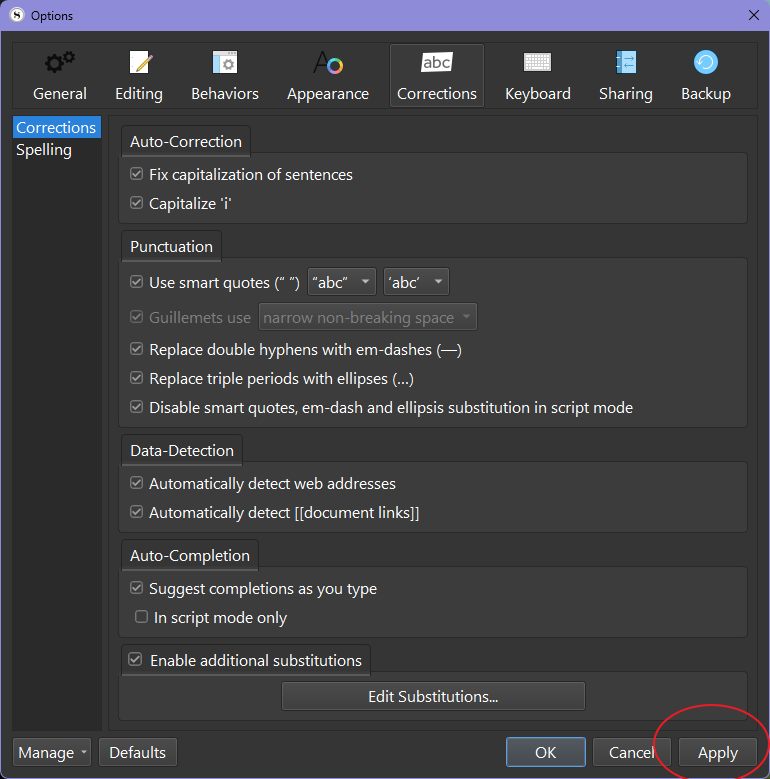
I’m trying to turn off the automatic capitalization of ‘I’ and the first word of every new sentence. This should be easy under the options. I go to file>options>corrections and uncheck the boxes. But I cannot for the life of me find a save changes button, and whenever I click out of the window, it goes right back to auto-capitalizing everything. Am I going insane? Help would be greatly appreciated.
Short list of what I’ve tried so far that hasn’t worked:
Exiting the app entirely.
Ctrl+S. This was a hail mary.
Keeping the options window open, just in case.
I haven’t yet attempted crying, but if you think it would fix this, I’ll make a sincere attempt to do so on command.
After unchecking the boxes under File→Options→Corrections, there is an Apply button at the base of the window. Click on the Apply, followed by Ok button to close the window. That should then affect the changes.
It refuses to be resized, so to fix it I’ve had to mess with my Windows settings and hide the entire task bar to access it. Thank you for pointing out that the button, at the very least, exists, and for the warm welcome.
Well, if you were able to find and click the Apply button, good on you.
However, this does seem to be a problem for smaller screens. The window can resize, grow larger, but will not resize smaller than what is presented. It is at its minimum. So, yes the options window cuts off beyond the lower part of the screen preventing visible access to those buttons. Seems like one for the dev team to address, allow for shrinking the window and add a vertical scroll bar.