In 2024 I wrote a work on a really broken computer, like literally hanging on by the hinges. Luckily in early 2025 I was able to get a new one. I copied all of my Scrivener files onto a USB for transport. Unfortunately, most of my files are blanks. The project isn’t there but my Data folders are completely full. I’m assuming maybe those were for backups or autosaves? Either way, it is just not there. I have no idea if anything can be done at this point. With the new year I’ve been trying to dig again. I don’t know where that old, broken, computer is now at this point to see if there might be a sliver of a chance to search its hard driver.
Help on retrieving or mourning a work I spent so much time on is greatly appreciated.
How I backuped the project: At the time I was backing them up to a file on the broken computer. I had put them on the USB for transfer when I got the new computer.
Other files from the broken computer: Yes, but it seemed random as to what .scriv file moved over to the USB along with a compressed zip folder of backups.
To the cloud: It would have been OneDrive or GoogleDrive but I have dug through that as best as I know how.
This particular file had been compiled in one file and compressed as a zip in a seperate file to keep safe in transfer, but all I have now are blank files.
Need to get a little more specific to try to help, but …
what is the exact folder name where your Scrivener projects were stored on the broken PC and is that the folder of project files now on your backup USB drive? this folder should hold all the auto saves, but if you did some “save as”, then where did they go?
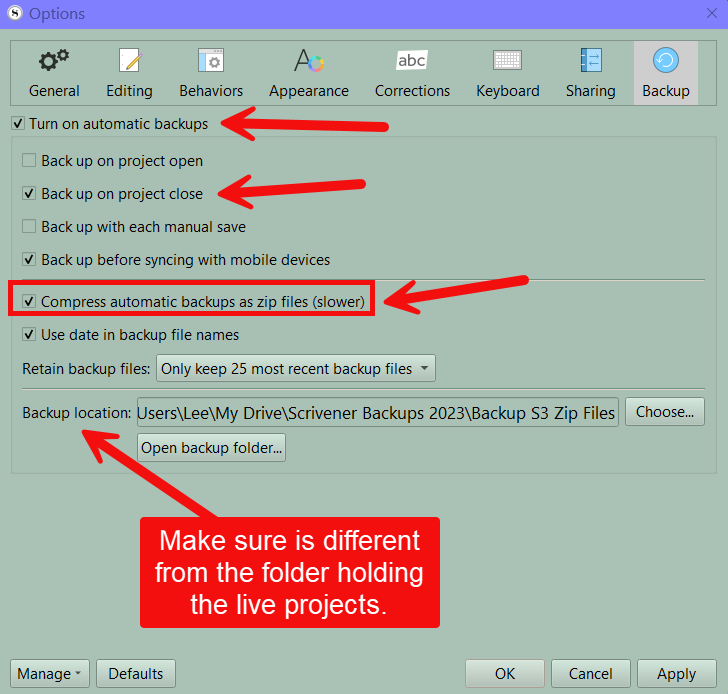
what is the exact folder name where you put the Scrivener backup *.zip files, and is that folder of backup files on the USB drive? This should be a different folder than projects.
It would have been called “project name.scriv” inside a folder called ‘Scrivener’ on the PC. On the USB, yes as I copied the folder onto it. Like I said, there were multiple projects transferred over and it seems really random what kept their .scriv files and what didn’t.
In transport the .zip backups were in a seperate file on the same USB called ‘Scrivener backups’ or something like it, uncompressed.
I had compiled this main project that I’ve been digging over a year for also in the initial ‘Scrivener’ file in a sub-folder that would’ve been called ‘project name COMPILE’
You should save backups as compressed zip files. These are essentially a single file and do not get messed up by cloud syncing services. Scrivener recommends not saving whole projects on a cloud backup service other than Dropbox. There are numerous stories of sync errors with projects on google drive and One drive.
I agree with rms if copied information that was not completely synced may be lost. You could try syncing google drive and one drive to the new computer and setting it to save files locally and might get back the whole project folder.
I assume you mean compressed, rather than uncompressed. If they are still .zip files in that folder, then they are compressed, and that is a very hopeful thing in your case. In the user manual PDF, go to §5.2.3, Restoring from Backups. You’ll skip past the first checklist, as that describes how to get to your active installation’s current backup folder, but you of course want to navigate to your USB device where this previous folder was copied. Read the yellow tip box on how zip files work if you aren’t super familiar, and then proceed with the longer checklist following that.
Hmm, okay. Well I know this won’t help you out right now at this point, but for future reference it is best to never modify your backup location (hence why the checklist in the manual encourages copying the .zip file out of the backup folder before even using it to extract, to minimise risk to the originals). Copy stuff down from it, yes, and then mess with the copies, but if you move things from it, and then unzip and delete the zips, you’ve discarded the original data, and if anything goes wrong at any point in the transfer or unzipping, there is no going back.
You might check the recycle bin though while the USB is plugged in. Depending on how you moved the .zip files, if you copied and then deleted, say, they might still be in the trash. But if you did the old right-click drag and move approach, I don’t think that goes through any kind of failsafe.