@Lindsiria So did all of those tweaks result in better looking fonts, or not so much?
I don’t have a good answer. I keep seeing new issues pop up, the cabextract error being the most recent. By and large I’ve been able to reproduce and fix them, but there are some I cannot reproduce and I’ve not been able to figure out. The best example of this is people saying the fonts look terrible. It seems to only crop up on the KDE desktop environment, (Cachy OS in particular) but I know that one is a major desktop environment and an increasingly popular distro. I want to iron that out, but I’m sort of out of ideas. If I could reproduce it on my own machine I could probably get to the bottom of it, but every time I spin up one of those distros, everything looks good to me.
At some point I may just have to accept that I cannot solve every problem before it goes live and just put some notes in the install documents that your mileage may vary. There are still alternatives people can try, like Lutris, Bottles, straight WINE, or CodeWeavers (which comes with customer support).
I originally built this Beta on the 23.08 runtimes which became unsupported during the Beta. I’m now on the 24.08 runtimes, but I really ought to get it running on the 25.08 runtimes before submitting to Flatpak.
I’ve also been getting a little frustrated with WINE because I believe some of these font issues are something that has to be solved by WINE, not by Scirvenix. I think they may be cropping up between the KDE desktop environment and WINE, which I can’t do anything about. I may just have to make peace with it at some point and say this is as good as I can get it to behave and turn it loose.
I’ve also gone down another rabbit hole these past few weeks and built a Linux native word processor that has the features from Scrivener and other writing platforms that I use and value most, as well as one that I’ve never seen implemented.
I can’t given you a definitive date, but I think I’m going to look up when Flatpak is going to require the 25.08 runtimes and I’m going to aim to have Scrivenex compatible with this before the 24.08 are end of life and I’m going to push it to Flatpak then. Flatpak is its own process and there are some hoops to jump through to get it accepted. Outside of how the runtime versions may direct me. It is August now and I’d like to have it available on Flatpak, as good as I can make it, by November of 2026. I’m not sure if that’s overly ambitious or not.
3 Likes
That is all really understandable. It occurs to me that with the grand variety of Linux installs, like you say, it’s possibly the best you can do to say, “Use at your own risk.”
Are you talking about this other writing platform any where else? I would be very excited by a programme that could genuinely replace Scrivener, even without the “compiler” option. Manuskript is obviously reaching in that direction, but there’s a clunkiness to it that makes it not quite there.
Sadly no. It didn’t do much for me.
So, I have some feedback after messing around with things.
The first bit is that older monitors are going to have more issues. I have a 10+ year old monitor (due for an upgrade) with the resolution of 1920 x 1080 at 60 hz. There is only so much I can do with this limitation.
The second is… dark mode. Do not use dark mode. Something about light text on dark backgrounds is what makes my text so bad. As I really don’t like light mode, i settled with dealing with bad text for the nav bars and made the main writing section a tan color that wasn’t so blinding but could still have black text. What has worked best for for me is using the font: inter at size 10 with black font color.
I don’t know that the monitor is to blame. I have a 1080p laptop screen that I’m working on and I’m able to make the fonts quite usable. I really think it is something between KDE and WINE that’s at work.
If you are feeling adventurous sometime, boot up something non-KDE in a virtual machine and try it on the exact same monitor and see if you get a different result.
I don’t use KDE. I am on Debian w/Gnome.
I have customized it a bit, with a custom template and modifying the GTK css in places, but none of that should be influencing WINE. Honestly though, the main difference has been moving from a dark theme → light theme in scrivener. When I am off of work, I’ll show the difference between the two. It might be helpful to future users.
Thanks a lot for this. I am a professional (fiction) writer. I have been making my living from writing for the last 9 years. Been writing for a fair bit longer than that. I’ve been using Scrivener on Linux (the 1.9 official beta) all this time. I am due to a laptop upgrade, and instead of installing the 1.9 Beta for the n-th time, I will give this a try. Ubuntu 24.02 here. What kind of feedback do you need?
1 Like
Un énorme merci @adgalloway pour Scrivnix. Globalement tout s’est bien passé pour l’installation.
je suis sous Linux Mint 23.4 Cinnamon ( XDG_CURRENT_DESKTOP $WAYLAND_DISPLAY =>X-Cinnamon )
Le ctrl et shift fonctionnent correctement.
J’ai bien pu activer ma licence et activer le produit.
J’ai un écran 4K, avec un coefficient multiplicateur de 125%, j’ai donc dû modifier la résolution d’écran dans les paramètres de Wine comme cela est très bien expliqué. (il reste un petit problème d’affichage mais je suppose que cela vient plutôt de Wine)
L’apparition de Scrivenix a nécessité un redémarrage.
J’ai pu modifier les emplacements de backup et d’enregistrement sur un dossier qui est synchronisé avec Nextcloud.
Bref tout fonctionne correctement, encore merci !
Translated with DeepL.com (free version) :
A huge thank you @adgalloway for Scrivnix. Overall, the installation went smoothly.
I’m running Linux Mint 23.4 Cinnamon (XDG_CURRENT_DESKTOP $WAYLAND_DISPLAY => X-Cinnamon)
The Ctrl and Shift keys work correctly.
I was able to activate my license and activate the product.
I have a 4K monitor with a scaling factor of 125%, so I had to adjust the screen resolution in Wine’s settings, as explained very clearly. (There’s still a minor display issue, but I assume that’s more likely due to Wine.)
Launching Scrivnix required a reboot.
I was able to change the backup and save locations to a folder that’s synced with Nextcloud.
In short, everything is working correctly—thanks again!
Translated with DeepL.com (free version)
Has anyone managed to import an ebook cover image? My project, imported from Windows already had one, but when I try to import a newone via drag and drop, the file import dialogue appears and then Scrivner hangs (KDE Plasma, Fedora 44)
Thanks for looking in to it.
Thank you for the initiative - I am planning to move from Mac to Linux, Scrivener is a software I use daily at the moment and have not been able to work with on Linux with Wine/Bottles. The installation of Scrivenix was smooth so far, right now I am struggling to open an existing project, now Scrivenix has disappeared from my program bar. Maybe to to restart the system. Do you have test cases you want checked? (KDE Plasma Ubunto 24.4 Distro)
2 Likes
More power to the team of people looking into this. Moving to linux in order to escape the shit show and endless anti consumerism of “big tech” is certainly becoming more attractive by the day.
2 Likes
I know I am late to the party on this thread. Even as a new-ish Linux convert, I would really like to be a part of this. I have Zorin OS, which is fairly new in the world of Linux distros. So far, I have gotten the old Scrivener for Linux 1.9.01 to work.
2 Likes
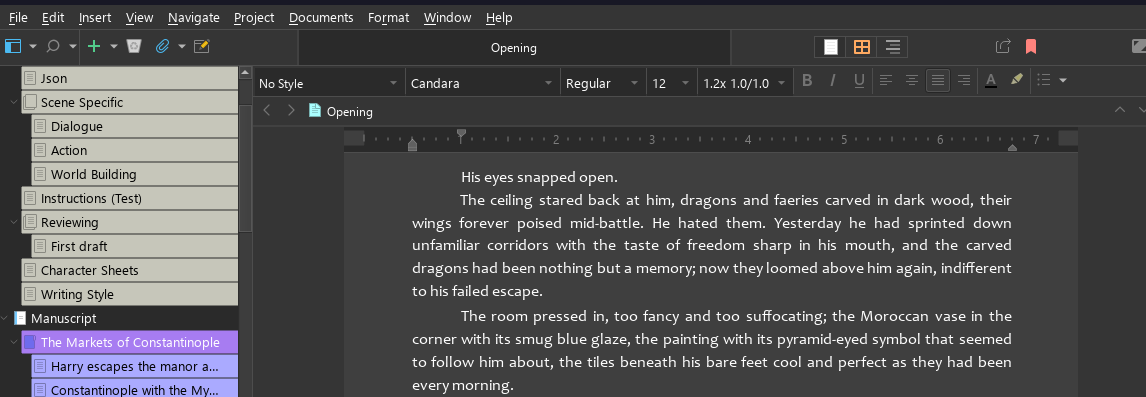
I got the fonts looking good with some help from AI (and comparing the Lutris version to yours).
I had to set the following in scrivenix-wrapper.sh:
exec env FREETYPE_PROPERTIES="truetype:interpreter-version=40" \
It seems v35 was the main reason that microsoft-like fonts were rendering improperly on my end.
Then, I had to Switch Qt to FreeType by patching qt.conf
WindowsArguments = darkmode=1,fontengine=freetype
Tested on: Scrivener 3 (same Scrivener.exe/Qt 6.4.3 as Scrivenix ships), freedesktop 24.08 runtime, Wine 11.0, GNOME on Wayland (XWayland), 1080p monitors at 100% scaling.
Screenshot below, even working in dark mode!
1 Like
That’s awesome! Thanks for sharing. Let me take a look at these changes and hopefully I can update the installer to incorporate them and then have some of the other folks with font rendering issues test a fresh install.
1 Like
@Lindsiria
I’ve added your changes to the Scrivenix files on Github. If you find yourself with an abundance of time and want to pull down fresh files and reinstall to see if the changes address your problem out of the gate, go for it. I have never been able to reproduce the font issue on my home hardware, so this has been tricky for me to troubleshoot. I note you are on Gnome (as am I) and previously all font rendering complaints came from KDE users. I’m going to see if a couple of those folks will give it another go as well. Thanks again!
@maatpublish Give it a go and let us know how it works on Zorin. Not sure that’s been tried yet.
@Maise_Malaise If you’d like to give a fresh install another try, Lindsiria found a couple of tweaks that seems to have solved the font problem for her. I’d love for somebody else with that specific issue to try a fresh install from Github to see if her fixes are addressing the issue on KDE as well.
@nitram3 If you’d like to give a fresh install another try, Lindsiria found a couple of tweaks that seems to have solved the font problem for her. I’d love for somebody else with that specific issue to try a fresh install from Github to see if her fixes are addressing the issue on KDE as well.