I it possible to reconnect a set of files to a project. I moved things to the cloud and rationalized some duplicates. Right now I see files in the files/docs folder but when I open the scrivx file in scrivener the layout is there but all of the documents are blank.
Glad to hear you were able to resolve the problem.
For anyone coming along later, there is no supported way to manipulate the contents of a Scrivener project other than with Scrivener itself.
If you choose to store a project with a cloud service, ensure that the service is configured to make the entire project folder available offline. “Empty” documents are usually a sign that the documents in question are not present on the local machine.
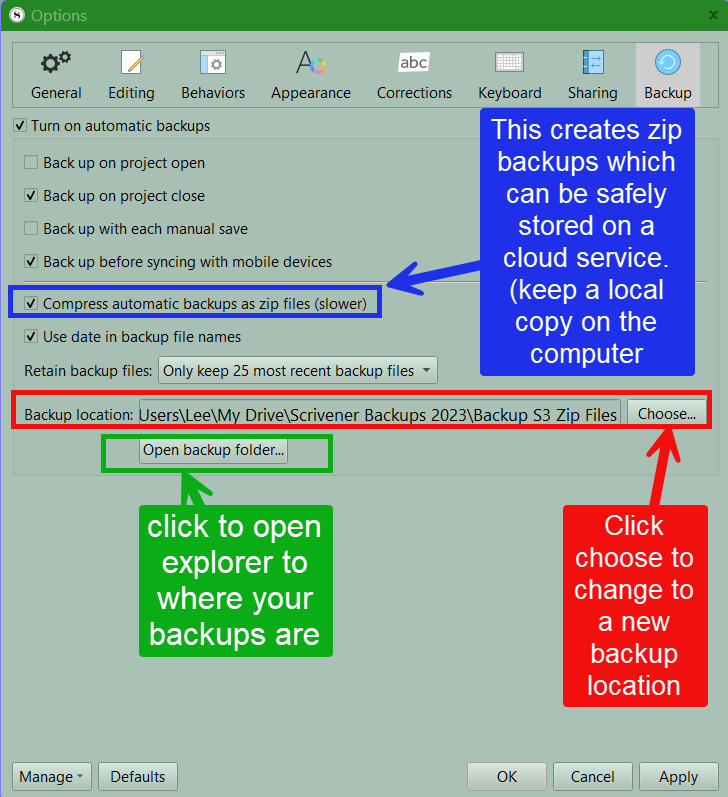
Also you can set your backups to be stored anywhere. Scrivener when set up uses a default location, but I prefer to put zip backups on a cloud backup (google drive for me) with a local copy on the computer. You should also back up externally as well, or use a computer backup service. (I use Idrive).
Go to files > options > backup and learn your options
Hi
Thanks for the response. Sadly when I lost my laptop my “offline” backup happened to be plugged into it. And the default of course was to the hard drive. Also lost. At the moment I’m working with an older backup that dates back to January but I have compiled versions of my three novels that are current. I’m trying to recover Scrivener to the same point.
I don’t understand why empty documents are created by not having local files on the machine. Can you explain the architecture a little. I have the documents on the Cloud drive and I expected the Scrivx file to see them.
Also when I closed my project from the cloud, it created a new scrivx backup called onedrive.scrivx which then included copies of all of the sub folders on the onedrive home folder.
Lastly is there an easy way to import all of the files that make up the novels into a new project. I wrote a macro to split my compiled versions back into the scrivener folder documents so I have separate files for what would be each scene. But its around 700 files and doing it manually seems impossible.
The .scrivx file is a master index file, used to build the Binder. The individual documents themselves are stored in the Files/Data subfolder of the Scrivener project. When you select an item in the Binder, Scrivener looks for the appropriate data file and displays it.
However, if your cloud service has stored the data file exclusively on their server, there’s nothing there for Scrivener to display. If your connection is sufficiently fast and the cloud service is sufficiently responsive, then the file will download before you notice a problem. (Which is why this arrangement might work fine much of the time.) But maybe your connectivity is disrupted, or the cloud service is having some kind of issue, or the specific file you’re looking for is old enough that it isn’t in the cloud service’s “frequently used” cache. Suddenly the file is “missing.”
File → Import → Import and Split might be helpful here.