If you feel you are entitled to a refund, instead of mouthing off here and making ridiculous claims of fraud, email the Scrivener team using the link on the web site. Hissy fits don’t encourage anyone to help.
Obviously for privacy reasons they do not discuss licensing etc on the forum.
Yes, the bullet point problem remains an issue, but meanwhile tens of thousands of us use this great app for long-form writing on a daily basis.
If the tool worked as advertised, there would be no need for my post. This thread itself proves the issue is real and ongoing. Calling my complaint ‘ridiculous’ implies bullet formatting isn’t a basic feature I should expect to work, which is absurd.
This has been a known issue for months, with no clear timeline for a fix. Instead, users are repeatedly told to buy third-party tools or spend hours applying a manual workaround.
Rather than tone-policing or dismissing valid feedback, how about offering an actual solution or escalation path?
If you read the whole thread you will see the L&L team are working against Apple’s ability to stuff things up from time to time. You can see that L&L staff have made every attempt to assist people facing this issue and continue to work on it.
I didn’t call the complaint ridiculous, I called the accusations of fraud ridiculous. I’ll bite my tongue on any other thoughts.
I’ve written five ‘long-form’ books with wonderful Scrivener and even used bullet points in places with only a minor annoyance at one time.
Like I said, if you think you are entitled to a refund, use the email on the web site, the L&L staff won’t discuss it here.
Edit: Oops, missed the bit about ‘escalation path’. senior L&L staff are actively contributing on this thread, so that’s probably ‘escalated’ as far as it goes. Plus Mr L&L himself is actively observing and chimes in from time to time.
I already answered this question. The only difference between then and now is that we’re much closer to when Apple is statistically likely to release the macOS upgrade.
The beta build that has been posted, primarily to address urgent macOS 26 compatibility issues, will also incidentally fix this bug (and other list bugs Apple has managed to create over the past months).
Although the beta is primarily for a few macOS 26 fixes, it is tested for 15.x as well, and should run fine on any modern Mac in fact (minimum macOS 11).
Sorry. I installed the beta, but unfortunately it doesn’t fix all the problems yet.
Let me explain my approach:
Removed incorrect formatting from list lines (no formatting)
Closed and reopened the file
After opening:
The (visual) indentation of the list no longer occurs
Nevertheless, the heading style is still assigned to the first list rows
Test 2:
For a tiny list of 4 rows, I removed the style from the heading and all subsequent rows
After closing and reopening, line 1 (former heading) has no style assigned, but line 2 (first list entry) has the original style assigned again
Test 3 (same list):
Lists reset to “None”
Style removed again
Close and reopen
This time, the incorrect style is no longer assigned to the first list line
Test 4 (same list)
Reassign heading
Reassign list lines to bullet point list
Close and reopen
Result: The heading style is again assigned to the first list line of the list!
Test 5 (same list)
All formatting removed again
List assignment reset to None
Manually redone alle line breaks after each line of text
Close and reopen
Result: So far so good, no incorrect assignments
Test 6 (same list)
Reassigned heading
Reassigned list lines to bullet point list
Close and reopen
Result: The heading style is reassigned to the first line of the list!
Test 7
If I assign a different style to a heading row, and this style is different from the (previously incorrectly inherited) style of the first list row, the first list row is changed to the previously assigned style of the heading row when the document is reopened.
Somehow, when opening the document, the format style is still “inherited” by the first list row.
Visually, everything looks fine, but structurally, something is still broken.
Thoughts:
The problem does not seem to exist in newly created files!
I think the “bug” has left something behind in existing files. Or the function for assigning format styles is broken. Simply removing the incorrectly assigned formatting does not solve the problem, at least for me.
I’m not sure, but I think maybe some of these symptoms are the result of gradually fixing the errors rather than fixing it all at once?
Here is what I have been doing anyway:
Select the styled line along with the following list lines.
Next choose one of the following methods:
If you have detailed formatting within the area that would need to be restored (links, italics, etc.):
Hit ⌥⌘0 to clear styles.
Use Format ▸ Lists ▸ None
Otherwise, if it is just list and styles to restore:
Use ⌘X to Cut, and then ⇧⌥⌘V to Paste and Match Style.
Generally I would use this method if you can, as it will be the safest and most thorough way to delete all traces of formatting—it pastes as raw plain text. For the most thorough approach, make your selection a bit around the affected area, a few words into the paragraphs around it, in other words.
Delete plain-text tab+bullet+tab text from the damaged list line(s).
On the first line, re-apply the style.
Select the lines below that should be restored to list formatting, and use the desired list command.
It should be perfectly fine now, but you can reload to make sure. The style assignment stays where it should be, the list remains a “real” list you can add new entries to, no marker doubling, etc.
I haven’t tried only doing some of that but not all of it. I’m not sure if it’s necessary to test for that, since the underlying formatting got so mangled to begin with.
I think the “bug” has left something behind in existing files. Or the function for assigning format styles is broken. Simply removing the incorrectly assigned formatting does not solve the problem, at least for me.
Well yes, that is going to be the case. We can’t fix the damage that was done, hence the checklist above to clean out all formatting, style codes, and plain-text list markers. The bug left them in the wrong places and semi-functional, and some of it is in areas Scrivener’s code can’t even get into, as Mac lists are a black box.
These are exactly the steps I took (and actually described above, see Test 3 and 4 or 5 and 6).
I have now done exactly the same thing again and come up with exactly the same result. Even if I close the program in between and then there is obviously no formatting left, the error creeps back in after reassigning the formatting preset to the headline and list style bullet points to the list entries.
One way that works, which I discovered, is to copy the content of a Scrivening into a new Scrivening (without formatting) and then reformat it manually.
I experimented a little further:
Removed the heading style
Removed the list style
Removed line breaks (del)
Inserted line breaks (return)
Reassigned the formatting style of the heading
Reassigned the list style
This seems to fix the problem. Somehow, Scrivener seems to have previously viewed the heading and list as connected.
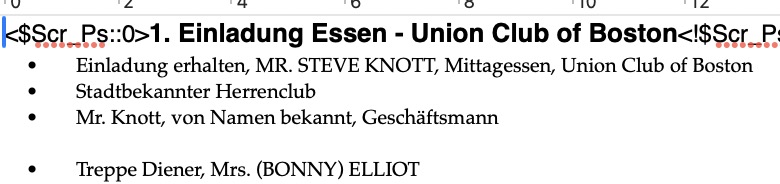
Here is the difference between the original and the copy in a new Scrivening.
Hmm, I’ve never actually ended up with a scenario where the style marker codes were so broken that they became visible text like that. So we might be working from a different starting point, which might explain some of the differences.
Well, the secondary method that I described above, of using cut and paste-and-match-style should be as effective as creating a whole new scrivening and using paste and match style. Like I said, I would even select a bit around the list and heading, too. So for example a few words into the previous paragraph, all the way through, and then down into the paragraph following the list a bit. Paste and Match Style will of course retain newlines, so there wouldn’t be any merging of lines by doing that.
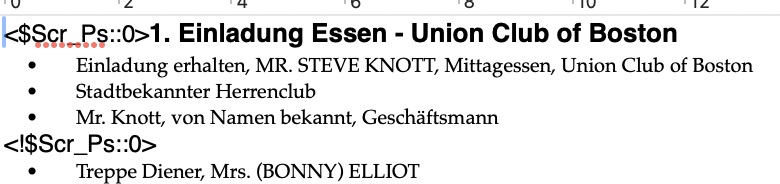
Selecting outside of the affected area ensures no bad formatting sits around the edges of the selection, if that makes sense. Imagine this <$Scr_Ps::0> marker is invisible like it should be, and to the left of your visible selection. If you Cut and then Paste and Match Style, it wouldn’t completely strip out the formatting. But if we start the selection before that point, then it will zap everything within the higlighted area.
Of course if you have visible style markers like this, those should be cleaned up manually. They are just normal text at this point, like the double-bullet that can get left behind after removing list formatting, it is not formatting any more.
I wish we could have fixed this stuff automatically—but it’s really the same thing that caused the problem to begin with that prohibits doing so. There is this chunk of text that Scrivener has no direct understanding or ways of controlling (the list), that is handled entirely by the Mac. When that broke it caused issues around it, corrupted it, and the corruption is still inside the area that we can’t fix. Our fixes are thus to only ensure the broken list code no longer “vacuums” formatting into itself (and yes, it still does that even in macOS 26, and there are even variations of this bug that can be reproduced in the stock TextEdit.app program).
Ah! Okay, that would explain it then, and yes that does demonstrate how the list code “vacuumed” formatting like I described it before, where the style-stop marker ends up down inside the list. It should look the way the second example does, with the <!$Scr_Ps::0> marker at the end of the line it starts on (at least for this particular case).
That said, your original is still a bit different than my simple test, as I only ever got the style marker down in between the fake bullet and the real bullet, on the first line.
I have no idea how to solve the formatting problem. I continued experimenting. I can only remove the formatting marker further down in a list by removing the line break before a line and breaking it again.
I use a tool to automate keyboard entries, but I can’t really solve the problem with it.
For example, if I search for “•” and reset the list format for these lines, the list format is often removed from the entire paragraph.
If I then add bullet points to this line again, this is not applied to the following lines of the paragraph.
Since there are currently no more bullet points there, I can no longer find them and automatically assign a list format.
Just to give a quick update: After several failed attempts to get my main document under control using various tools, I have now removed all formatting and recreated each list using a macro. This has taken me at least three full days so far, and I will have to add back the missing formatting for headings etc. as soon as I get to each section. Unfortunately, the formatting tags were sometimes only after the third or fourth list entry. And since the next paragraph in the same document usually also starts with a heading and lists (and was therefore also broken), there was little else I could do. Based on my experience so far, a complete overhaul would take me at least two weeks.
However, I am probably also a problem child. The document has about 150,000 words, more than 75% of which consist of lists.