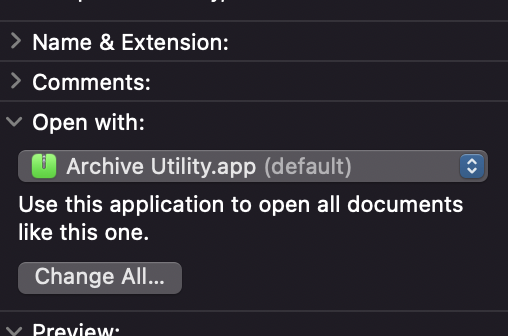
However, it is unusual that Scrivener is listed above.
Right click and select Get Info
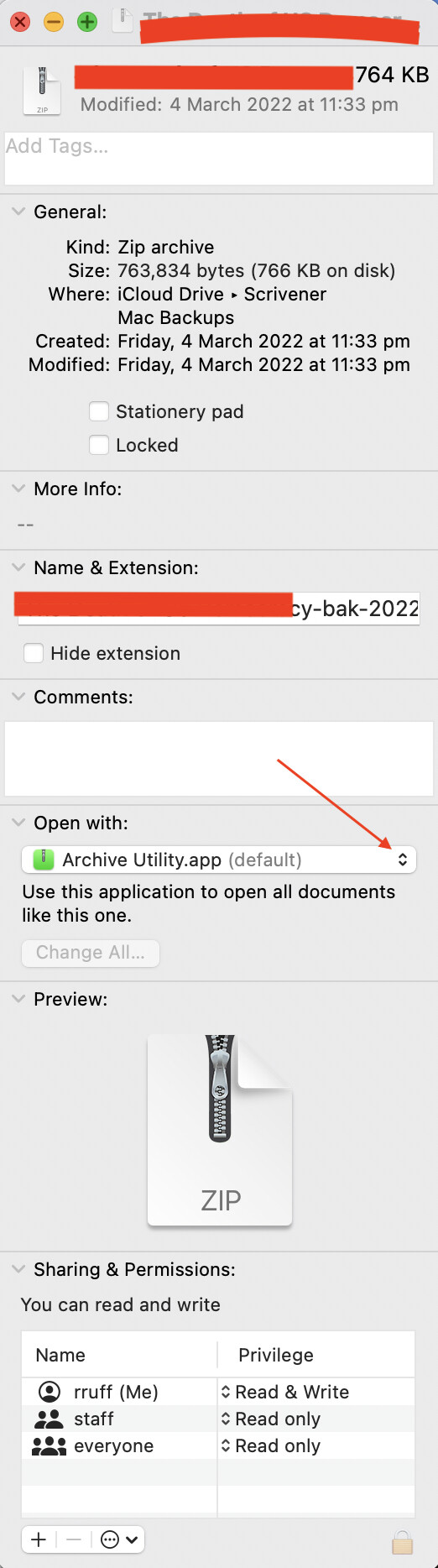
Per the screenshot, Archive Utility should be selected. I’m suspecting you will find Scrivener listed. If so, click the drop down arrow and select Archive Utility.
No worries. I’ve just discovered I’m on Monterey 12.2.1 and there’s an update for 12.3. I’m doing this now and hope it will solve it. I’ll let you know
I’m with RuffPub here. I think the Get Info for that particular zip file is set to Open with Scriv. Only question is how did it get that way. Intriguing.
You’ve said the anomaly is only true for zip files that have been Dropboxed. I gather this means the same thing is true for other similar zip files that are in your Dropbox-blessed folder. Is that right?
If so, it is probably significant that these zip files were obtained ab novo from the Dropbox servers when you set up your new Monterey machine and let Dropbox populate your Dropbox folder. Though I can’t see how that could actually matter.
Perhaps a mystery we will just have to live with. Happily, it will clear itself up anyway as your backup cycle eventually overwrites your merely downloaded zip backups.
the Monterey update didn’t fix the issue, and to answer ‘gr’ above: any other zip file downloaded from Dropbox uncompressed as it should. Just .scriv.zip files are affected. I’m not going to spend any more time on this. I’ve got my file now. If no-one else has a problem then it’s just me!
Your screenshot says the app to open it is Scrivener (first in the list), not the Archive Utility. That’s the MIME type speaking. When it says (default) after the utility name, it’s telling you the default for files with the zip extension (but not for this file, because it has a contrary MIME type).
The issue is a Dropbox web interface bug. When you download the project in that way, Dropbox or the browser sets the MIME type to Scrivener, despite downloading it as a zip file.
Now my question is why you’re downloading it from the website at all. Why not find it on your hard drive? When I do it from the website with Chrome, I don’t get the problem you do, but I still wonder why you’re doing it that way.
When the problem arose, you hadn’t downloaded a zip file. You downloaded an uncompressed project and Dropbox compressed it as part of the download. So it’s not quite the same as downloading a zip file.
But that’s exactly what Dropbox does. I don’t know (and it doesn’t matter) if it’s building the zip file in memory or to a temporary file on disk somewhere, but the byte stream that comes across the wire from the web server to the browser is the byte stream of a zip file. It’s just-in-time compression.
Though markmapstone has moved on (and I guess we should let him! haha), drmajorbob has an interesting point. If dropbox was doing the zip compression (because the OP was asking for uncompressed stuff from dbx via browser rather than installing dbx on the new system and letting it do its thing), the problem could be on the dbx end (or dbx x monterey).
Obviously, but just-in-time compression (which changes the file extension) is not the same thing as downloading an already-compressed zip file (and not changing the file extension). Dropbox should have made the MIME type match the file extension (or not embed one), but that’s apparently failing for the OP.
It is not the act of the compression (or when the compression happens) that determines the client filename or the MIME type that is suggested by the server.
I don’t do it every day, but I do occasionally download compressed projects and files from Dropbox on a fairly regular basis. Mind you, I do it on Windows – but I have done it from iOS and from Macs as well. The MIME type helps determine the suggested filename and extension, but what gets downloaded is simply a ZIP file. If the OP has something else going on, then I submit there is a piece of the puzzle – client side – that we don’t understand yet. (Perhaps AV or a browser extension…?)
It shows a file in Dropbox, it shows the OP downloading it, it shows the result as a zip file, and it shows that macOS thought Scrivener should open it. That’s entirely wrong, regardless what the original file was.
If MacOS thought Scrivener should open it, I’m not convinced that’s the result of Dropbox and MIME types. There’s something else going on that set that association. I don’t have a Mac anymore, but when I did, there was a feature (just like in Windows) where you could tell it which program to use to open specific types of files. I don’t remember if it was granular enough that you could tell it to open specific files (rather than types of files) with a given app, though, but if so, I’m willing to be that’s what happened.
Yes it is that granular. We know from upthread that the Mac was set to open zip files normally as its default, but the particular zip file was set to open with Scriv. So, unless the OP did that themselves to that file manually (which by courtesy we must suppose they did not), then, I dunno, drmajbob might be onto something. I am not on Monterey so I can’t try to replicate.