Upon compile, I’m looking for a way to change the chapter title (“Chapter X”) to “Lesson X.” I assume there’s an easy way to do this, but I can’t seem to figure out how. Thank you in advance.
That is indeed an easy one:
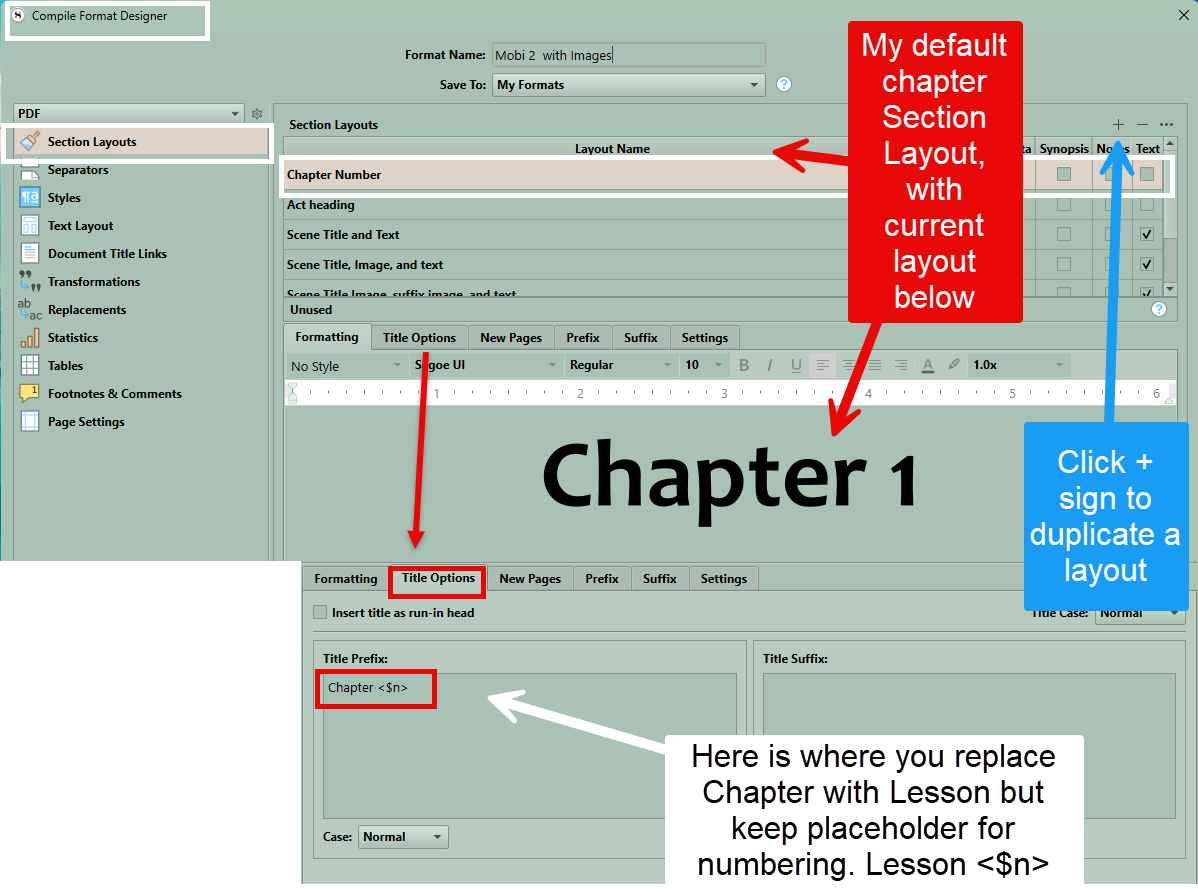
- After opening compile, scroll to the tile that has the word “Chapter” in it, in the middle column.
- Double-click on it to edit (or click the little pencil that shows up when you hover).
- Select the “Title Options” tab, and have at it in those prefix/suffix fields (usually it is in the prefix).
You may want to flip through the other layouts in the list here, to change other titles as you see fit, even if you aren’t using them (yet).
1 Like
I’m sorry, but is there any way you’d be willing to upload a couple of screen shots. Yes, I’m a very basic user. Again, my apologies.
There seem to be at least four title with “Chapter” in them. Should I change all of them?
It sounds like you’re in the right place after all!
Yes, just change all of them to keep things simple. The ones marked in bold text are the ones you’re actually using, but you might as well have them all fixed.
2 Likes
Hope this image helps you to see where to look and change. Chapter heading could also be in Suffix tab but classically under title option. Once do this change Layout name to Lessons (or something to remind you of its purpose. You can click on any Section Layout and click the + sign in the upper right to duplicate any Section Layout. see image
2 Likes