Hey friends! I use Scrivener for plotting and writing fiction projects, and I like to do all my worldbuilding/character dev/etc in Scrivener as well. I like using footnotes in things like timelines where I wanna make a note about something, but don’t wanna clutter up the main text (e.g. I have a page where I list out how old all the characters are at various points in a lengthy story, and I use footnotes to add notes like “This is when his mom died”). This is all just my own back-end development stuff, not stuff I’m planning to export.
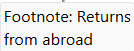
I know this is a weirdly nitpicky thing and I won’t be surprised if it’s just not possible, but is there any way to stop the word “Footnote:” from appearing at the beginning of footnotes when I hover over them? E.g. in the following screencap:
Is there any way to make that just display as “Returns from abroad” without the “Footenote:” at the front?
I know this is probably a niche use of this feature, so I totally understand if that’s just not possible—but I figured I’d ask, since I’m pretty new to Scrivener and I know there’s plenty of features I’m still getting the hang of! TIA!
I know there are two places to alter the formatting of Footnotes, but I know none to change the content of the Footnote.
Of course, Comments and Footnotes in the Inspector are meant for personal metadata like this. And the Notes pane in the Synopsis tab is also available for this kind of information.
Thanks! Yeah, I’m aware of all of that—the reason why I’m using footnotes specifically is because I want to be able to leave notes on certain bits of text and then view them by hovering over that text, not by having to refer to the inspector.
You might prefer an option found in the Editing: Options tab: Open comments in inspector if possible set to off. In this condition, with the inspector closed (as it sounds like you have it), footnotes will come up in a pop-up when you click on them—and that includes when you create them as well.
You can tap Esc or click anywhere else to get rid of the box, and you don’t have to sit there and wait for however many seconds it takes for a tooltip to appear to begin with. Plus, you can edit if you spot a mistake, rather than spotting a mistake and then having to click and open the inspector, fix it, then close the inspector.
The interface will still use in the inspector if it is open to the Footnotes & Comments tab—after all, it’s right there—but in all other cases you’ll get this format.
That aside, I also echo a bit a confusion over why you are using Footnotes for this instead of Comments (which have the same exact set of features, save for also being capable of colour-coding). And unlike footnotes, by default they will never be exported (and if you really want to export them as footnotes, you can actually do that, so there is no downside).
If you do ever change your mind, it’s no big deal either:
Select Draft or some other high level folder.
Switch to Scrivenings view.
Open the Inspector to Footnotes & Comments.
Click anywhere in the sidebar to move the keyboard focus there, and press CtrlA to select all of the footnotes.
Hi there! I just turned “open comments in inspector if possible” to off, so thanks for that. However, I actually prefer getting the tooltip pop-up over clicking it–just personal preference for the way I’m using it.
I’d originally been using footnotes because I hadn’t realized you could change the color of comments and I liked the nonobtrusive grey of the footnotes better, hah. I do realize now that you can change the color, which is neat! They do still have the same issue of having the “Comment:” at the beginning, same as the footnotes having “Footnote:”. I might switch to Comments just for the ability to color-code, though.
All that being said, I’m a little confused over the confusion about me using footnotes for this instead of comments—as far as I can tell, there’s not much of an actual difference in their function, so I’m not entirely sure why footnotes are a bad use for this? I’m only using this on worldbuilding/planning notes that I’m not planning to compile at any point, so how or if they export isn’t really a concern for me. I read through the footnotes & comments part of the Scrivener tutorial, but I’m still not 100% sure exactly what the difference is supposed to be?
If they’re only for use in Scrivener itself, there isn’t much difference. There’s quite a lot of difference for output, though. Footnotes are “real” content, expected to appear as part of the final output text available to every reader. Comments are “internal use only,” intended for the authors, editors, reviewers, and other collaborators. This is why, for instance, you can exclude comments from the output document entirely, but not footnotes. They are also handled differently by third-party software, notably Word.
Ok cool, thank you! I think I’ve got it now. I think in this particular case, there’s not much of a difference since I’m only using it for internal notetaking, but I will for sure keep this in mind if I need to make notes on the actual manuscript at any point.
Thanks very much to everyone (@AmberV@AntoniDol) for the help! Like I mentioned at the top, I’m still very new to Scrivener, and I really appreciate the help figuring everything out. Really loving the program so far! It’s definitely better than my previous “have everything scattered between 30 different Word docs, Google docs, and physical notebooks” approach to worldbuilding and plotting, haha.