Hi! I accidentally external sync’d my entire project. I corrected/deleted those files, and now only externally sync to/from the external sync folder. This folder only has 3 documents in it. Problems are:
- Scrivener is now very slow to externally sync, even with only a few documents syncing at a time.
- Auto Numbering remains high e.g.: [1744] vs [03] (with only 3 files syncing).
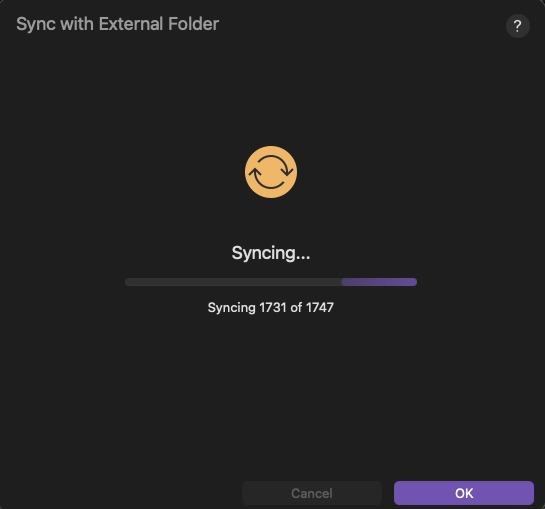
- When externally syncing, I can see the interface run through numbers 1-1744, even though those files do not exist. It’s as if it’s checking on old database numbers, even though those files have been deleted.
Is there anyway to delete or reset this old database, or whatever is causing this? Essentially reset the external sync process fresh, without any record of old files that used to exist/be sync’d?
Thanks for the help!
Hi.
Do you mean Sync with external folder ?
If so, once your project is up to date in Scrivener, just pick a new folder. Or no folder at all. [Clear]
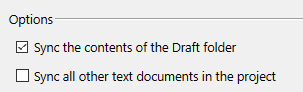
You may also want to make sure you’ve checked the setting to only sync your draft folder.
There is also a setting to sync on project load and quit. You may want to uncheck this setting, and sync manually when needed. (Although that doesn’t fix your issue in itself.)
Thanks for the quick reply. I cleared out the “sync with external folder” settings: folder, documents etc. I restarted the computer and Scrivener. The sync is much faster now.
When I test the “sync with external folder” now the UI still shows it going through number 1-1747, and the single document that I’m testing with external sync is assigned the number [1748] by Scrivener.
That means somewhere Scrivener is keeping track of the number of documents external-folder sync’d and continuing the numbering scheme. Any idea how to reset this?
Not a huge deal now that the syncing is no longer taking a long time. My OCD hates the numbering scheme continuing on, haha. Any ideas? Thanks so much!
Question: how exactly do you get it to sync a single file?
For the numbering, perhaps try this :

…but it is a shot in the dark. Not sure it is even related.
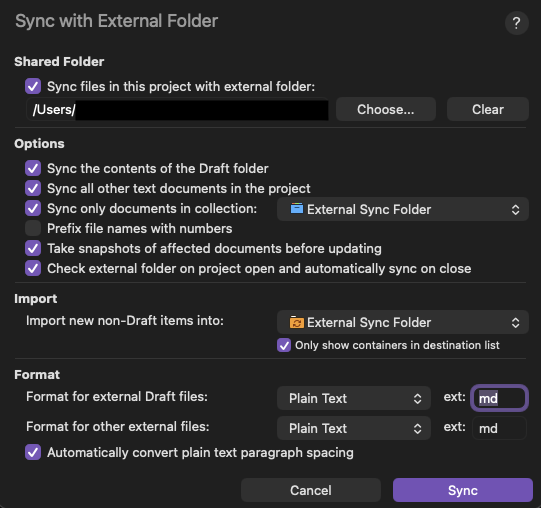
Currently I’m external folder syncing to an Obsidian file. Here are my settings in Scrivener:
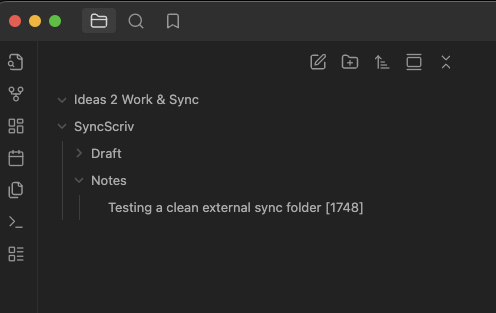
Here is a my folder structure in Obsidian:
Previous to the accidental external-sync with all my files (instead of targeting just the external-sync folder), the number on the files was low e.g. [01], [02] etc. Currently there is only one test document that I am syncing. This should be numbered [01] by Scrivener now that all other documents are deleted and trash emptied.
I’ll try the save and rebuild idea. Thanks so much!
Uncheck 2 and 3

Also, I can’t be sure, but syncing that specific collection seems odd. Did you create that, or is it the pseudo-collection Scrivener creates on sync? If so, I wouldn’t sync that.
(I am running the Windows version by the way. There is only so much I can do.)
No worries, I appreciate the help and kind attention!
Looks like if I disable options 2 and 3 I can sync Draft content but not notes, and not in markdown format.
Interestingly, I started a new Scrivener project and set up external sync to the exisiting Obsidian folder. The new Scrivener project (having never sync’d to an external folder before) numbered the single document in folder as [01] after sync.
It looks like the numbering system is tracked inside the individual scrivener project somewhere. It would be great if there was a way to reset that. I wonder if one of the devs has an idea of how that could be done.
Thanks again Vincent! I appreciate the help!
1 Like
The bracketed number you’re looking at is an internal ID for the file; it’s how Scrivener connects the external copy with the one in the project to actually sync your changes. All the documents in the project are mapped when you’ve set up a sync, even if they’re not currently set to be included, so even if you wiped the map and started fresh, you wouldn’t get your select set of documents to sync reliably incrementing from 1 as you add them.
To get a 1, 2, 3 etc. sort of numbering system to keep your external files organized, check the Prefix file names with numbers option in Scrivener’s sync settings.
2 Likes
EDIT: MimeticM beat me too it. Thanks for the great info!
Some musings for fellow external-folder-sync travelers:
I found this in the forums: 2.7 syncing much slower than 2.6 - #2 by AmberV
This may be what I’m encountering – spooling through all the documents in the entire scrivener project file before syncing just the ones it should target.
Luckily I’m no longer experiencing the slow-downs after I reset the sync and restarted the computer/Scrivener. Hopefully the quick sync continues. As for the number labeling, it may be a function of combing through all the files, regardless of the small subset that I’m actually syncing.