Cloud Safety Features?

Hello everyone,

I have been using Scrivener Windows for a while and I really like it. I use Scrivener both for a computer game project and for a book, and it works well for both. However, I am already thinking about the time after these two projects, and there is one issue that makes me seriously consider looking for alternative software: project security.

Scrivener is not designed for simultaneous collaboration by multiple users. That is fine for me at the moment, and while it would certainly be an interesting feature, it is not my main concern. What bothers me much more in today’s world is cloud security. There are no truly secure cloud services, and this is exactly why millions of data records are stolen again and again. With the help of AI, it has also become almost effortless for attackers to search through large amounts of data and make them usable for their own purposes.

Since Scrivener project files are stored unencrypted in the cloud, this represents a serious problem for any commercial project. What are the developers of Scrivener planning to do to bring security for us customers up to a modern standard? And like me, many users surely work on more than one device. In my case, I use three different devices depending on where I am, so cloud syncing is very important to me.

Assuming that Scrivener will continue to be designed primarily as software for individual users, I would like to see a solution along the following lines:
The project file is stored in the cloud in some form of password-protected or encrypted archive. When opening a project, Scrivener would use a locally stored password to unpack or decrypt the project archive (ZIP or another format) and load the project. Updates would then be handled by exchanging this encrypted file.

In the event of a data breach, the content would at least be protected, provided that no trivial password such as “1234” is used. And as long as Scrivener remains primarily designed for one user at a time, the implementation of such a system seems like a manageable project.

Personally, I would be willing to pay for such a security feature, for example as part of a version 4.

Perhaps I am simply not up to date and something like this is already planned—or even already exists? If so, I have not found it yet and would appreciate a pointer to where I can read more about it.

Thank you for your time.

1 Like

Welcome to Scrivener and the Scrivener forum.

Perhaps consider using a third-party sync service the does encryption for you? They are out there, including Dropbox which works well with Scrivener now.

1 Like

Thanks for your thoughts, and welcome to the forum. I’ve moved this to the general Scrivener discussion area, as I don’t see why any of this would require a Windows computer.

Since Scrivener project files are stored unencrypted in the cloud, this represents a serious problem for any commercial project.

This one misunderstanding is perhaps the only thing of importance to address here, since without this statement being true, much of the rest can be set aside is largely irrelevant. There is a lot of misunderstanding on the Internet about this topic, and in particular with Scrivener, a number of myths that should be disregarded.

I would stick with the source on this as best as possible, and only go looking for advice online if you can’t find it there. In the introduction to project usage, in the user manual PDF, §5.1, The Basics of Using Projects, we find this opening paragraph:

Scrivener is a project based application, meaning you can create separate storage containers to organise your different interests into. These projects are stored on the computer in the folder you designated upon creating them. In this way it is quite similar to any program that loads and saves files to your disk—rather than a database style program (like Evernote or OneNote) where all of your information is managed behind the scenes or maybe even online.

(Emphasis added.)

Scrivener is of the type of software most secure in this regard, in that it has nothing at all to do with the Internet. Your work is stored locally, and entirely offline. We do not know anything about your projects, we don’t even gather information about how you use the software (as companies of low repute, like Microsoft, do).

I say this is the safest kind of software to use, because it leaves all of the security up to you, and that’s the only good way to do any of this. Otherwise you are trusting others to be honouroble, and the more you do that, the less safe your data is. I’d rather you not take my word on the matter, and us just give you full control over your own data to do with as you will.

Scrivener is not designed for simultaneous collaboration by multiple users.

To an extent, that is older information you have heard, though to be fair, sadly the features that were designed to allow for parallel collaboration by multiple parties where never added to the Windows version. So in a way, it’s still kind of true on Windows, though indeed if any one single person in the group has a Mac, then everyone can collaborate, based on how the system works. We do intend to rectify this gap in the design, but it’s difficult when there are many of other problems like that in the software.

The project file is stored in the cloud in some form of password-protected or encrypted archive.

You’re certainly welcome to do that on your own, but I don’t understand why you need our help to do so (outside of general advice maybe, though there are surely better sources for that, such as eff.org)? Encrypt your disk locally, first, and then research cloud sync services that are well-designed, second, so that the data is never decrypted anywhere but on your end-points, and even the service cannot access your data if you ask them to. If you are using a service that doesn’t fit that criteria then that is the entire problem. That isn’t something Notepad.exe should solve, or Scrivener.exe.

Then, if you really need more encryption than that, employ the use of technology for putting data into vaults, and store the vaults online. At that point though, I’m wondering why you would want to use an online service to begin with; that seems like a very bad idea. If you’re working with data that sensative, such that requires encryption within encryption, then you should be thinking more about air-gapped systems than any kind of Internet storage.

As to whether we should be doing all of this ourselves for you, I would suggest you search the forum here for threads on password protecting projects. That is not a conversation that needs to be started up again. I’m leaving this thread here though open, rather than merging into a password discussion thread or closing it as a duplicate, specifically to help dispell any rumours that Scrivener stores data on the cloud, at all.

Hopefully the above helps you find a way forward. Search for services that provide zero-knowledge, end-to-end encryption, and enjoy security for all of your loose files, no matter what software they come from.

5 Likes

Thank you for your replies.

Okay, I wasn’t aware that Scrivener on macOS is so much more advanced that even multi-user collaboration is possible. However, I do not have access to an Apple device, and I am not planning to purchase one. Therefore, I hope that the gap in functionality on Windows will be closed in the future.

Regarding the security issue, I believe my use case may have been misunderstood.

I connected Scrivener to Dropbox because, at the time, this was either recommended or the only officially supported option. I don’t remember the exact details anymore. When I log into my Dropbox account now, I can browse the folder, click on a file like content.rtf, open it with a text editor, and read my text. It may be unformatted, but it is clearly readable.

That is what I meant by “unencrypted.” However, without Dropbox syncing, I cannot work across my three devices, such as my laptop when I am on the move. This is why I suggested—or rather, gave feedback—that Scrivener itself could provide protection through the way it stores project data. Regardless of whether Dropbox claims to encrypt data, once the system is compromised, the files become readable. And the fact that there are no truly secure cloud providers has been demonstrated often enough by data leaks and breaches.

For this reason, I would like to see a feature where Scrivener itself encrypts or packages the project data before uploading it, so that all of my own devices receive the password from me once for the respective project, and everything else then happens automatically.

I hope this clarifies my thoughts more clearly.

And the reason why Scrivener should help ensure the security of my project data on cloud services is that security is a major issue that many people neglect—and from a business perspective, it is something one can make money with. At least I would be willing to purchase an additional version if that meant having everything from a single provider. Every third-party tool either makes things more complicated or increases the risk of doing something wrong.

2 Likes

Okay, I wasn’t aware that Scrivener on macOS is so much more advanced that even multi-user collaboration is possible.

Well the method we are using is not too crazy. Don’t mistake what I’m saying for the tech that companies like Google make, where everyone can see each other’s cursor and stuff like that. It’s more along the lines of an internal sync system that can take a project that someone has been working on, and sync its changes into your own. So in this way you can send out copies, everyone works at their leisure, collect them, sync them and then send out updates and repeat. That is why any collaboration group only needs one Mac user in it.

And it shouldn’t even be too difficult for us to get this caught up in the future. We based much of the internal logic for it, on the Mac, using the same internal syncing code that it uses to merge mobile edits (from the iOS version) back into the main project. The problems and their solutions are very similar given how the iOS version works on a internal mirror of the project instead of the original directly.

I connected Scrivener to Dropbox because, at the time, this was either recommended or the only officially supported option. I don’t remember the exact details anymore.

Oh okay, yeah that’s one of those myths I was referring to above. :slight_smile: That’s never been true, but for a while (maybe fifteen years ago), it was certainly one of the most reliable services and the founder of the entire genre, so a lot of the talking up about it in that fashion has over the years, and over many shared telephones, turned into exaggerations. At this point I would say it is, if anything, a mediocre middle-of-the-pack option. One can do much better.
But yeah, again I would encourage searching the forum for conversations on the wisdom of having us encrypt your data for you. This is something that has been discussed forward and backward at this point. I’ll provide a link to one such thread below.

When I log into my Dropbox account now, I can browse the folder, click on a file like content.rtf, open it with a text editor, and read my text. It may be unformatted, but it is clearly readable.

To be clear, I wouldn’t trust Dropbox any further than I can toss the headquarters for the NSA, but I don’t think that is evidence of anything in and of itself. It is entirely possible for a service to provide end-to-end encryption not only with their client and your connected devices, but within a website too.

Here are some threads of interest:

1 Like

If you have concerns over cloud security, perhaps check Sync. It’s based outside of the Billionaire’s Republic of USA and has end to end encryption.

Nothing in this world is ever guaranteed 100%, but it’s probably a damned sight more secure than data on your own system if its internet connected.

3 Likes

In their elliptical way, I think AmberV is saying: Just because you can log into Dropbox on the web and view an rtf file does not mean the rtf is sitting unencrypted on Dropbox’s servers.

2 Likes

That’s true, but who’s holding the keys?

The wonderful thing about Scrivener is that we are responsible for our own data. The terrifying thing about Scrivener is that we are responsible for our own data. (With apologies to A Tale of Two Cities.)

Here’s a possible workflow, if security is more important than convenience, for working on a project from different PCs non-concurrently:

First, make sure your .scriv project is located in a directory that is not within the Dropbox folder. That’s because we do not want Dropbox to have a cloud copy of your unencrypted Scrivener projects.

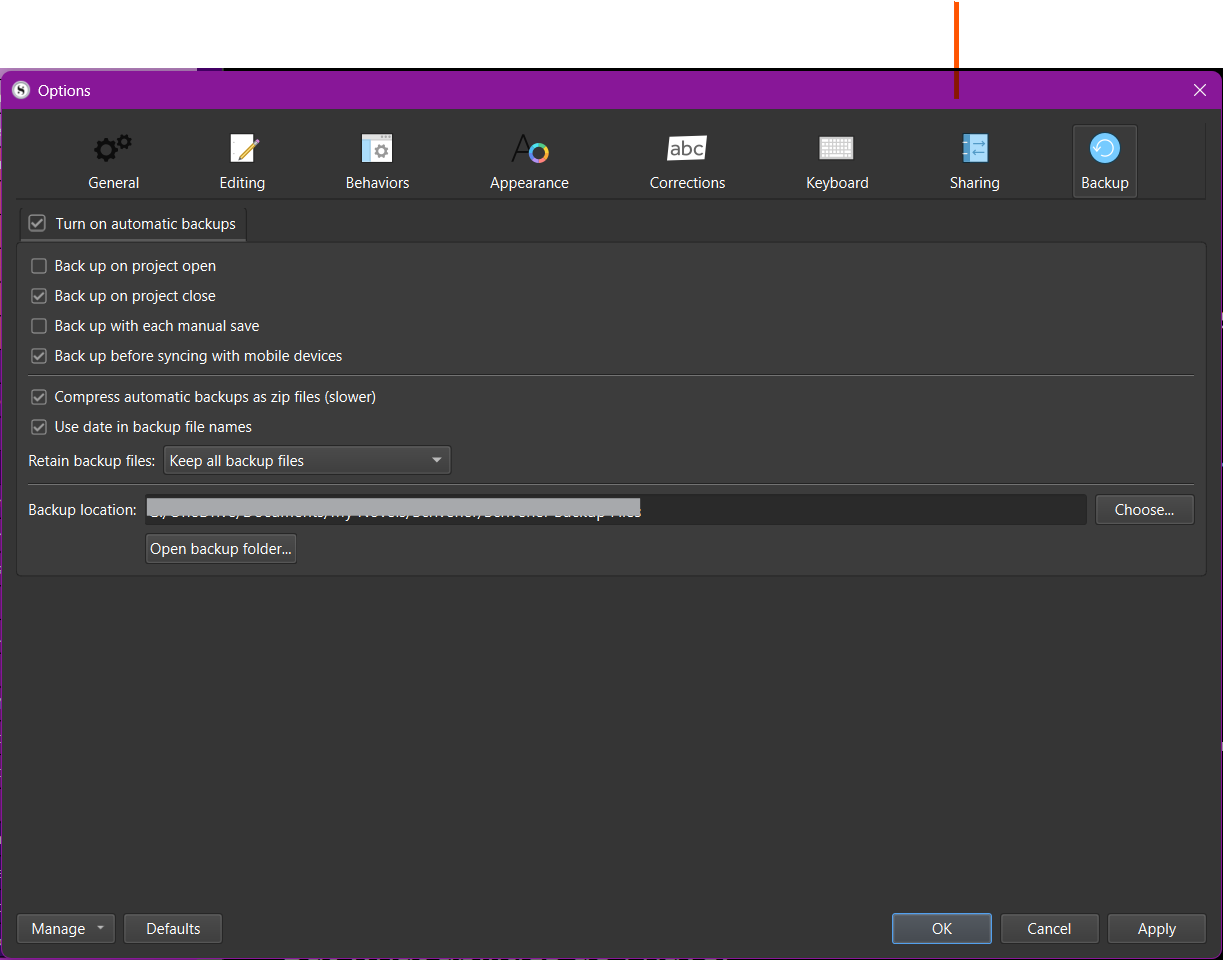
Next, set Scrivener to back up the project. I show my settings below, but please note: You do not have to set Scrivener to zip your backup folders. I do that for another reason.

What is my other reason?

I keep my Scrivener projects within my OneDrive directory, so it’s important to set Scrivener to zip them as a measure to prevent OneDrive from messing with a file. But as you will keep your Scrivener projects outside of your Dropbox folder, you won’t have this issue. Even so, if you want, you can still set Scrivener to zip your backups, maybe for convenience and to save space. The following steps assume you don’t, but they don’t really differ much if you do—you’d just have to unzip the backup file twice.

Here are my settings:

In your workflow, let’s say you are writing from PC A and are finished for the session. You close Scrivener, which triggers its backup routine, creating a backup of your project.

Using File Explorer, navigate to the newly created backup project and zip it with encryption. Move the zipped, encrypted file into your Dropbox folder so you can access it from another PC, say, PC B.

When you start a new writing session from PC B, unzip the backup project to a location adjacent to, but outside of, any existing Scrivener project folder. You will see the full .scriv bundle. Double-click the .scrivx file; Scrivener will open it exactly as it existed when you closed the session on PC A. At the end of the writing session on PC B, close Scrivener and repeat the procedures that you followed on PC A.

You could automate much of this with PowerShell scripts, but the manual steps aren’t too bad, IMHO. (Personally, I would write PowerShell scripts to watch a particular folder and then handle all the unzipping, etc. That way, it all happens automatically.)

I hope this is at least worth considering. :slight_smile:

Caveat

My caveat is that I haven’t tested all this out. In my workflow, I’m not that concerned about security, as I consider the security risk with OneDrive to be acceptably low compared to the content of my writing project. I happily (naively, some here will argue) allow OneDrive to copy my unencrypted .scriv projects into the cloud, so that I can just pick up where I left off on my laptop and vice versa. It’s worked flawlessly for years. Of course, I was careful to set OneDrive to always keep files locally, not store them exclusively in the cloud.

That said, in the decades that I practiced law, there were plenty of client confidences I would not have trusted to any cloud service unless they were first encrypted. So I get it; sometimes the need for security is greater than the need for convenience—but that’s where scripts and devices like Stream Deck come in, automating tasks that involve many steps or letting you do them at the push of a button.

3 Likes

Thanks for all the answers. SNC, your way is a option, but we hornest. Humans are lazy and early or later we stop ways like that. We pay money for have automatic in a lot of workflows. To start copy and paste all with hand is a step back and not forward.

Ok thanks for your Time @all :slight_smile:

1 Like

Fair enough. But to be honest, Scrivener might not be the right tool for you if you aren’t one to roll your own solutions along these lines, at least if you want the convenience of cloud availability between PCs beyond the security natively offered by the cloud service. Personally, I’m comfortable managing my own data and, if need be, creating automations. I get your point, though. Good luck in your search for the right writing tools.

1 Like

The question is whether I even give it another tool that also offers me the same quality of work. If Scrivener Windows is also a multi-user functional, then it is already pretty close to the optimum for my current work progress. You have to be so honest with yourself.
But I just hope for a Verison 4 with more of which I hope for. As I said, I like to pay for the comfort and functions I need. And this would rather be done with a program I know than a new one that I would have to familiarize myself with.

1 Like

Well, that’s just it. I’ve spent years experimenting with writing tools, always searching for the holy grail of the One Tool to Replace Them All. I’ve found some amazing tools, but never one that does everything I need it to. Once I finally accepted that the world isn’t quite the way I want it, I’ve made my peace with a bit of a modular approach which, I discovered, has the advantage of employing in concert what, for me, are the best-in-class tools for my writing project. If you do find that one, that perfect, that magical tool that does absolutely everything you need, let me know, would ya? :slight_smile:

1 Like

Regarding multiuser functionality, please be clear about exactly what you are envisioning.

Real-time collaboration, Google Docs style, is not supported on any platform, including the Mac. What Mac Scrivener does support is an “Import and Merge” function, which makes it possible to merge user B’s changes into a master project maintained by user A.

3 Likes

Yes, Dropbox decrypts the encrypted data stored on their server in order to show it to you, a properly authenticated user.

Incidentally, please don’t edit your project on the Dropbox server in this way. I recently helped a user who seriously mangled their project through careless use of the Dropbox app. Scrivener is the only supported tool for directly editing a Scrivener project.

2 Likes

Might be worth mentioning

Dropbox uses 256bit AES encryption for files stored on their servers: when an authenticated user connects, if you view a file (as an authenticated user), it is decrypted into memory & displayed, or transmitted over HTTPS. So this is as close to end-to-end encryption as you can get. However Dropbox employees can open those files if requested by law enforcement etc.

This is where I wish iCloud was supported: on iCloud you can enable ADP which requires a key that only the owner has. Even Apple cannot decrypt those files.

2 Likes

I thought it was documented that Dropbox are using customer data for training models, not just decrypting the files for law enforcement purposes. But happy to be proven wrong :slight_smile:

1 Like

According to their terms, they will share data with third party AI providers only if AI features are active. Shared data is subject to the third party’s terms.

I am not Dropbox, consult them directly for details.

3 Likes

Here are their FAQs that address @kewms’ point.

3 Likes

It is supported PROVIDED iOS Scrivener is not in the mix (I haven’t seen anything to suggest that’s changed).

As with any cloud service you have to make certain all syncing has completed before turning off a machine or opening Scrivener on the second machine. iCloud has historically been a bit lazy on syncing.

3 Likes