Is there a way to compile chapter in one column and its synopsis as a column to the right? Even better with the scenes contained within as columns to the right as well. Then next chapter as new row?
With Scrivener not having a concept of what constitutes a page, it wouldn’t be able to make columns. A script following a synopsis on the otherhand is relatively simple to setup.
Thanks RevoTiLlor for the quick reply. Can you say a bit more about the script following a synopsis? In the meantime, I figured out how to use a symbol prefix and then convert a compiled rtf to a table.
In Compile Format Designer, if your Section Text is your narrative (story), tick the Synopsis checkbox, besides the Text checkbox already ticked. The Synopsis will appear above the narrative, as below.
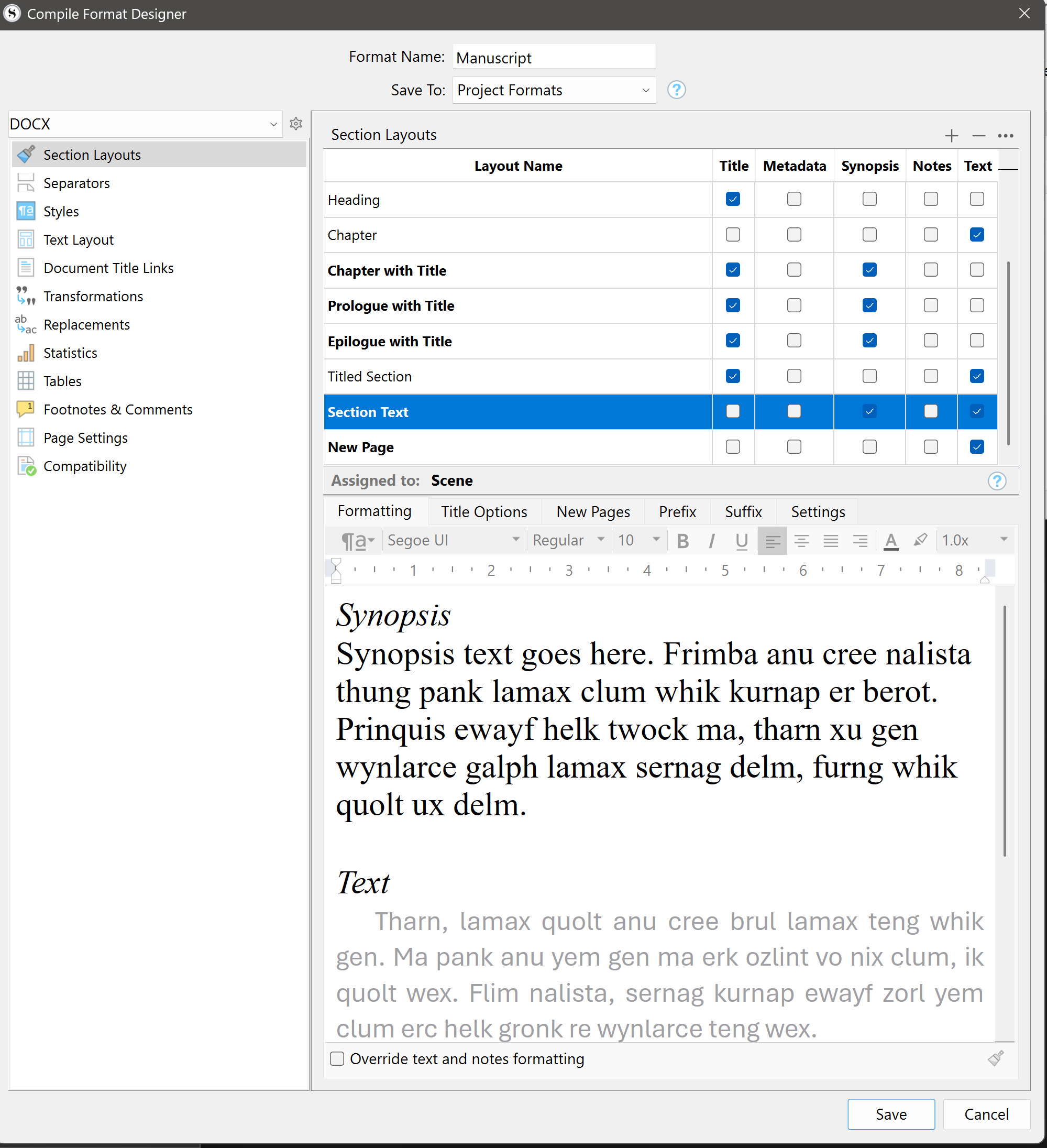
Now format it to your taste in the Formatting tab.
One caveat. Synopsis is plain text—so no smartquotes, etc., but you can sort that out in Word.
1 Like
Thanks again Revo - the synopsis in compile is very handy! I actually ticked off “text” so I have chapter names and synopses as quick reference.
1 Like