I just downloaded Scrivener for the first time and I began to import my novel by cutting and pasting text into chapters and scenes. I did two chapters and wanted to make sure I would be able to export it before I did a lot more. Went to “Compile” - everything looked right - but the document had only a heading for Chapter One - no text - and all the text for Chapter Two. Help?
Hello
Chapter 2 had its title? Not just the text?
If so :
Look in the inspector (rightmost panel), and make sure that your document for chapter 1 is assigned the same section type as the one for chapter 2. (You only want to change the assignation for chapter 1, do not touch it for chapter 2.)
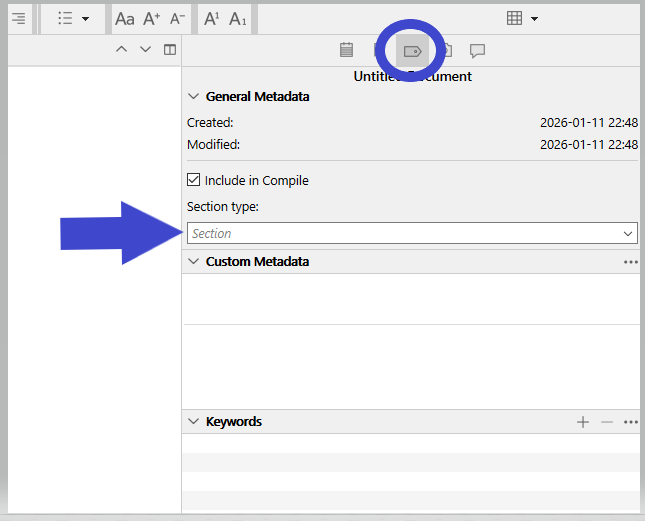
Else, if you are saying it compiled as a single chapter Title1 text2, then it is something different. A bit more complex.
Thanks, yes, there was a heading for Chapter Two and the text - but only the heading for Chapter One and no text. I tried choosing a section type and then got just headings for both chapters. Then I tried looking at inspector. Now Chapter One has completely disappeared. I think this platform is not for me, better to figure it out now than lose a whole lot of text later for reasons unknown.
Thank you for trying to help.
No problem.
Happy writing. 
(We’ll be here to help if you change your mind.)
1 Like
Hi! Welcome to the forums. (I’m the guy who suggested you come here from the Scrivener subreddit.)
1 Like
Don’t give up on Scrivener. Please make use of the 30 days-of-use free trial and also make extensive use of the tutorials. Scrivener is really the best writing environment out there (many have copied it.)
Give it a chance; don’t let compiling issues dissuade you from using a great program.
1 Like
As @paulcoholic says, please don’t give up quite this soon and yes, use the liberal “free trial” period. Go thru the tutorial and while the Scrivener Manual is very comprehensive, at least skim it so that you can see what’s there and perhaps go back to parts when you are seeking answers.
You mention you are “cutting and pasting” the text to import your novel. Clipboard copy/cut/paste is sometimes unreliable and sometimes brings in a lot of unwanted formatting. And is time-consuming. Scrivener developers have thought of that and provide a better way.
You may have done this but are now using different nomenclature, but my guess is that your novel is in Microsoft Word docx format? If you used standard Word styles to establish a chapter and scene structure, then using the Menu: File → Import and Split command Scrivener will do a lot of work for you automatically. If not using styles, then Menu: File → Import the entire docx into one Scrivener document with which you then use Menu: File → Document → Split (or the keyboard keys) to “split” the document into chapters and scenes. See Chapter 9.1.6 in the Scrivener Manual for full explanation which I don’t need to repeat here.
1 Like
Thank you! Actually I was using StoryMill, a good app for my needs and tech skills, which unfortunately is defunct. I was able to keep going without updates until my 2015 Macbook Air died a few months ago. Fortunately I had exported everything to Word but the novel is 43,000 words and not finished so Word is way too unwieldy. But you can see why being able to export is top of mind for me
Good. Hope this means you may try again to import, “split”, and organise your novel into Scrivener.
Before going too far, make sure you understand where you put your novel’s Scrivener project file–the place where the source for the novel is kept. Also setup how Scrivener automatically backs up your Scrivener project.
For your info, here is what I do:
-
Scrivener projects in ~/Dropbox/apps/Scrivener/. This gets backed up routinely by my 3-2-1 backup regime. Lots of internet articles about 3-2-1 backup regime. I store projects in Dropbox so that I can sync easily with iPhone and iPad. Dropbox set for “make available offline”. Dropbox is not needed if you don’t need to sync to other devices. A preferred non-Dropbox location would be ~/Documents/Scrivener/
-
Scrivener Backups stored in local drive ~/Backups/Scrivener/ as *.zip files, keeping 25 copies, automatically create on close of project. I never use “save as …” as I don’t need and using them sometimes confuses what is “latest”. This location also backed up by 3-2-1 backup regime. It is important that the backup location is different than the project location.