Compile e-Pub 3 eBook / format

Hello to all.

I can surely say that after a long and bumping road, just know something about compiling on Scrivener. Like every regular user. But I’m having a little trouble about the eBook’s formats.

I’m trying to upload on Kobo, not Amazon (and later starting to use Bookfunnel), but before:

Every time I get the compiled manuscript, the format presents some diagramation error.
Could be a line, the text that doesn’t fit only on one page etc.

I’ve already editing the section layouts, and the CSS, let the page’s breaks as default for all the separation.

But it seems that I couldn’t get anything right.

Do I have to use a diferent software to format the eBook?

I’m downloaded Sigil (?) and find hard to edit having to write the code language.
I found Kindle preview a little insufficient when it comes to details, but you know, this could be my ignorance as well.

Thanks for the answers!
Cheers everyone!

Fabio.

If what you mean by that is how some chapters may end in a short phrase or even single word on an otherwise empty page, that isn’t something you would be able to do anything about in .epub. The problem is that even if you manually tried to fix it, like you would in a fixed layout desktop publishing environment, your attempt would stop working for any reader not using your specific font family and font size settings (among other settings, like margin width, line-height, etc.). Indeed attempting to make it look good for one case may make it look even worse in other cases. For example you might use a CSS code to force a “page break” on the final paragraph so it all stays together (the way you might handle this in print), but then if you reduce the font size you might end up with half a page of text, then flip forward to find one solitary paragraph on the next page, before the next chapter break.

Some book readers may try to handle widows and orphans like this, but it is a bit of a difficult problem given how they work in general. They don’t lay out the entire book prior to paging through it, as that would be a needless waste of battery. They only lay out the text you can see in front of you, starting from the following word from the previous screen. This can even result in different layouts when paging backward instead of forward, I’ve found.

In short, you can’t really be picky about this kind of stuff in ebook publication. As with making websites, and being unable to control the thousands of different ways it may be viewed on different phones, browsers, and so on, you have to live with that and just do the best you can to make it look good as often as possible.

4 Likes

Hello Amber and thanks for the message.

Yes, you assumed corretly that was the problem.

for instance:
If the poem is:

AAAAAAAA
BBBBBBBB
AAAAAAAA
BBBBBBBB

AAAAAAA
BBBBBBB
CCCCCC

The C line jumps to another page.

or if the A line is like this:

AAAAAAAAAAAAAAAAAAAAAAAAAA

one part junmps to another line.

So I think no matter what I do, all depends on the reader’s device and try the best I can not to compile the worse manuscript.

Thanks again for the message!

1 Like

thanks @Vincent_Vincent for the heads up on the message title

From what I’ve seen, books where the layout is important to the meaning tend to rely on PDFs rather than ePubs. Which of course creates its own problems.

Poetry magazine uses a custom app for their electronic version, and they sometimes still get wonky results between the iPad, the iPhone, and the online versions. (Their poems do reflow as the screen size changes, so I suspect the underlying format is ePub.)

3 Likes

Hello kewms, thanks for the message.

When I compiled PDFs, everything is a smooth process.

The catch here is: as far as I know Kobo doesn’t accept PDF, only e-pub ou mob (and only with 100 MB).
I guess this idea to stay away from KDP doesn’t has a future here (hahahaha).

I would double check on that.
I recently bought a book on the Kobo store that is clearly a PDF.

. . . . . . . . . .

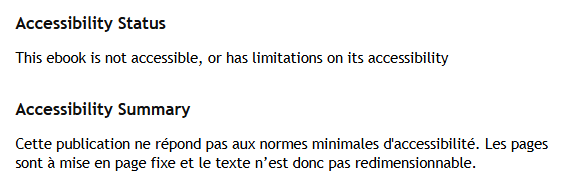
That, on the Kobo store, means PDF:

The french part says: pages are fixed.

This said, reading it (that reference book that I bought) is highly unpleasant. I have to read it on my computer ; else, it is truly annoying.

If you want to publish to PDF, make sure you take into account the screen size of a Kobo ereader. In the case of that book I bought, they just published it in the same format than the print. The result is a mess. The pages are way too tall for an ereader, and to make it worse, they’ve coupled the pages 2 by 2. One page is a two pages set. So you have to scroll up and down (and right and left) to read the left page, then again for the right one, and then hunt for the controls to turn to the next set of two pages. (Zooming out makes the text so small that it ain’t a viable alternative.)

2 Likes

Hello Vincent, and thanks again for the message.

So, I went to the Kobo’s page and found what you said. Indeed they seem to accept PDF’s. Although viable, I don’t think would be my choice 'cos the reading problems that you mention. Always like to take the reader’s seat on this journey, and imagine if I was reading something that isn’t working materially. For sure it would be desapointing.

But, in other news, I just have watch in these three last days a lot of Sigil’s videos and tutorials (always internet tutorials hehehehe) and things started to walking.

Taking into account what @AmberV has said above, I’m making my expectations very grounded about it. But, I think that’s a start.

Thanks one more time.

Best regards

Fabio.

2 Likes

All right, in knowing what you are going after a bit better, I think there might be a solution for you.

I was answering more broadly, on how to keep prose paragraphs from leaving bits of sentences together instead of spread across pages—for that there is no good solution.

But for poetry you would be working with shorter sequences that need to remain together, stanzas, and having a whole stanza drift to the next page together might not be as disruptive, particularly if we use a CSS code that ensures that the lines within that chunk of text drift together, instead of trying to force the issue with CSS that would page break.

You will find an example of this type of CSS in our stock “Ebook” compile Format, in the CSS pane. Scroll down in the left column, to the very bottom, and look at how we are handling figures and their captions. When you use an image with a figure in Scrivener, it is wrapped in a <figure> element, which contains the image and the caption. By using the page-break-inside: avoid CSS directive on the figure, we hint to the ebook reader that its interior elements, the image and caption, should never be broken apart across “pages”.

Thus the idea is then to wrap each stanza in its own container, so that we can add that directive to the CSS pane in a similar fashion, which would seek to keep all of the <p> lines within it together.

If we were doing this in Sigil, for example, by hand, we would be aiming for something that looks like this:

<div class="stanza">
    <p>AAAA</p>
    <p>BBBB</p>
    <p>CCCC</p>
</div>
<div class="stanza">
    <p>AAAA</p>
    <p>BBBB</p>
    <p>CCCC</p>
</div>

If the last “CCCC” line would need to go on to the next page, then the ebook reader would move the whole second stanza to the next page so it stays together.

So the question becomes: how to make the compiler produce a structure like that, without having to write poetry with all of that in the editor (which you absolutely could do, but I think most would not feel very creative writing that way!).

Scrivener’s style system would be a natural approach to doing this, but it does have some limitations that might make a really straight-forward application of them tricky. If you go into the Styles compile format designer pane, you’ll see some promising fields in the right of each style. You could even insert HTML before an entire block of lines, and after, which would give you a hook to insert the <div class=“stanza”> line one … line two … line three </div> construct you would need to add CSS. But the problem with this is twofold:

  1. You would be unable to use standard rich text formatting within these lines, because otherwise typing the above HTML examples into those fields would have them escaped so that they print for the reader.

    Basically the software assumes you are writing about HTML in your book, unless you toggle the Treat as raw markup setting for the style. But if you do that, then it will treat all of the text marked with this style as plain-text essentially. If you want italics you would need to use a style for “Emphasis” (or whatever you need it for), and then add <em></em> to its prefix and suffix fields—or type HTML into the poem itself.

    So overall it does make formatting a little more deliberate, and something you have to think about, and then set up in the compile format’s Styles pane. You can’t just hit CtrlI. Depending on how you format your poetry, this may not be a huge problem though.

  2. The other problem is in how Scrivener recognises a sequence of lines as a block. If you created a style called, “Poetry Line”, with the intention of having these lines contained in a <div class="stanza"> block that you add around sequences of such lines, how would you mark when one stanza ends and the next begins? Styles are per-line in Scrivener, not around whole chunks of lines. We are simulating chunks of lines by looking for lines that are using the same style around it.

    You would need some other kind of line in between stanzas that isn’t a “Poetry Line” to break them apart. I suppose that is a kind of solution, an empty “No Style” line between each stanza. It’s a bit ugly, at least in terms of well-formed HTML practices, but it would get the job done. You could even use CSS to decrease the amount of padding between stanzas to mitigate the visual effect of having one whole actual empty line between them, if you wanted.

There are other ways to solve either one of those issues, but I think this is probably the simplest to execute. The method is pretty easy to use, and write with creatively once you have it set up—certainly nicer than typing in the HTML you would need, in Sigil. :slight_smile: The only part is indeed remembering to leave No Style lines between blocks.

Here is a demo project that has all of the above set up:

poetry_demo.zip (147.8 KB)

If you compile that, you should find that increasing the font size on the reader will cause the next whole block to go to the next screen rather than bit by bit. Whether Kobo reader actually supports this CSS is another matter. :slight_smile: It should though, it’s a pretty common formatting code because there are lots of reasons to want some lines to stick together.
3 Likes

Hello Amber! Hoping you’re doing fine!

First things first:

I’m an Art’s student, with the major in Portuguese.
One of the objectives of this course it’s that we lear how to teach portuguese at schools. Let me tell you that there are few teachers at university that has your pedagogical expertise in terms of explain a dificult topic to someone that doesn’t know a dime about computer language, CSS or so.

Your text is so crystal clear that in the end, I’m alredy starting to thinking that I’ve became a little bit smarter.

THANK YOU SO MUCH FOR TAKING THE TIME TO DOING THIS!

Your kindness to do it it’s moving in so many layers, that I could only thank you.

I’ll try to increase all this tips and try to incorporate the demo that you give (another incredible kind act from you), and see what I could get.

Once again, thank you so much for this!

Best regards!!

Fabio

2 Likes

Hello Amber, how are you?

Hoping everytthing it’s allright.

So. I wanna write to you to bring the updates about the problem and all that happens since you kindly create a solution.

I’ve used the Poetry Line style on a number of new documents. It all worked well inside the Scrivener compile settings. But, when I send it to Sigil, the first lines of the poems has a different position and size.

‘Cos it was just a single line and all the rest of the poem always compiles in the right format, I just make the changes at Sigil and move on to the next step.

Trying to make some steps by myself, I found a little longer solution, but it seems to work very fine too.

I compile the manuscript in .docx and uploaded at Sigil. Using one of the tools from the program that allouds you to directly edit the Epub without coding (like a simple edtion software) I was able to make the ebook and upload at two plataforms (KDP and Kobo).

I’m now having some troubles at Kobo, but it’s plataform relately, not with the manuscript.

Once again, thank you so much.

Cheers from Brasil

Happy Holidays!

1 Like

Thanks for the update!

I’ve used the Poetry Line style on a number os new documents. It all worked well inside the Scrivener compile settings. But, when I send it to Sigil, the first lines of the poems has a different position and size.

It’s very likely there is a setting you have enabled somewhere in the compiler that is doing this. If we were to strip all settings down to “zero” for example, it is possible to get an ePub with almost no formatting (I think there may be one or two things you can’t really totally turn off), or in other words it would leave the look of the book up entirely to the book reader or Sigil’s preview pane. So if you’re getting a line that is different, there is probably something somewhere you can switch off.

I don’t really know off the top of my head what would make it a different size and position, there isn’t a specific setting that would do that, but there are some settings in the “New Page” tab for Section Layouts, that can indeed change the first line, or the first few words of a line. These settings are more for non-fiction or novels maybe. You should try turning all of those off, for the Section Layout that prints your poem files.

Using one of the tools from the program that allouds you to directly edit the Epub without coding (like a simple edtion software)…

It is true, this all becomes a lot easier once you set some time aside to learn how these things work so that it isn’t all shots in the dark and magic wands. For example with a problem like this, you can examine the first paragraph in the HTML/CSS inspector, see exactly what CSS is impacting it to make the line look that way, go to the line in the stylesheet.css file that is doing that, and then look in Scrivener’s CSS pane for where that is. Maybe you can delete it if it is in the editable left column, or if it is in the right column, you can override it by copying and pasting it, and then changing how it works in the left column.

If even if you do not know much yet, these things are something easy to fix. If you see for example, “font-size: 1.5rem”, once you learn that basically means 1.5x the normal size, then you can make your own that says “font-size: 1.0rem”, to make it the same size as the rest of the paragraph.

2 Likes

Hello Amber.

Thanks for the message and, once again, for the tips. I’ll try to see all the compiles settings and correct this little line.

All in all, everything seems going in the right direction.

Thank you so much, one more time.

Best regards and happy Holidays

1 Like