Compile nightmare [trying to use page breaks instead of section breaks]

Hello scribes,

I am desperate to compile my novel into a Word doc to send to my editor by October 1. I have done this before, but with an earlier version of Scrivener. Now it seems Word has interpreted everything into “sections” including what used to appear as simple “page breaks.” So page numbering the Word doc is a nightmare. It just won’t work. I’m wondering if there is something I can do on the Scrivener side to make this compile more palatable to Word. All the suggestions on the internet say to manually go to the footer of each section in Word and format the Page Number to “Continue from previous section” but this only works if I manually type each page number into the footer. And I have 82 sections to do this in!

Hoping against hope there is a magic bullet for this.

Thanks in advance for anyone here who can help.

All best,

Cari

With version 3 of Scrivener Compile was changed completely. So if the earlier version of Scrivener you had compiled with successfully predated version 3 you will have to re-set up Compile completely.

To get further help here you have to tell us if you use one of the Compile formats that come with Scrivener, and if so, which one. And you have to provide details about your Compile and project settings, at best as screenshots.

Only then the experts here will be able to deliver the appropriate magic bullet. Which does exist, I’m quite sure.

Thank you for your reply. I’ll try to begin filling in your requirements. My section types are not structure based, but based on them, with a few special ones I haven’t used in a while, but basically as you see in the screenshot (hopefully). I can’t get a screenshot of the pulldown menus. The detail content is mostly collapsed except for the first chapter, which has been recently renamed to Chapter 1, Chapter 2, etc. but still using the Title section instead of the chapter structures which are over them, if that makes sense, Parts, then Chapters, then Titled sections, with some misc. sections called Epigraph and a few outliers. I’ll upload the successive screenshots of my compile windows to show you what my workflow is. There are four PNGs, showing in reverse order of the window opening sequence. … OOPS, I can’t upload images. I’m a new member and it’s not allowed (I was a member years ago but apparently let my activity lapse so I’m new now). Any suggestions? I have a website and could maybe make a page there for the images? Unless you have a better idea.

  1. It would be useful to know if the section breaks in Word were happening whenever a certain section type was encountered in the compiling. Then one would want to know what Compile Format that section type was assigned. Because that would probably be where the culprit lies. ((If you know the suspicious section type, then in the Compile window, open up the center pane and see what Compile Format that section type is being assigned to. The question will be, what compile format is it and what is it about that compile format that is giving you the section breaks.))

  2. The Separators section of your chosen compile format (when you open it for editing) seems like a good place to look for whodonit. The section types listed there in bold will be the ones which are being invoked in your project. Click on your prime suspect section type and look at what the separator settings are for that. Anything funny there? ((I am not really sure what you could put there that would induce a section break in Word. Seems like it would have to be a Custom separator, so you could at least look for that, I guess.))

1 Like

Have a look at this post, which describes the various conditions required to get rid of section breaks entirely, and revert to plain page breaks. As I note there though, depending upon your workflow, the best answer might be to switch all manual brute force page flow settings off in Separators. Depends on the software you’re moving on to though.

The previous version worked this way as well, by the way, but it had fewer triggers for it, and so you might just never have encountered it, or had deliberately simplified the output back then and haven’t yet done so with v3.

As with the previous version, whether you get section breaks or page breaks is an all or nothing thing. Scrivener is incapable of determining when they should be used, and when they should not, so it just spams them everywhere a page break would go. It means its settings (such as swapping out header content per chapter) work as advertised, but as you note, it produces a quite rigid and difficult to work with document when attempting to introduce it into a flexible design workflow.

1 Like

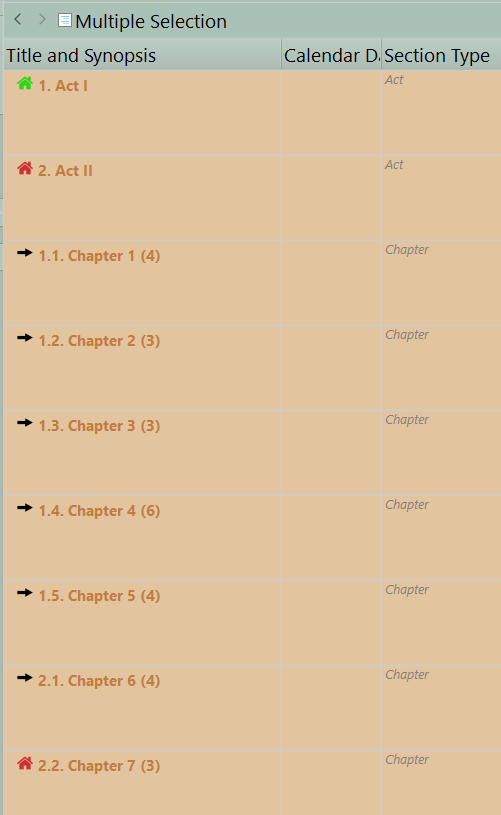
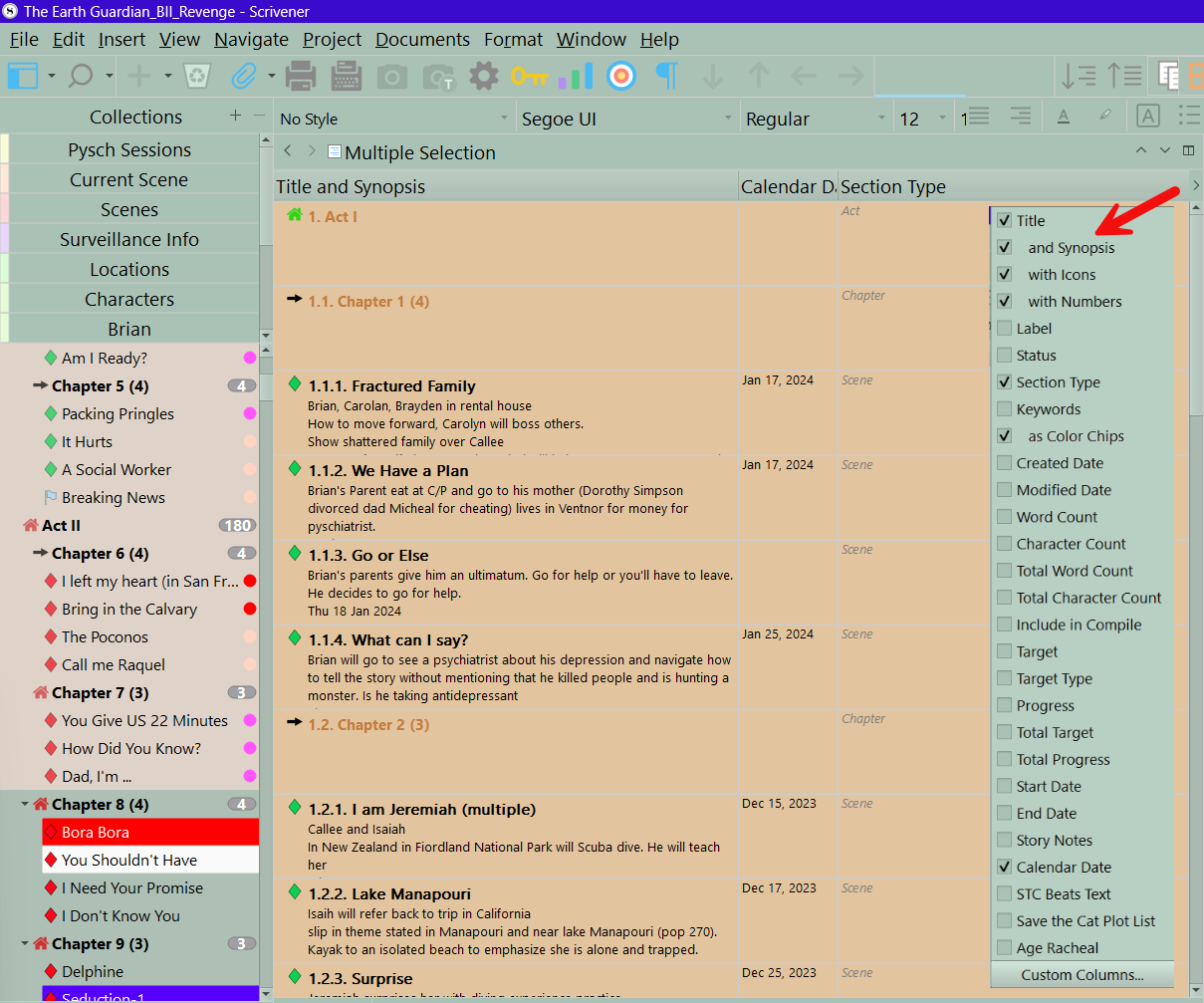
My guess is part of the issue is the novel structure and inconsistent use of section types. If you could show and outline view with section type displayed of a good chunk showing the various parts of your novel, it might help. Would look like this. Note: You can click on the section type column to change how view the binder elements see below

The outliner in this view can quickly show if your section types are applied consistently throughout the novel which is crucial to your compile output.

Clicking on Section Type column to change how items arranged.

As I note above, whether the compiler uses simple page breaks or section breaks is a combination of settings that have to do with whether the document might need section breaks, anywhere within it, and as a blanket assumption rather than an explicit setting. The word ‘section’ here is word processor jargon for a major content or layout shift (e.g. switching from portrait to landscape text layout, or three columns to one). This is what the OP describes as having to manually change header and footer settings by section, which is another thing you might intentionally use section breaks for (at least in less sophisticated word processors, as that is a very time consuming and inefficient way of designing documents versus the master page or content/style driven systems, but that’s Word for you).

Scrivener’s internal jargon for ‘sections’ is completely different, of course.

1 Like

This looks useful:

“Looking to get rid of section breaks?”
Scrivener User Manual, page 679.

2 Likes

I want to sincerely thank all you lovely people who have generously shared so much expertise and information here. It’s truly impressive, how active and vital these forums are. I’m sure the answer is in here somewhere and when I can, I will read and look up and test all the options until it comes out right. The fact is, despite using Scrivener since 2017, my understanding of how it all works is sketchy at best, haphazard at worst (as right now) and now that I finally “get” that making the compile formats work for me instead of against me, I look foward to doing the work and clearing it up so I can have them reliably work for me in the future.

But I have a deadline to meet and a long draft to read through before then so I’ve had to choose the actual writing over the formatting for now. And wonder of wonders, I tried a trick that might actually work, though I feel it’s hanging by a thread and I can’t count on it for the future. I took the whole problem over to my old laptop (MacBook Pro from 2014 running Mojave), opened the Scrivener file in the old version, 3.3.4, and compiled it there, WITH my custom compile format (created quite willy nilly). Then, when the old Word wouldn’t generate any page numbers, I brought it back over to my newer MacBook Air and opened the compiled file in the newer Word, v. 16.88 (standalone, no subscription so precious little support online), and LO AND BEHOLD, it generated all the page numbers, all the way through, created NO section breaks and voila, I am there.

I suspect something fundamental changed in the 3.5.2 update I installed AFTER the last time I compiled this long manuscript (early in 2025) and that I was right to wait until after that was submitted before doing the update (which I knew would be an upset, since it was designed to work with the big Apple upgrade to the Tahoe OS). Sure enough, it broke what I knew as my compile format.

All this to say, after the dust settles and I can send this manuscript off October 1, I hope to be able to untangle this problem the right way. And when I do, you can be sure I’ll be back with more questions. I wish I didn’t have to deal with Word at all. I detest the program and have for at least twenty-five years, but it’s the “industry standard” and unless or until that changes I have to wrestle with it from time to time and try not to throw my computer into the creek in utter frustration.

Thank heaven for Scrivener and dedicated Scrivener users.
2 Likes

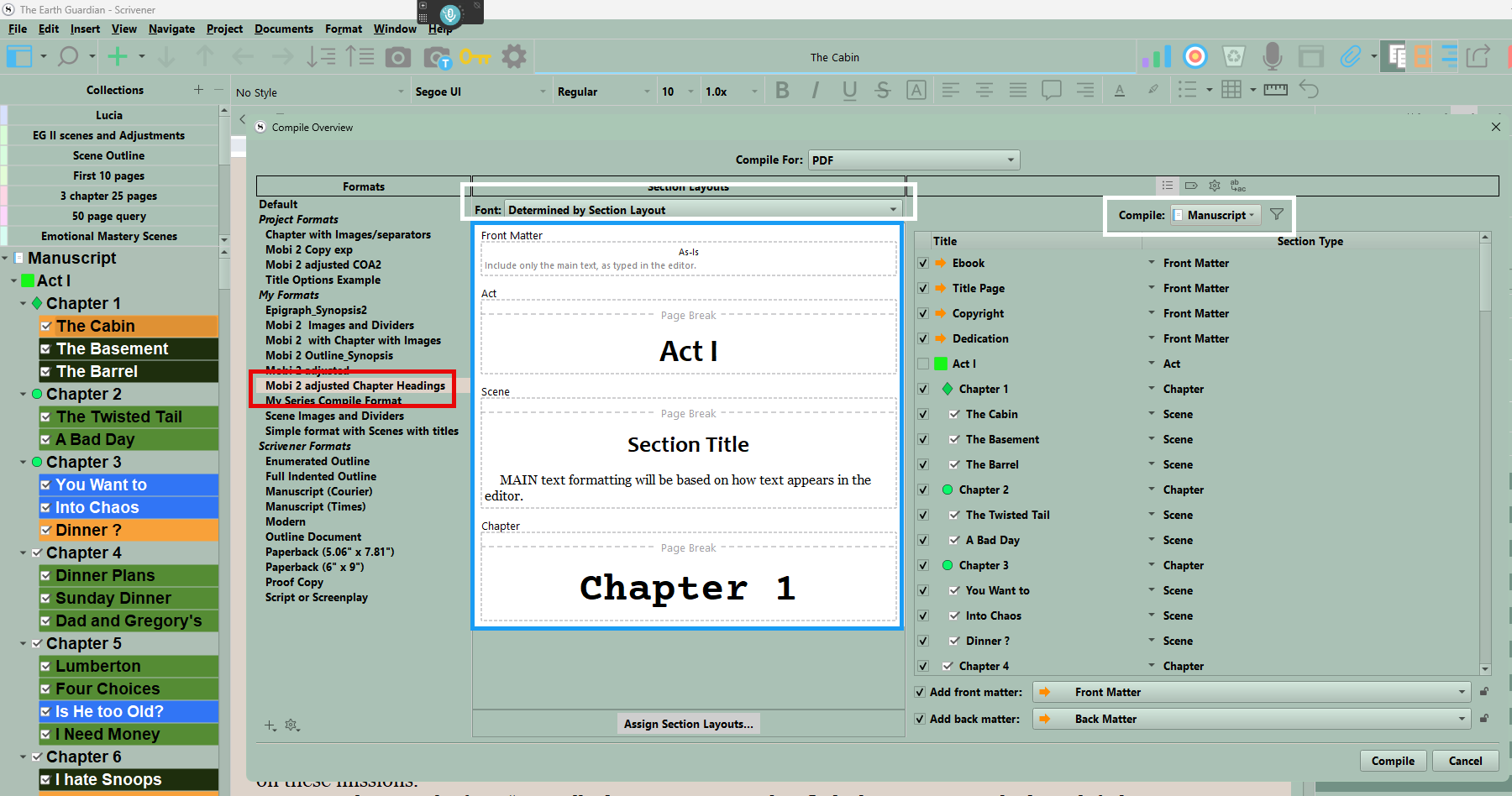
I could send you a compile format that works for me, below is the preview image. Scenes include a title of the scene only, the chapters are numbered sequentially, the Act is as and Includes titles as Act I, Act II, Act III. Front and back matter are as is.

Thank you, GoalieDad. It’s always helpful to see other’s people workflows and solutions. Has L&L created the share page for uploading compile formats? Or just the image, as you have shared with me and on your July post where I see the idea of the share page? Are compile formats something that can be imported, as styles can be?

Yes, if you right-click on a style in the Format sidebar you’ll find options for exporting and importing. Generally they do not contain information about your book unless you put it there yourself, such as in the Replacements table, header and footer fields. But this is why we have a second Replacements table in the main compile settings, as placeholders intended to take the information you type into the Metadata tab, to place in header/footer fields, like <$author>. That way anyone can use it, and it will take their name from the compile settings instead of yours.

I suspect the main reason we do not see many shared is that book designs tend to be very specific to the book, and part of its identity. You would have to be okay with a lot of other people using books that look like yours, or rather spending the time to make a design just for the sake of sharing it. I would also suspect a lot of such things get distributed as project templates, with the compile Format already saved into it, since that is easier to document if it is already set up to work with a project—same idea behind how most of our custom formats are embedded in the stock project templates.

1 Like