After a lot of hard work and feedback from one very patient tester i finally completed it http://coolega.xyz CWS was heavily inspired by scrivener, and I already thanked him for it. Scrivener isn’t the only software inspired by it, theres writer’s cafe’s storylines in there and a few other things too. I would be honored to have your feedback.
Edit: Any mac support buyers will get a free copy of the mac version once released. So even if you don’t have Windows you will still get Coolega Writer Studio!
ah crap I knew I forgot to mention something, i forgot to mention that I recently updated to support epub. PDF is in the works…..gumroad page updated
Also I did not create it because scrivener is difficult. I created it because scrivener did not support touch screens.
No free trial period
No mention of a refund policy How can you offer a refund policy on a software that is easily copied and no proof it is uninstalled?
Windows only with vague promise of iOS and Android I am finalizing windows before I move on to the mobile versions
No Mac version I need a mac to test the mac, or a very willing owner of a mac wh would be willing to screen share and be my buddy on discord so that we can develop the mac version together
ok. this is hard to describe so bear with me, I’ll do the best I can. When you try to touch the screen with scrivener, no matter where you touch all you do is basically drag the mouse. Depending on where you touch you either select text or (my most hated thing) drag the binder entries around and possibly lose them by nesting them where they don’t belong. This made me create what I call my binder number system. Each scene starts with chapter name and part example 12.3, 12th chapter, 3rd scene to cope with this happening, very early in my scrivener use. I spent two days straightening up my first imported book cause I was new to the software.
Now in Coolega if you touch the screen you drag it like you expect. Exceptionally useful for if you’re reading your document holding your tablet (if youre lucky enough to have one) while curled up in a chair. There is also portrait mode support.
well, that is what inspired CWS but that is not all of the reasons I made it. There is a lot of stuff unique to CWS, theres a true global find and replace for one thing. I’m working on a Q&A to add to the site, based on feedback. here is the why did I create CWS one
Q) Oh great, another Scrivener clone because “Scrivener is hard” or why did you make another scrivener clone?
A) I did not create CWS because scrivener is hard, or even to clone it. On the contrary, I used every single feature of it because if I pay for a software I’m going to use it and watched every video I could on it. I created it because I wanted touch support. Then my needs grew, making Coolega grow. I wanted notes that I can easily reference, so I created the notes tab. Then I thought of Writer’s Cafe’s Storylines was an amazing idea and implemented threads. Then I needed a page view so I can visualize how many pages I got. Then of course a good writing software requires export, which also got some custom features like single chapter export. and it just simply grew from there.
if I really wanted just touch support I would use my ipad all the time. There is now a lot more to it than that. I too prefer a keyboard, in fact my surface pro has a keyboard and mouse bluetoothed to it (random thought why the word bluetooth why not something like wicon or something?)
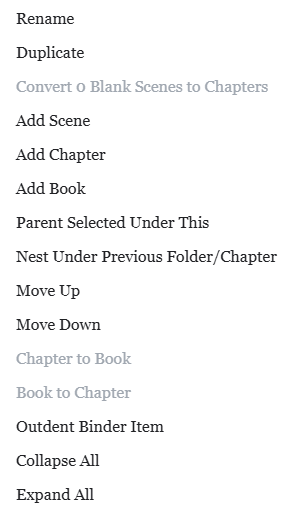
For example, there is no drag and drop binder instead I borrowed from blender. You select what you want to nest then right click on its new location and hit “parent selected under this” right click or touch and hold is how you rearrange based on my own terrifying experiences with drag and drop.
I’ll take a look at it later when I dig my winblows laptop out, it has a touch screen (Lenovo fold-all-the-way-over laptop that masquerades as a tablet with pretensions) and so the feedback may be useful.
I went ahead and bought it to help support you either way, even if I don’t end up using it.
I have found memories of Storylines and later Writer’s Cafe, though I have mastered Scrivener more than I ever did the others.
I’m not familiar with Blender (but I know that it exists), what you describe sounds interesting. That was kind of what I was wondering: Is there a different approach to interface design? Apparently there is.
Definitely more, as far as I can see, than in Apple’s future Mac touch teaser (“Okay, but why?”).
blender is a 3d software that I am also intimately familiar with. It has a select A to affect B feature, and that’s what I did, here is a screenshot of the right click interface
There is some drag and drop, but only within the actual folder/chapter/book. You cannot drag outside, due to the first use D&D terror I mentioned earlier.
Edit if anyone wants to see any kind of snapshots of anything that I havent featured in the site feel free to ask. I would only be too happy to get feedback and requests
FWIW, Scrivener manages this by voiding the license key if a purchase is refunded. We do that through a third party licensing provider, which may be more complexity than you want to take on at this point.
Thank you! I saw that. And I’m interested in expanding to the Mac. Do you have discord? Join my server and let me know we can work together to make cws Mac a reality and you’ll get a free copy!
Without one of those options, it’s always a deal breaker for me, and I suspect others.
During the Win Scrivener beta and as I was writing the Win version of my Scrivener book, I purchased a MS Surface laptop. I found the touch interface a PITA even on touch enabled apps.
That and the poor keyboard and touchpad and the abysmal performance for something that cost more than a MacBook Air running Win under Parallels convinced me to dump it and take the tax write-off. (Back in the days I was at Apple and desperate for tax deductions)
I’ve yet to find a compelling argument for a touch laptop. The iPad is great for touch apps, while my fingers hardly leave the keyboard on the MacBook. Reaching to touch the screen seems counter-productive.