I’m creating a book series. Some of my characters cross over into the other book. If I create a character sketch in one project, can I copy the same character sketch into another one? I know I could probably drag and drop it, but I don’t want it removed from the first project. Does that make sense?
Dragging from binder to binder creates a duplicate/copy. (No need to worry.)
There is also this option that will list other open projects as choices/destinations :
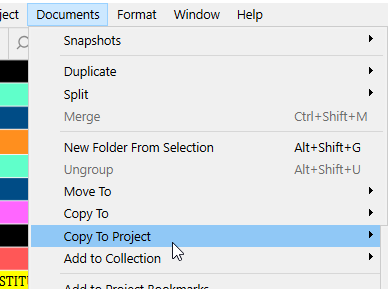
. . . . . . . .
Technically speaking, you can achieve better.
If you dedicate a project to your character sheets, you can link to those in your actual writing projects.
The advantage is that if you edit the character sheet, it remains up to date for all of your projects, since there is only this one version of it, and you only link to it rather than creating isolated copies/clones of it.
Another strategy, rather than linking, would be to have your main writing project leave a little slice of unused screen space to the left of right. You then save that as a Layout. (This will allow you to recall it at will.)
You make your character sheets project use only … say, 1/3 of the screen, and position it to the side where your main project leaves an unused strip. (You save that as a Layout too.)
So, clicking in that left or right strip will bring your series bible / character sheets project to the front. Clicking in your writing project hides it again.
Voilà. 
3 Likes
Wow! Thank you for this. I’m just getting into Scrivener. I’m importing my previously written work into so I can get ahold of all my characters who are crossing over. I’ll reread your advice and practice these steps to see how it works for me. Thanks again!
1 Like
Just an advice:
If you opt for a “sub”-project to host your character sheets and series specifics, the way I would go about it is that I wouldn’t bother with identifying which characters are represented in multiple novels/books. (I would, but passively.)
What I would do is that I would create a file for each and every character, unconditionally.
Then, using keywords (there are other possible ways too), I would tag them by which book/novel they appear in. If they are in 2 or 3 novels, they’ll simply end up with 2 or 3 keywords.
Later, you can use those keywords to filter lists.
…This way you’ll have the whole of your characters available for reference, whenever needed.
If you want to only see those in the third novel, searching for the corresponding keyword will get you that.
2 Likes
Okay, I’m confused. How do I create a “sub” project? Is it just a new project that only has character sketches?
Yes.
It is a project just the same. That’s why I quote-marked “sub”. The only difference resides in its purpose.
2 Likes
This has been so helpful. Thank you for not making me feel completely dumb.
Once I try this, I may have more questions. I hope you don’t mind. I also hope this helps others in the community.
1 Like
This is awesome, thanks.
I have character and setting sketches across multiple books which I constantly have to update. How do I link to a sketch in a ‘sub’ project?
I’m writing a multinovel series and find it works well to write them in one Scrivener project. It’s especially helpful because I sync with a single, corresponding project in Aeon Timeline and can view things like character arcs, story beats, locations, objects, etc. not just in one novel, but across the novels.
1 Like
In the menu, if you right-click a binder element, there is a function Copy Document Link. You then paste it, in your main project, where you need it.
But it is a very long string.
The best is to apply a link to a shorter anchor. Something like “LINK” (lol), and you edit the link and paste the string you’ve copied by using the function in the binder-element-right-click-menu in the little popup.
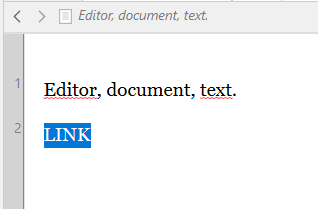
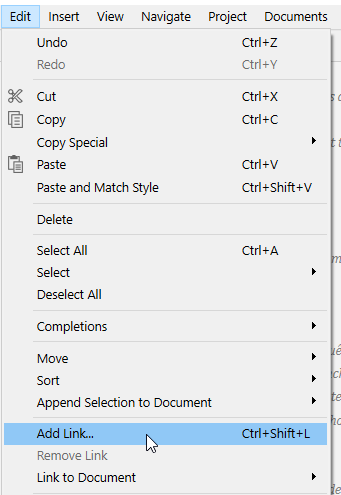
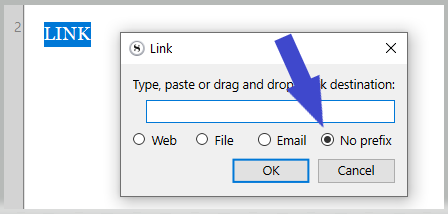
If you did everything right, the copied string should already show up in there on its own. (You only have to hit OK.)
4 Likes
Thanks for the help!
1 Like