If there is no text inserted in the synopsis of a document, Scrivener helpfully shows the first few lines of document text in the cork board view. I would like to print out these first few lines but cannot figure out how to do so. As a work-around, I can copy/paste the first lines of each document into the synopsis, but this is clunky. Is there a way to print Scrivener’s default “snippet”?
While you may still see it as a work-around, there’s a faster way to copy the text to the synopses for printing, and a quick way to delete it afterwards if you want to revert to using the dynamic filler. I do recommend making a backup first, since you’re going to be altering a bunch of documents at once and Undo won’t be available if you find you made a mistake.
Add the text to the cards:
- Select all the cards that use the dynamic text
- Select
Documents ▸ AutoFill ▸ Set Synopses from Main Text
That will add a little more than the default dynamic text limit, but it should do what you want. At this point, you can print your cards with the synopses.
Remove the text from the cards:
- Select all the cards you want to clear the synopsis from (so that it will revert to the dynamic display of the main text)
- Making sure focus is still in the corkboard (i.e. don’t click into the binder first!), select
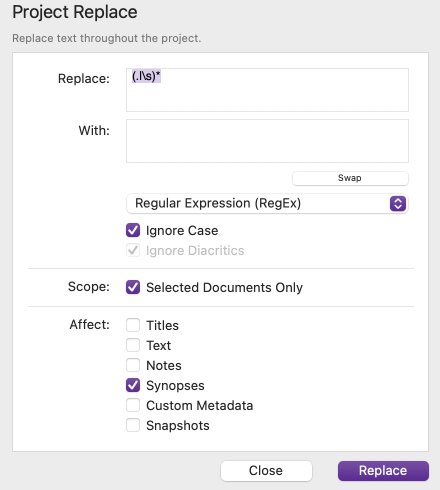
Edit ▸ Find ▸ Project Replace... - Set the following:
- Replace:
(.|\s)* - With: [leave empty]
- select Regular Expression from the dropdown
- Scope: tick the box for Selected Documents Only
- Affect: tick only the box for Synopses
- Replace:
- Click Replace
2 Likes
Amazing! I agree it is a bit of a work around but works great.