This would just be a nicety but since I use annotations quite a bit* I realized today that it would be great if I could change the color of the annotation text. I looked for it in Prefs -> Appearance -> Customizable Colors but couldn’t find it there.
Right now my projects are littered with blocks of red text but maybe I’d like to see them in green or purple. These colors have an effect on one’s mood so it’s good to have control over them.
I use them for temporary notes to myself of what I want to fully write out in that section
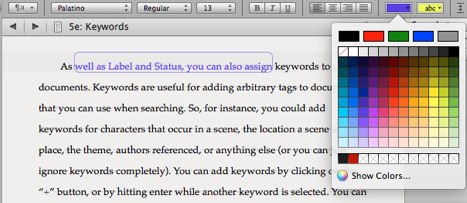
Just click in an annotation and hit shift-cmd-C to bring up the colour palette. Then change the colour in the palette to change the colour of the annotation. Any new annotations you create in that project will use the colour you last chose.
You can also use the Format Bar’s text colour tool. Right-click on it to bring up the swatches pop-over. There are a bunch of useful swatches provided, and any custom ones you’ve created will be listed below the main group as well.