I have finished my novel and am ready to export it to .epub for self publication. I am using Scrivener version: 3.0.1.0 (1274136) 64-bit - 28 Apr 2021 (Windows 10)
I have spent some time familiarising myself with the formatting tools and have managed to get the export formatted to my liking - however there is one issue:
Each chapter has a “Prelude” section, which is simply the first Text Section in each Chapter folder. I have assigned each Prelude its own “Section Type” and configured that section type with a Page Break as the “Separator between sections”.
However, when I compile the book I’m only getting a blank line between the Prelude section and the following text section.
I’ve tested the output .epub (version 3) file in multiple readers on multiple platforms and they all behave the same way.
Does anyone have any thoughts on this? I saw a similar question posted back in 2020, but it had no replies. I am unsure if this is a bug, or it’s my lack of knowledge about the export system.
Thanks in advance for any advice.
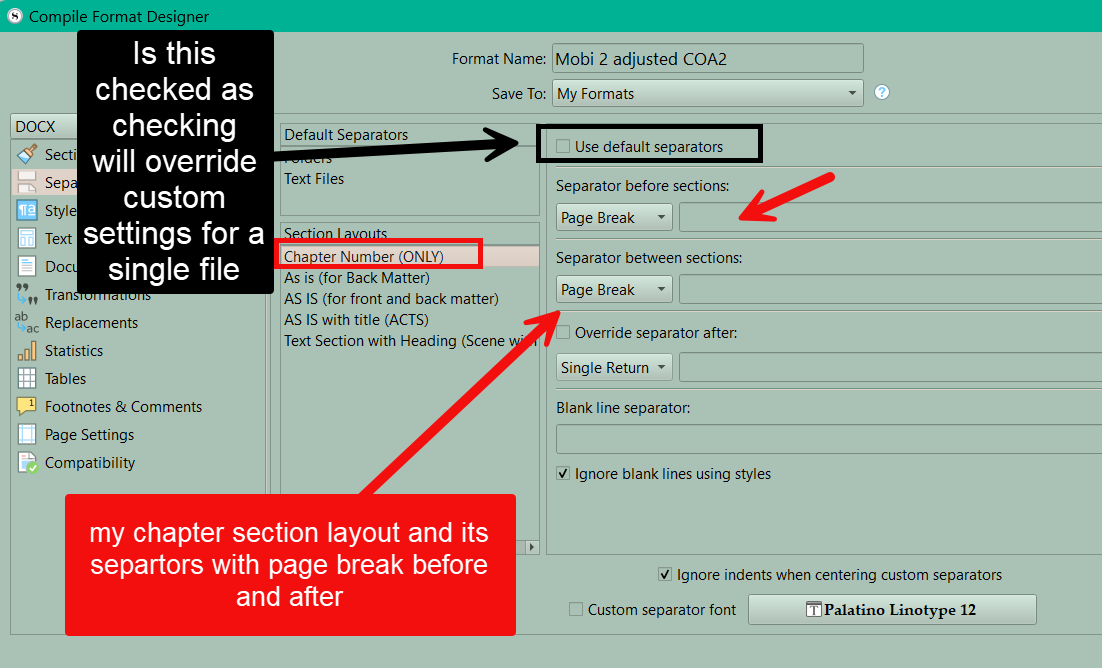
Why not give us a picture of your compile format separator setup for this Prelude Section Type. It should look like my image below for chapters, use default separtors should be unchecked unless treating Prelude as a folder. (My guess you set it up as text file.)
1 Like
Thank you for the feedback. I didn’t think to include a screenshot. I just tried to, but because I am a “new account” it won’t let me upload media. You can see the screenshot on Dropbox here (hopefully it lets me include a link)

Yes the Prelude is a text file.
Comparing my settings to yours, it all look like it should be ok, but no dice. The first page of the chapter just runs on after the Prelude text.
Just a side note, I updated to the latest version of Scrivener on Windows just in case there was a difference between versions, but the compile is still the same.
If you want the prelude on a different (its own page) try making both separators be page breaks and see how that works. When playing with arrangements save the section type as manipulate it give the versions numbers. when click the + sign you duplicate the currently highlighted section layout without a name. Just add name and version number and when get right delete it.
To be clear - I just want a page break after the prelude. That’s all. No break before. My understanding of how the formatting system works is that the configuration that I’ve shown should do that. I can’t see any reason why it doesn’t.
Versioning sections seems sensible and I’ll try that, but at the moment I can’t get it to do the basic thing I need at all, so I’m rather in limbo. I really don’t want to do some hacky thing like using extra folders to separate the prelude from the chapter text, but I have a feeling that I might have to go down that path.
Add a Page break after the Prelude in the Separator settings.
The “Page break between” adds Page breaks between Preludes, and you’ve only got one of those.
Hope this helps
2 Likes
When I first started troubleshooting this issue I did exactly that. It seemed like the obvious solution. However when compiled the readers I’m testing with show no page break. I have just tested that again with the same results.
I have also tried using the “Custom” option of “Override separator after”. I can add extra carriage returns with “Opt-return” key strokes in the custom field - so I know that Scrivener is respecting the “Override separator after” command - it’s just not putting in a Page Break (or the readers I am testing with aren’t respecting the Page Break, but I have no way of testing that) when I choose that option.
So for now I have settled for just adding two carriage returns. It’s not ideal, but it will do.
Thank you for the ideas, I appreciate the assistance from you both.
You could test by outputting to pdf or word format and see if see page break.
An ePub3 can always be edited in an e-book editor like Sigil, of course. Either put the Preludes in a seperately XHTML-file, or add a CSS-class and page-break: always; in the CSS-Stylesheet for that class.
HTH
2 Likes
There could be an issue with the particular device, but certainly you should be able to get the section break via Scrivener’s separators, and it’s looking fine in my output. Assuming a structure like this:
Chapter
Prelude
Text
Text
the separators of interest are those for the “Text” layout—that is, whatever follows the Prelude item, since the separator that will determine the break is the “before” separator for that section layout. So the “Prelude” can have, say, empty line for both before and between (unless you ever have two Prelude section next to each other, the “between” won’t ever be used, but the “before” will determine the separation between the Chapter item and the Prelude), and then the “Text” layout should use a page break “before” separator, and then whatever you want as the “between” that will separate the multiple text sections coming together.
With this, you should not have the “override separator after” ticked on the Prelude layout.
2 Likes
You are correct, I needed to add a page break to the “Separator Before Sections” of the main text. That fixed it. I now need to fix the broken table of contents, but that’s another story.
Thank you to everyone who contributed to helping me fix this issue.