my theory was that the div-class names are set under
select section layout in overview
select tab “settings”
fill out “css class name”
but for some reason it doesn’t work. I assume that the value under “formatting” that can be either “text and notes use standard formatting”, “use editor formatting” or “custom formatting” plays into this being used, but I don’t get the distinction in the handbook at all, unfortunately.
AFAIK, inline markup is unavoidable because of the XHTML-export module Scrivener is using. The md-PANDOC-route seems to be the only way, which is well documented here.
Personally, I open the e-book in Sigil and use RegEx to replace the inline markup.
The CSS class setting only adds a class to Scrivener’s generated wrapper; it won’t create the nested <div> structure you’re expecting. I’d check the Compile settings and the CSS included inside the EPUB, and try “Text and notes use standard formatting” to avoid Scrivener generating inline styles. If macOS works but Windows doesn’t, comparing the Section Layout/Compile settings between the two projects is probably the quickest way to spot the difference.
The main problem is that there is a very large disparity between versions when it comes to HTML quality in the output, which translates to ease of design. The Windows version effectively cannot be used with your own CSS designs, without extensive and time-wasting post-compile cleaning and rebuilding. The code sample the OP gave as the desired target is precisely how clean and layered the Mac output is. In fact it is even cleaner than that, as it doesn’t spam duplicate and invalid IDs into each paragraph (I can only presume that was a copy and paste error). The “docNum” ID is only generated at the first emitted element for a binder item, to facilitate cross-references.
The amount of inline CSS is a big part of the problem of course, but there are a lot of other puzzling problems like paragraph-length spans repeating what the paragraph class has to say, the use of lettercase transformations on characters that have already been literally transformed to upper case, heavy use of serialised class names, broken or entirely missing features (such as the section layout divs not nesting properly or even working at all after the first), “default paragraph formatting” as a concept doesn’t work and overrides much of the GUI generated CSS because of that, the option to create styles for paragraphs was misunderstood to mean you want to spam inline CSS instead of omitting all deviant formatting and produce only pure and clean HTML, section layouts generate CSS you can’t override because it gets appended after the custom CSS insertion point, and so on. Some of the many problems are described in more detail in this thread.
I’ll just say what I tell everyone (as I did in that thread) who uses the Windows version, and cares about output quality or wants to do their own designs more directly rather than fly-by-wire with a GUI: install Pandoc, restart Scrivener and switch to using its ePub converter. By all means, if you want to try and wrestle with the other converter, go for it, but I bet it would take less effort overall to learn how to produce Markdown from your rich text and go from there, and use that side of Scrivener. What little you would need to learn of Pandoc to get the most of out its generator is probably something you can pick up in an afternoon if you already know Markdown basics.
In fact if you do your own CSS from the ground up, you may even appreciate that workflow more, as Scrivener’s Markdown approach is more about defining structure than formatting. It is thus quite simple to learn in comparison to the wild thicket of checkboxes the RTF/GUI users have to learn, and chances are you only learned those to figure out how to turn them off in the first place.
I’m happy to walk through any learning hurdles with it.
Thanks, will look into PANDOC. Coming from the (very clean at my stage of fiddling) project export I was confused why it wouldn’t work on the very same project.
Unfortunately I am looking for a “configure it and then it should be okay” approach. I’ve spent far too many hours doing exactly this kind of regex matching and cleaning before I sat down and configured the export to epub settings. Before going back to that I just accept to know that the raw epub looks like … that.
Thank you (and yes, the doc links are due to my laziness, I hand-constructed that). Thank you for affirming that I’m not imagining things
Thank you to you, too, I wasn’t aware of this. Started using Scrivener on Windows, had a mac for a hot second, perfected the output in v3 there, and now am back, so I kind of missed the whole epub conversion-gate.
I will try to sit down and work through every link and docs to Pandoc this week and hopefully will be back all glowy and happy!
Short question, as I’m trying it out for the first time but get the error “Deprecated: –epub-chapter-level. Use –split-level instead.”
Did you mean “select Pandoc > epub” as output format in Scrivener, or “make a perfect for conversion in pandoc markdown”? because the Pandoc > epub output results in that error, even with the “Basic Pandoc” format etc.
Oh! I forget about that happening because it can be ignored, so I have a habit of just hitting the Enter button again. We need to update the flag we are using that sets at what heading level internal XHTML files should be created. It works using the method we are using, and you should be getting an ePub file if you check the output folder, but it complains every time because we have it set up to let you know if Pandoc complains (whether or not the complaint is fatal), if that makes sense.
That is a good thing to know of in general. In the regular Scrivener way you have to set up section layouts and change how separators work to get “chapter” files internally in the ePub. With Pandoc you’ll barely touch separators (scene breaks would be the main exception). It uses the section’s heading level to decide when cut to a new internal HTML file (and thus also the sense of a “page break” in the ebook reader). By default level 1 (or the level right below Draft in the outline) is considered a chapter, or what you would break into separate files within the .epub container. Books with Parts->Chapters would probably want to change that to level 2, which is done at the bottom of the metadata tab, with Split chapters at level.
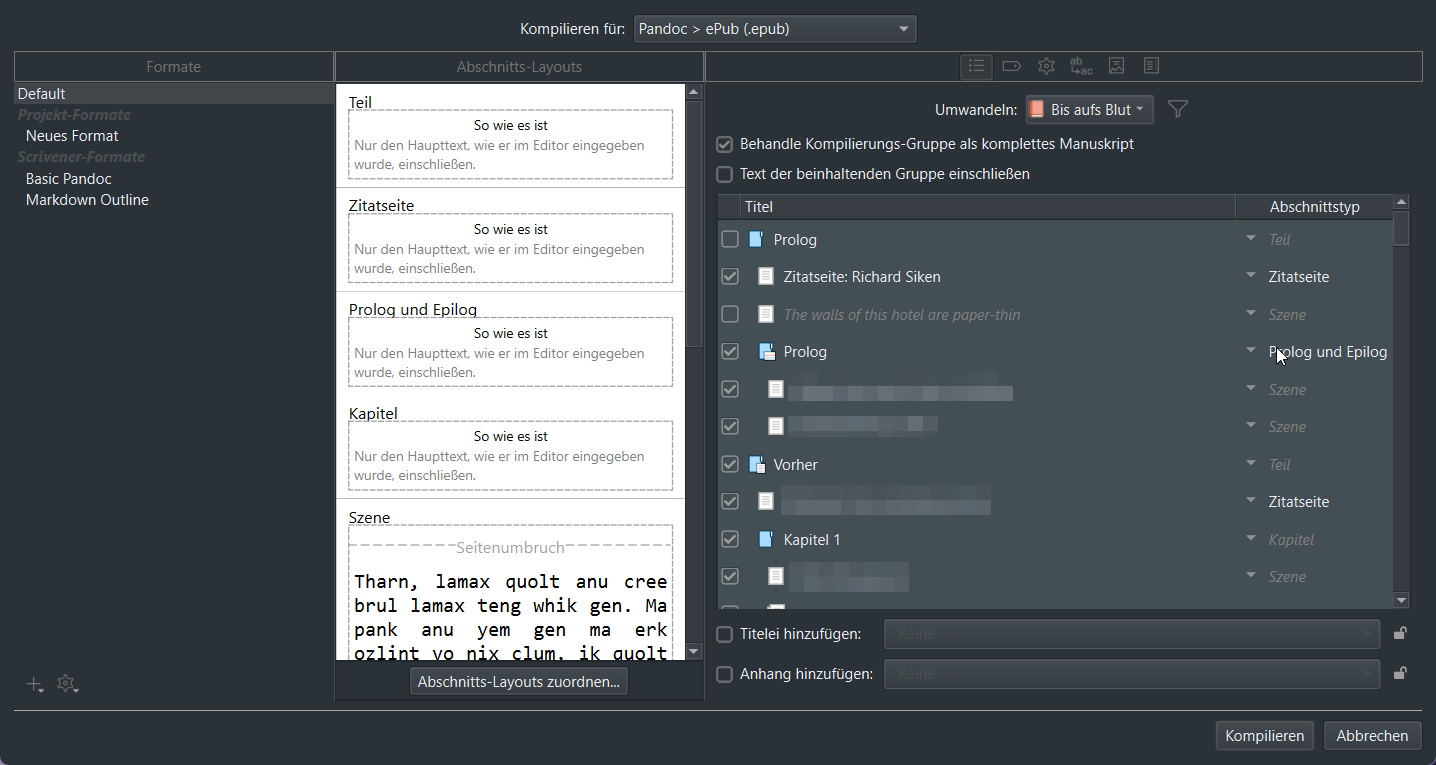
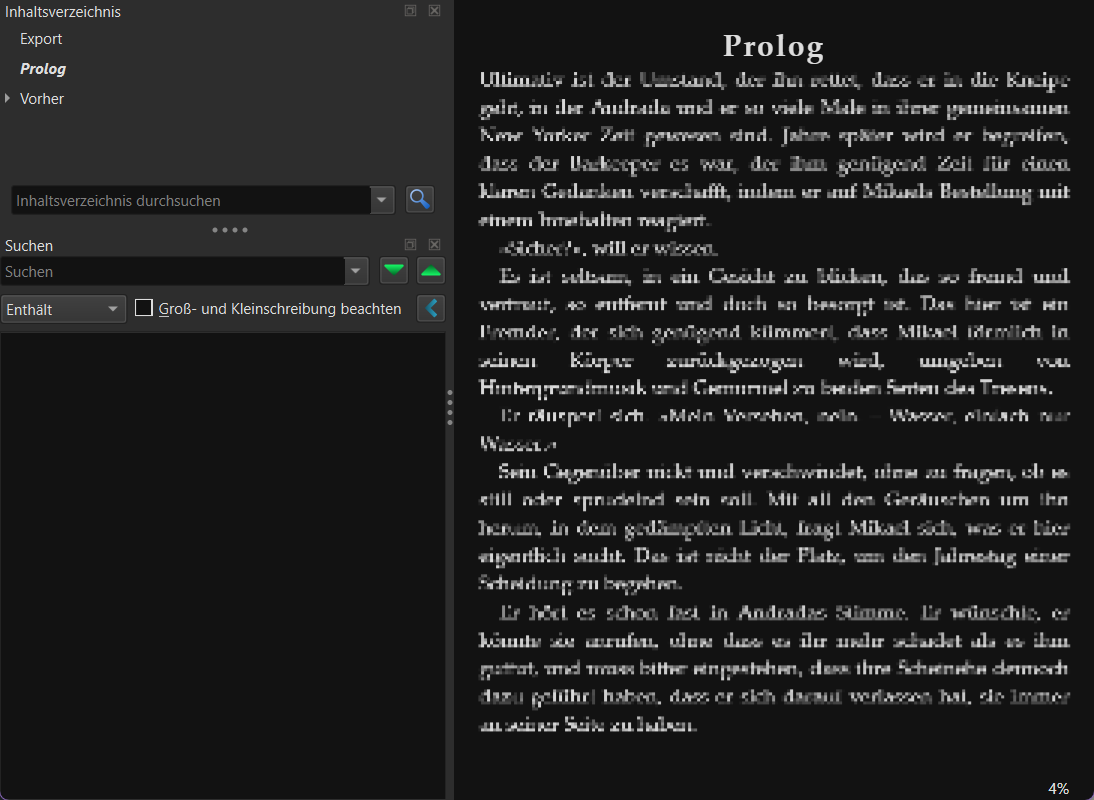
Thanks for the reassurance! I’m on my way to fiddle around with it further, but now run into the problem that for some reason, only ever the first folder / chapter is exported. E.g. here it only uses the first document, because the first folder is Prologue and then it calls it a day. I’ve had this problem ever since, and all checking the different tabs in the general export menu here won’t help (and format-settings can’t be it, really, because this is default format?).
I feel really silly coming here over and over again for help, but either I suck at using Google suddenly (which seems unlikely haha), or I have… very unique problems?
Firstly, no worries at all. As I said above, I’m happy to answer questions, and I don’t believe we have a good thread on Pandoc-ePub migration on the forum, so this will all be valuable to future writers as well looking to try it out.
Secondly, I would definitely recommend not bothering with “Default”, when using any of the Markdown-based export options. It’s really not made for it, and won’t be set up well. Stick with “Basic Pandoc” for now, but you’ll probably very soon want to duplicate from that so you can add your own CSS to the “Pandoc Options” compile format option pane.
Those aside, I don’t really see what could be causing what you describe, nor can I think of anything that might cause it. So yes, maybe it is a little unique. Well one thing I like to do if something isn’t working right, is to change the compile format to plain “MultiMarkdown”, which will just export a simple text file you can read in anything like Notepad. Does that weirdly stop after the prologue too?[1]
A thing to know here is that this simple text file is the main thing that gets sent to Pandoc for conversion. The ePub setting also does other things, like handling your metadata settings and cover image, but the “.md” file is the core thing that matters, and so if something is wrong with that it can sometimes be easier to figure out why, with such a simple test. ↩︎
It seems fine now, “Basic Pandoc” seems to have done the trick or (this is my theory) the additional reboot / start of Scrivener. Because I’m pretty sure I did my general troubleshooting approach of “ok. let’s remove all custom settings and run the standard, see if that works” and I’m 95% sure that this also resulted in the cutoff the past few days – otherwise I just would’ve taken basic pandoc as a foundation.
It’s looking really solid now! I feel like I’m fine from here on, thanks a lot for your help!
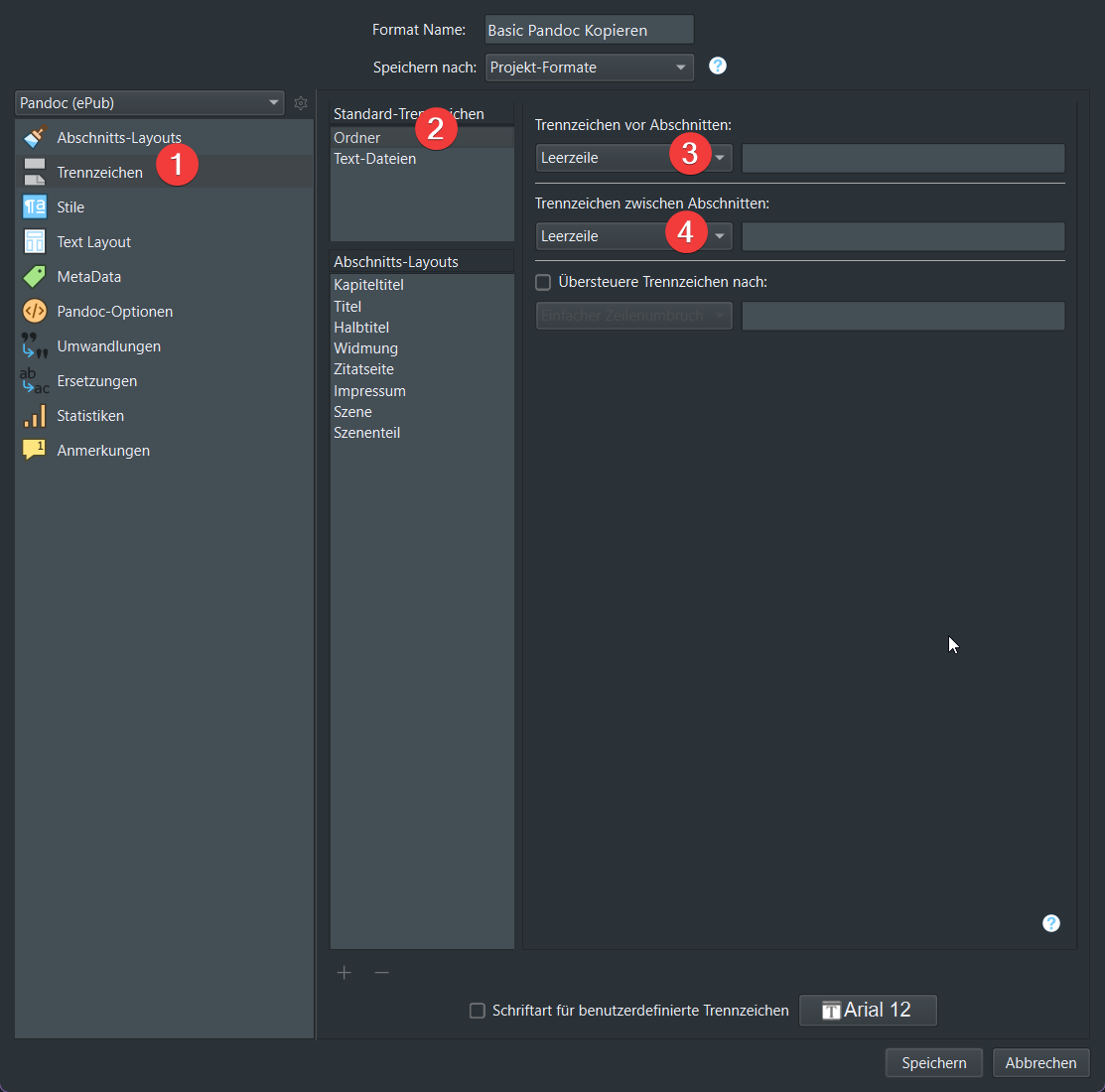
Followup: It seems that the behaviour of “unwanted cutoff” hinged on the setting for dividers being set to “new page” for folders. It seemed innocent enough for me to set it, but after trying the export with “blank line” it works fine again.
Here’s a screenshot of what I mean (sorry for being to lazy to switch up scrivener’s language):
I’ve seen that the options of Pandoc offer a flag to embed fonts. Can I give Scrivener options for the Pandoc conversion by e.g. placing a .yaml file in the same directory as the .scrivx? (This would be my first try/ intuition)
Yes, you can take over full control of the process. You will need to switch to the plain “MultiMarkdown” output method I mentioned earlier as a troubleshooting step, although this time for the purpose of accessing post-processing control. Doing so, when editing your compile Format, will grant access to the Processing tab, where you can target Pandoc at its install location, and provide your own flags (which incidentally would also get you around the error message since you can use the correct flag of --split-level=1).
The main downside to doing things this way is that you will need to learn and take over all of the process. The extra compile option tabs you get with ePub, and what they do, are:
The ToC tab changes command line arguments for setting how it works, with --toc=true and optionally --toc-depth=x, where x is the heading depth you wish to include.
The Cover tab exports the image and designates it for inclusion (--epub-cover-image).
The Metadata tab of course creates the necessary fields. This can be done yourself in Scrivener, for the main document metadata block, in the same Metadata tab (you’ll note it loses most of the fields when using “MultiMarkdown” mode, and instead provides a freeform key+val table.
Something to be aware of is that with the Markdown compile workflow, you can a create working folder that you compile into, which can contain support files such as the cover image, stylesheet.css, font files, and anything else you want assembled into the .epub. Refer to §21.5.1, Compile Folder, in the user manual, for further info.
I see what is going on with the “page break” separator setting. It is producing a result like this:
# Prologue

Some text...
# Chapter One

Some text.
Not only does that look awkward, it is also invalid Markdown. Heading lines can be adjacent to each other, or to a line of text following them, but there must be a clear line above them. So “# Chapter One” is merging onto the end of the last paragraph of the prologue. The same would go for any other section using that separator.
Well at any rate, as I said above, the page break setting is largely useless in Markdown anyway. We achieve page breaks through other means, typically as a product of heading structure.
Thanks for the in-depth answer on where to start / telling me it’s a somewhat different workflow. I think for me this is interesting (sooner or later I will probably just have a script to run the pandoc -o output.epub input.md command with all flags pointing to various css, font-files etc). I’m aware this doesn’t entice a lot of other people, though (which my other side judges as valid – i become so damn invested in fiddling around with settings just to make everything perfect and it’s always a long walk for a glass of water).
Definitely valuable to know this doesn’t solely involve Scrivener! Also thanks for the pointers re: useful flags
Ahh, thank you for explaining that! My brain didn’t make the connection of “yeah, duh, a pagebreak isn’t really a thing in markdown”, even though I know about the needed blank line before headings.
Hey, one last question (it’s looking really good!).
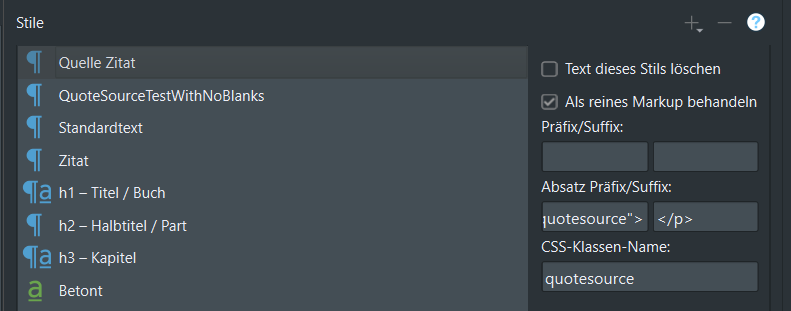
If a paragraph has styling and sits at the end of a document, the styling isn’t applied. What I mean is for the 2nd line to get applied, I need to have two things:
A blank paragraph at the end of the document
Uncheck “remove trailing blank lines at end of document” in the options-tab of the main export menu.
In raw xhtml, the “Nigerian Proverb” is just set in <p> tags, no <p class="quotesource">.
This seems… buggy? I mean it works, as long as I remember to add blank lines at the end of the document. Coding and ESLint has taught me to be immune to a trailing \n.
But for the average user, this might be a headscratcher why the formatting breaks sometimes? I even suspected that the issue might be the name of the style in the raw doc containing a blank or something before I thought “mh, maybe it’s a end of document thing”.
I’ve kind of finished setting up everything and am now happy to report that thanks to @AmberV s excellent recommendation of “just use Pandoc” I was saved from many trials and tears
For whom this might be interesting, I am now exporting multimarkdown to a dedicated Pandoc output folder, and in that folder, there is: