I am new to Scrivener and have run into a big problem. I picked Scrivener because I write poems and I wanted to be able to move the poems around, to find the right sequence, like you can in Scrivener.
here is my issue:
I had written some poems and found the right sequenc and I then exported it out so I could print it/send PDF’s out, but the exported poems looked nothing like how they were in Scrivener. The text was way bigger and all the choices I had made for the poetic expression was lost.
I tried and tried to find out how to export the text so it looked like it did in Scrivener but it seemed impossible, and I had to set the text up again in Google docs to be able to send it.
This was a big let down for me, and to think that I would have to do this with all my text makes me wanna quit Scrivener, because I make a lot of esthetic choices when I write and set up my text.
I really wanna stay in Scrivener, so I am writing and reaching out in the hope that some of you know how I can export my text so it looks the same as Scrivener.
The way Scrivener works is that you can reformat everything at compile. (This allows to focus on the content and see to the formatting only later - at compile -, or to match requirements from different recipients, editors, etc., all from the same project, without having to modify it a bit.)
I assume that by “export” you actually meant compile. But it doesn’t matter much.
You want to compile.
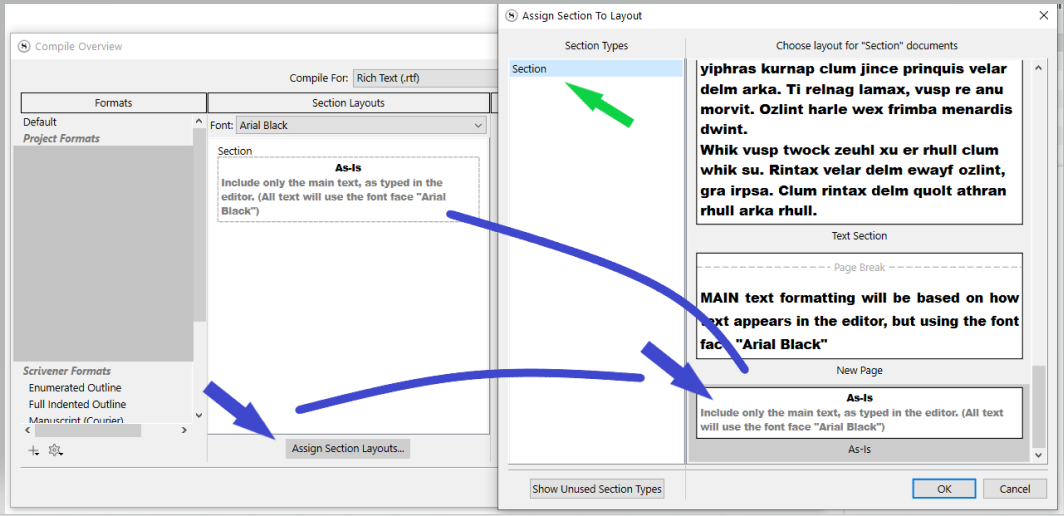
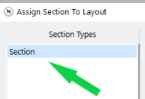
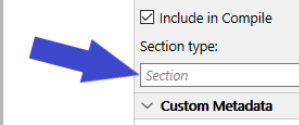
Do this for all of the listed section types where my green arrow is, or, if you want to be meticulous, check in the metadata panel of your project to see what section type your documents are assigned to, and do it only for this one (where my green arrow is).
Don’t give up. Scrivener is not a WYSIWYG word processor like Pages, Word or Google Docs. Its underlying philosophy is that creation is separated from final formatting.
So the first question is, did you “export” your poems using File -> Export -> Files, or did you try “compiling” you project… File -> Compile.
You should be using the latter, but it comes with something of a learning curve; you have to set it up to produce the output you want. That is something you need to spend time learning. But you say you make a lot of aesthetic choices in creating your poems, so here is a quick way to try to get them out.
First set all, in the editor, make sure all your poem documents are assigned the same section type. It doesn’t really matter what the type is named, but you’ll probably find Section which would do well.
As you are wanting everything to appear as it is in the editor, you can choose Default as the format #1 on the left. As you learn more you can experiment with others like Manuscript (Times).
Make sure the whole Manuscript (It may be called Draft depending on what template you started from. ) #2 on the right.
Click on Assign Section Layouts, #3 at the bottom. A new dialog will open.
You can set the resulting file to be automatically opened in your word processor of choice (mine happens to be Nisus Writer Pro).
I have chosen to compile to Rich Text (RTF) as that is both Scrivener’s and Nisus Writer Pro’s native format. But Word, OpenOffice, Pages, Mellel, and a host of other word processors and layout apps read RTF perfectly, though I don’t know about Google Docs.
I hope that will give you a start. I see @Vincent_Vincent has got in first, but he’s given you Windows screenshots.
Hey - I am FINALLY finished my book after approximately 5 years of joy, pain and everything in between. I’m trying to compile it and my ADHD brain can NOT handle the sheer number of fiddly options.
All I want is to export it so each section starts at the top of a new page like a grown up book would (is that so wrong??)
I tried to follow your instruction, but I don’t work for me.
The text size is way bigger
I have tried taking a screenshot were I compare a screenshot of how it looks in Scrivener, the complied export from Scrivener were I use the steps given in the thread, and a screenshot of the text put into Google Docs.
Maybe I just have to go over to Google Docs because I am starting to think this will not work, because as many of you say “Scrivener is just for drafts, not the finished layout” and because of that, it will not suit my needs.
It is really a shame because I really really like Scrivener, I just wish that I could rely on what I see in the program and be able to make visuelle choices
Probably you have mis-placed expections on how Scrivener works and the features it provides for writers. If you need WYSIWYG in the editor, there are many other apps out there that may well suit you better.
When you say the text is way bigger, are you using the font examination tools in each program and noting an enlargement of the physical font point size in the output, or are you just looking at the way two different programs (wildly different, when it comes to web app stuff) render fonts or handle base zoom levels, or attempt to compensate for differing PPI standards in systems?
From your screenshots, I don’t really see anything being done here that would challenge Scrivener. I thought maybe, when I first read your description, you were trying to meticulously design poetry across a physical page, as some might, floating lines around horizontally and such, but you’ve just got flush left lines. You should be fine using Scrivener.
It does look like Google struggles to read some formatting correctly though? It doesn’t understand the line height settings you used, maybe?
This could be the error. How do I check the page size in the compile editor? I follow the Mac compile step by step, that is posted earlier in this thread
The stock Formats we provide almost always use your project’s print settings, in the File ▸ Page Setup... menu (the two exceptions print the paper size in their name). This is true of the “Default” compile Format, which you should be using at this point as it is designed to pass through editor formatting with optional headings. It almost looks like you are using A5 in Scrivener.



 )
) 


