I’m a scrivener newbie so pardon this very basic question.
Is there a way to export all the text documents in a folder to a single word document? I have tried to no avail.
Scrivener exports the folder to an identical folder on my mac and includes the text documents as separate MsWord files.
To reiterate what I need, I am hoping to save time by having all the text documents go into a single MsWord file.
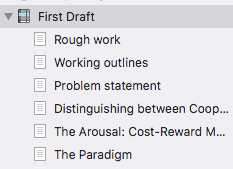
As in the photo attached:
I want to covert all the text documents under the folder titled "First draft"t to a single MsWord document call “First Draft”
When I choose the File=>Export option, Scrivener creates a slew of folders named “Chapter 1”, “Chapter 2”, etc. with individual docx files for each section inside. I end up with over fifty individual docx files for the book.
I’ve tried the compile options and can create a single docx, but there are tons of options that affect formatting, fonts, headers, etc. and I usually end up losing simple formatting like bold, italics, smart quotes, etc.
What is the simplest way to export a single docx file comprising all the chapters and sections of my book that is as clean and representative of my original text as the File=>Export option offers?
The simplest Compile option is to use the Default Compile Format. Double check the options under the ‘gear’ icon in the right-hand pane of the main Compile screen.
I am working with the latest Scrivener version & Windows. I have done this before but have forgotten some crucial element and am overwhelmed by the manual segment. All I wish to do is compile the manuscript and export it as a Word Docx. Once it compiles, and I know how to click the boxes, I want the file to export as one file, not with a separate file for each chapter. I go to File > Export then choose a name and location. The Print menu keeps coming up but I don’t want to print, I just want to end up with a Word file. Scrivener keeps creating a manuscript file but it is empty.