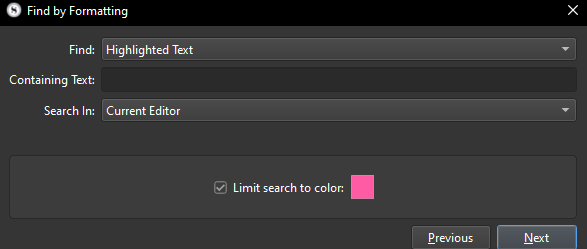
Result: Find by Formatting ignores the “Limit search to color” checkbox and finds all instances of highlighted text, regardless of the highlighting color.
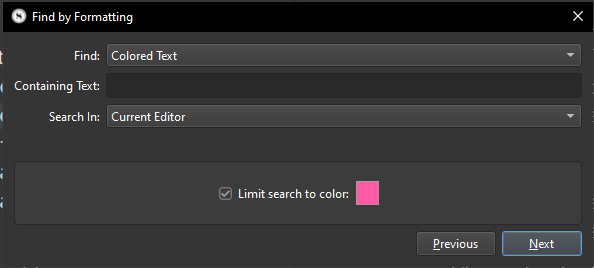
Bug #2 - Find by Formatting, Find: Colored Text, limit search to a specific color
Thanks for the report. The first one with the highlight we have logged, but I’m not able to reproduce the second case. Could you share the steps you’re taking to see this problem?
Here's what I'm doing:
In a new blank project, write three lines of “test test test test” in the document
Select the first two words of the first line and use the format bar to apply the green text colour (from the top row of colours)
Repeat this for the second word in the second line and the last two words of the third line
Duplicate the document in the binder
Place the insertion point at the start of the first document
Open Edit ▸ Find ▸ Find by Formatting... and set to find “Colored Text”, then tick the box to limit search to color and set the color to green; leave Search In to All Documents
Click Next repeatedly to jump through each instance of green text in both documents
Click Previous repeatedly to jump backwards through each instance
For the second case, I can replicate your results, in the test project and in my real project. I think it was user error on my part. I was using HTML (#ff5aa4) to set a custom color and perhaps I typed the HTML incorrectly.
I would say it’s not a big deal, but since I saw that option, I decided to use it by harmonizing the highlight colors, and then, upon looking up for what I need, it fails, and so it’s a bit of a letdown (not complaining too much, just the context).
After searching highlighted text through the whole manuscript, this leaves the last highlighted text of each sub document selected , when we get back to any of those document. Useless, mildly annoying et potentially dangerous (typing will replace!).
Well that should just be general intentional behaviour, rather than specific to this tool. If you double-click on a word to mark your place, and then go somewhere else and come back, it should remain selected (and scrolled into view).
I’d like a chance to explain it better, if I may try again.
Usually, using the search feature, it highlights (select) the first occurrence of text, and then, clicking next (or kbd shorcut) scrolls to the next find, and highlight this other occurrence while the previous is not longer selected. And this behavior unfolds like this all along the document without any exception (unless wrapping back at the first maybe).
Now, with the project-wide find, I would expect a similar behavior, even more so in Scrivener as a tool that has the ability to showcase the whole project as a single content.
And that is not how it behaves. Former selections lags behind at each document frontier, and if you consider the whole content (as a thought experiment) it seems that the selections are randomly sticking here and there, so to speak. What for? Despite the user having moved to another place to search.
This is how I see it: more inconsistent than consistent with the usual behavior. Maybe it’s a matter of point of view, but then we could look at the practical usefulness of such behavior.
I do kind of understand where you are coming from, but I think the main problem here is that finding is an act of selection (and is normal to do so, as you note) which means there is no functional difference between this kind of selection, and the one you make yourself. There isn’t a second kind of selection we can use that doesn’t collide with any selection you had made prior, it overwrites it, becomes what is stored in the metadata for this item.
(The obvious exception to this is Project Search, which does indeed passively highlight all matches at once where it can, but those persist even around typing events, so it can’t really be compared to this.)
So the question then becomes, where would the selection go, if the Find by Formatting command somehow were to revert to the previous selection upon document switch? That could very well be the second to last find highlight that occurred, which would in my opinion make even less sense. But even if it were to, upon navigating into a document, cache the original selection or cursor position, and then restore it upon leaving, I think that would still be a bit weird because then it would go against the notion of Find being, in general, a hybrid selection and location tool.
 Useless, mildly annoying et potentially dangerous (typing will replace!).