Hi drmajorbob,
Good idea … how do I do that?
Thanks,
scrive

Done … I think!
Let me know if that did not work … now to get some shut eye!
scrive
Um, how about just cmd-G’ing through occurrences of the word ‘atmosphere’.
Would this be in essence resolved if there was some kind of “Select All” button as a feature of the standard text find tool? If you could instead of going through one by one, have as a result a multiple selection of every matching word in the current view, you could then in theory apply or remove formatting from all of these selections at once.
There are already tools for multiply selecting text based on their formatting and styles (check out the Edit ▸ Select ▸ submenu, as well as right-click and gear button functions in the Styles panel), which make switching between styles as well as applying styles to ad hoc formatting quite simple.
Hi gr,
Thank you for the suggestion.
Actually, combined with a cmd-V to make the replacement (after having used cmd-C to capture the replacement text) that is exactly the alternative, that in some cases with other words, that I have used to make the replacements.
I have to admit, however, that after making a few dozen of such replacements, I can get a bit bleary eyed and loose the focus to make sure I am not making the replacements where I don’t want or need them.
Although having a Find and Replace by Formatting function by definition would replace ALL occurrences of a particular text+Style combination, and that would NOT be what I would want, that is, in most cases the exception.
If a Find and Replace by Formatting function were available, the process would be then, in those cases where I might NOT want ALL of the text+Styles replacements, for me to quickly run through the entirety of the code quickly via cmd-G just to see if there are ANY places where I don’t want to make the replacement. If I were to find such occurrences where I don’t want to make the text+Styles replacement, I could then make a temporary change to the text for those occurrances prior to making the global replacement. Then after making the global replacement, I could backtrack to where I would have made a temporary change, convert the text back to what it was originally, and that would be it.
It sound like a lot of work to make that kind of back and forth change to the text, but it is a balance that I’d need to make depending on the text+Styles that I need to convert, It would all depend on the frequency of how many changes need to be made versus how many don’t.
This is about the potential of having just another arrow in my quiver when adjusting the text+Styles as I go through, what is for me, a multi-year process to change how I render text to best effect so that I don’t blow out any (potential) readers that may have happened across wherever my words may have fallen.
It is just a potential tool, but a powerful one for me, and possibly for anyone else that stumbles upon the power of Scrivener Styles. There isn’t a day that goes by where I continue to develop as I wonder, ‘There’s (should be) a Style for that!’.
For most Scrivener writers, my guess is that for the majority that do not use LaTeX, there is a benefit to Scrivener Styles that won’t be apparent. I’ve mentioned this before, but the added complexity with LaTeX almost demands a Styles-like feature of some sort, where I can implement a particular Style that I have coded and tested, and that I can implement dozens, or even hundreds of times throughout my project without, in the vast majority of cases, EVER having to worry about introducing a coding error into the LaTeX code. This is no small feat when, after compiling, there are ten-of-thousands of lines of LaTeX code, (Yes, that is the case for me) and as can be the case, I get an obscure LaTeX coding error whenever I make a change to the Scrivener code.
Prior to implementing Scrivener Styles, to protect against a case where I just could not resolve a LaTeX coding error, I needed to construct and maintain several layers of backup code so that I could revert to (an) earlier version(s) of the code, to then in a piecemeal fashion, test each and every change to determine when or when the error occurred.
In such an environment, a Find and Replace by Formatting function would just streamline the day to day process as I continue to add to the story that someone may or may not want to read and not have to deal with my inexperience in writing as I learn the steps to write a better collection of words that is the craft of writing.
Apologies for going on for so long … thank for reading,
scrive
As I understand it (and I may not, because everything you are trying to do is embedded in that arcane and highly architectonic structure you have built for yourself) your target is a particular word styled in a particular way, so any search functionality which would enable you to set a target string plus either a target style or a target format would equally serve your current need. Evidently what you are missing and need is the plusability.
By the way, this is also something you could make a macro fix in LaTeX for. Though that would definitely be a bit of kludge-work.
Hi ,
As best I can tell, a ““Select All” button, as a feature of the standard text find tool”, would essentially be one implementation of a Find and Replace by Formatting function.
A cursory check of having a “Select All” button on either the Edit ▸ Select ▸ submenu or the right-click and gear button functions in the Styles panel, I believe would work. This of course is assuming the user has previously captured the replacement text+Style using the cmd-C function, prior to clicking on the “Select All” button, and then uses the cmd-V function to paste the replacement text+Style in all those locations where the “Select All” button has highlighted instances where the target text+Style exist.
One potential benefit of using a “Select All” button is that if the user could then de-select those particular chapters, sections and subsections where the user does NOT want the replacements to be made, the “Select All” button could serve as a conditional “Select All” criteria that would gild an already powerful command. The issue with all “Select All” criteria is the lack of any ability to make the selection in any way conditional, reducing it’s usefulness. Making the “Select All” criteria conditional to just those chapters, sections and subsections that the user has selected would be a welcome embellishment.
Thanks for the suggestion/clarification,
scrive

Hi gr,
Thank you for your thoughts and suggestions,
Even though English is my first, and for the most part, my only language, I don’t feel comfortable at all with words. I find solace in that wonderful tool I use referred to as the “Look Up …” where I can patch my language deficiency with access to what my memory is unable to provide.
An example is that I felt the need to do a “Look Up …” for the words arcane, architectonic and plusability (a.k.a. plausibility). All three words are informative as they provide a perspective into the environment in which I have been posting. I do not have access to any statistics regarding others that are reading and posting on L&L, so I can only gleen what is the status of users who alight here.
It is informative to me (and I am grateful for the feedback) that my question and subsequent postings revolve around an “arcane and highly architectonic structure you have built for yourself”. I can easily get over-excited about software, particularly an app such as Scrivener that I find is so elegant and powerful (a rare combination from my perspective) and at the same time presents an open interface for users themselves to participate in a pseudo-development environment.
I realize that this message string falls under the category of Scrivener-Wish List and therefore may occupy the bandwidth for those who are not LaTeX inclined, and for that I must apologize for consuming whatever unfiltered transmission capacity that occupies.
As for the “arcane and highly architectonic structure you have built for yourself”, I do not mean to keep any of what I have developed to myself. This site, and to some extent the very application we all here use, is a broad exercise in sharing the tool(s) we share and have in common, a very unique and special place where a very unique and special group of people can meet (Zoom or not).
If anyone is interested in whatever coding I have developed in my particular implementation of Scrivener+LaTeX, Scrivener Styles, or anything else that someone might think is of any value, I would gladly share what I have with anything I have done. I already have one request on my plate to share the “full workflow” of my Scrivener+LaTeX implementation, for which I need to dedicate some time to complete.
I am, however, more than willing to do a data-dump of my LaTeX (Memoir Book)->Project Formats->Styles files and accompanying “Front Matter” code [1], and anything else that anyone else might be interested in. The risk (to me only) is I would be opening my self to an even broader inspection of the “arcane and highly architectonic structure” and style of the code that I use to implement the “arcane and highly architectonic structure you have built for yourself”. ( I am a grownup and I can stand such criticism.)
My implementation of Scrivener Styles is not a unique function of LaTeX, and I believe can be as helpful and powerful for non-LaTeX users, but I could be completely wrong here. If so, I stand (actually sitting) open to be corrected.
As for:
that is an option. I would prefer to keep any Style adjustments within the Scrivener framework as I can then benefit from the visual clues (color codings) that Scrivener Styles provides to confirm the status of any selection of text. Any post-compile adjustments to the LaTeX code could prove to be confusing when I am working within the Scrivener framework.
Thanks for the feedback and suggestions,
scrive

[1] It would be a great time saver if anyone had a script or other tool that I could use to perform a data-dump of my LaTeX (Memoir Book)->Project Formats->Styles files. Otherwise, I’d have to do a cut-and-paste of each of my many Styles files.
That would be awesome!
Just to be clear by ‘that you have built for yourself’, I just meant “that you yourself have built”. No implied criticism.
Oh, and I really did mean ‘plusability’ (not really a word) — the ability to “plus” together two sorts of search conditions!
all best,
gr
Hi gr,
All is well …
I just hope I’m not annoying people here with my long-winded explanations of my hair brain schemes …
This really is an amazing piece of software, as reflected by the people on this discussion board.
Thanks for reading … and being patient,
scrive
P.S. I really DO use the "Look Up … " feature to fill in the gaps … words are NOT my domain! 
P.P.S. ‘plusability’ … is there a RegEx for that? 
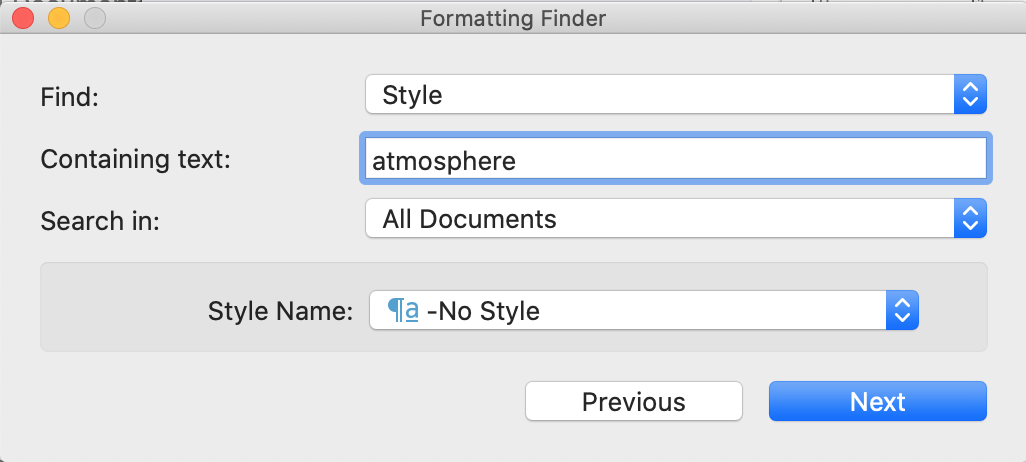
If I can add one additional thought to adding the “Select All” button as a feature of the standard text Find by Formatting... tool … is to add “No Style” or the equivalent to the list of Styles available under the Style Name: popup.
Certain words, such as ‘atmosphere’ and their ilk as discussed earlier, may have a special meaning, and as such, in certain writing styles such as my own, more often than not need to be presented in a particular style.
As a relative newbie to the world of writing, I can attest to how part way through the development of a document, the need or desire to apply a (or even create a new) particular Style can arise, requiring the author to backfill the earlier instances of a particular word with the Stylized version.
Enter > “No Style” for the Wish List of a “Select All” button …
Although I have made many replacements of the word ‘atmosphere’ with the stylized version, I’d like to make a clean sweep across all 500+ pages in my document to determine that I’ve made all of the Stylized replacements for ‘atmosphere’ that I’d like. Not all occurrences where ‘atmosphere’ may occur need to be updated, however, such as in tables and equations where the Stylized version would not apply, or could actually break the LaTeX code (e.g. in equations) where the word is used.
You’ll notice my feeble attempt in the screen capture below to actually create a ‘-No-style’ Style, but that did not work. Perhaps I missed something about creating a ‘-No-style’ Style that caused it to fail. 
What I think would make sense is if in whatever incarnation of Scrivener this Wish List item were to appear, if at all, the list of available Styles in the Style Name: popup were to include a bonafide ‘No Style’ item. This would facilitate searching for those instances where a particular Style has not been applied to a particular word or string of text where I would like to, but have not.
Feel free to let me know if there is another way to facilitate what I’ve described above. My alternative is to do a brute-force search through my 500+ page document for all occurrences of the word ‘atmosphere’.
Thanks for reading,
scrive
The lack of “No Style” in this list may well be an oversight. This is certainly something you can do in the Windows version at any rate. I’ll put it on the list for consideration.
I did not mean to imply that this hypothetical “Select All” button would be in the formatting finder panel, as I referred to the standard find tool. It would not make a lot of sense to have such a button in a tool that inherently operates at a scope greater than what is in the text editor.
Not all occurrences where ‘atmosphere’ may occur need to be updated, however, such as in tables and equations where the Stylized version would not apply, or could actually break the LaTeX code (e.g. in equations) where the word is used… Feel free to let me know if there is another way to facilitate what I’ve described above. My alternative is to do a brute-force search through my 500+ page document for all occurrences of the word ‘atmosphere’.
Well, we’re talking about different tasks then, as no “select all” capability is going to ever be appropriate for that. So we’re back to where the Mac version seems to have a blind spot in its implementation, that if it were not so, would allow you walk through instances one by one and decide whether or not to style them.
This is one of those cases where we can readily see one of the disadvantages rich text has. One needs an ever increasingly complicated feature set to do things with it, where if we were talking about how some words in your document are atmosphere and others are {\cmd atmosphere} or even some Replacement-based shorthand markup like ..atmosphere.., then all you need to find the instances not marked up is a regex tool.
But it is a balancing act, if one has the ability to push the command into the background with a symbolic representation, it makes sense to do so where the profusion of such commands would hinder editing and writing. So I do digress a bit, but it is food for thought.
I only use Scrivener’s styles as a last resort. First is whether Markdown supports it, then I use that, second is if I can’t better use “custom syntax” with Replacements, and if that is unwieldy, then I’ll use styles with the recognition that in doing so I will handicap myself in some regards.
I try to think of these limitations in my decision-making process for whether to use them. If a type of formatting is going to be applied to words that might be found anywhere, like ‘atmosphere’, I would lean more toward visibly typed syntax. For stuff that is in and of itself inextricable from its formatting (like the pairing between menu command paths and the style for displaying them) then I can more safely sacrifice capability. It is after all extremely unlikely that I’m ever going to need to batch convert hundreds of words into a menu command format.
I don’t mean to speak entirely abstractly, as this may be something to consider as an implementation choice for this problem. After creating a full project backup:
Edit ▸ Find ▸ Project Replace to convert “\batmosphere\b” to “…atmosphere…” (or what have you).It depends on whether there are more cases that match that description than the other, really. If there are ten instances where the word should be styled out of 400, then it makes more sense to just style or mark up those ten by hand.
Feel free to let me know if there is another way to facilitate what I’ve described above. My alternative is to do a brute-force search through my 500+ page document for all occurrences of the word ‘atmosphere’.
I don’t know if there is ever going to be a way around that though, since as you say, the determination for each and every individual instance should be styled is something only a human can decide, based on its context. Computers can help us with the brain-dead stuff, like finding the next instance of the word, without having to waste hours leafing through 900 sheets of paper and reading them closely. But when it comes down to whether the word should be underlined or not, that’s on us.
Hi AmberV,
I very much appreciate your comments and suggestions. Your years of experience remind me of just how far I need to go before I can think of myself as a Scrivener master.
I’d like to respond in kind to the thoughtful insight that in so many cases raise ideas and possibilities that I need to consider from my limited slice of the spectrum of all the colors that Scrivener brilliantly shines onto writers that are graced with the app.
Part of my response is that I think I need to review my use of Scrivener Styles, and in particular, why I find them Sssooo incredibility useful. As part of that review, I need to create a listing of all the code that lives in my Styles, both as a review of just what I have done, and to share with you what exactly it is I am doing with Styles.
To that end, I’d like to know if there is a file where the Styles code is stored. nontroppo not too long ago mentioned that some Scrivener code is stored in certain files in XML format. It would be immensely useful if you could point out if/where the Scrivener Styles code is stored so I may then extract the code that I developed for each Style.
If there is a direct way that I can just print out whatever text in whatever files the code is stored, I would appreciate if you could point me to the appropriate files. I’m assuming, however, that it won’t be that simple as printing out the relevant files as if they were plain text.
My brute force option would be to simply cut-and-paste the code for each Style into a plain text file, and then arrange the text in some understandable format for review by myself, and possibly others.
Thank you again for your thoughts; I appreciate your digressions as well as all of your ‘food for thought’.
I look forward to hearing back on what options may exist for extracting my Styles. I’m hoping to respond more fully once I’ve had a chance to review what the heck I’ve created in all those styles I’ve manufactured.
Thanks again,
scrive
I’m not sure exactly what you mean by “the code that lives in my styles”, but all of the project-side style information is stored in the project package, under Files/styles.xml. Unless you are able to read RTF snippets though, it’s only going to be of minimal use to you.
That’s only half of the story though, for functional style usage via the compiler. For that you will find the settings for them in the Settings/Compile Formats subfolder, in any of the .scrformat files here that you make use of. Within those XML files you will find a Styles block toward the bottom, where each compile defined style is listed along with prefix/suffix and other settings, and any RTF formatting it uses.
Hi AmberV,
Thank you for outlining the extensive steps toward assembling a comprehensive list of Scrivener Styles.
Although XML is a definite challenge for me, perhaps someone with more expertise that I can distill the intricacy with how Styles are stored into a plain text form.
I think for the moment, for my summary of Scrivener Styles, I’ll cut-and-paste the Styles together to assemble a comprehensive view of what I’ve done.
It would appear I may be far past the time when I should have had a more comprehensive look at what I’ve done with Styles, and more importantly, where I am going.
Thank you again for your outline of how code for Scrivener Styles is stored.
scrive
Apologies to all that may have participated in this long thread back in February when I posted my question regarding a Find and Replace by Formatting function within Scrivener.
I will be the first to admit that, as a ‘kinesthetic’ learner, I don’t read manuals, much to my detriment.
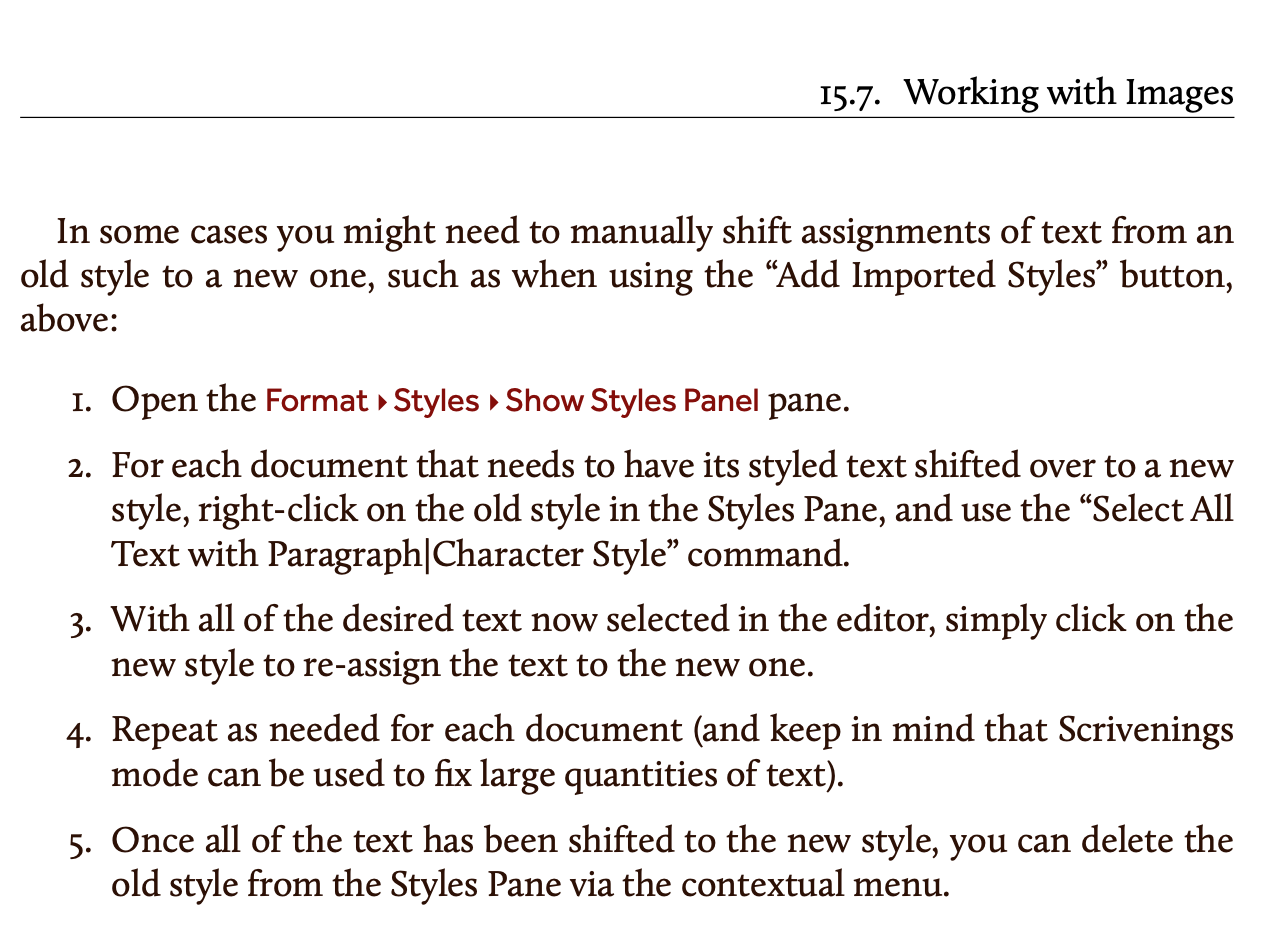
That said, in another more recent posting, November_Sierra pointed me to the Import Styles... feature, which it turns out, holds the key to the Find and Replace by Formatting function I was looking for so many months ago. The relevant passage in the Scrivener Manual is as follows:
Although not something I often need, when it is needed, it is transformative. Such was the case just last week. I had created a new Style that utilized the longfbox LaTeX macro, in place of a minipage-based macro, to allow for a verse to break across pages. I had hundreds of instances where I used the minipage-based macro. Not knowing about the Scrivener feature
to manually shift assignments of text from an old style to a new one
cost me several days of cutting-and-pasting to update my project from using the minipage-based macro to the longfbox LaTeX macro wherever there was a verse.
I thought it important to point-out this Find and Replace by Formatting feature for Styles to the larger community, particularly those who may be using Scrivener Styles to create a form of LaTeX macros as I do to facilitate my writing.
Thanks for reading,
scrive