First line indent problem in Novel template

While I was writing a little webinar on exporting Scrivener novels to EPUB, I just stumbled over some strange behavior regarding the first line indent. I setup a new project with the built-in Novel template and used the folder/scene paradigm for the binder structure, just as explained in the information page of the template. But when compiling with the Ebook format, the first paragraph of the chapters were indented, and they shouldn’t be.

So I dove down into the XHTML and saw the following generated code:

> <div class="chapter-title">
> <h2 id="doc3" class="chapter-title-page-padding"><br /></h2>
> <h2 class="bordered-title"><span style="text-transform:uppercase;">CHAPTER ONE</span></h2>
> <p class="br"><br /></p>
> <p class="separator"><br /></p>
> <p id="doc4" class="ps2"><span style="text-transform:uppercase;">THE PURPOSE OF</span> this document is to demonstrate the conversion process into an ebook, in ...

Normally, a CSS rule in the standard stylesheet would kill the indent of the first paragraph:

.br + p { text-indent: 0em; }

But in this case, the paragraph was preceded by a <p class="separator"><br /></p><p class="separator"><br /></p>.

Now that I knew the cause of the problem, I went into the Ebook format, set the Separator before sections of the Section Text section type to Single Return and all worked perfectly. Now the generated code looks like this:

<h2 id="doc3" class="chapter-title-page-padding"><br /></h2>
<h2 class="bordered-title"><span style="text-transform:uppercase;">CHAPTER ONE</span></h2>
<p class="br"><br /></p>
<p id="doc4" class="ps2"><span style="text-transform:uppercase;">THE PURPOSE OF</span> this document is to demonstrate…

And the CSS rule works just fine.

I am posting this, as others might also stumble into that same problem. Also, it might be helpful in improving the project templates.

If someone with more experience than me has time to look into this, I would appreciate to learn what I might have done wrong for the standard template to work or get a confirmation of my observation.

Cheers
Norbert
1 Like

Did you look at the text layout settings and see if certain boxes are unchecked for the section layout for chapters and scenes.

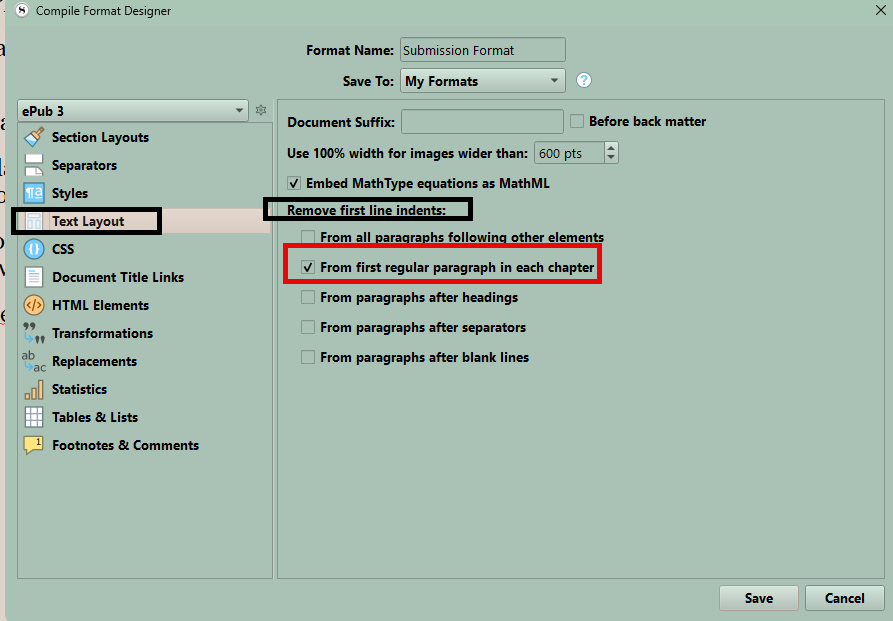
Yes, I checked that. I even have it on “From all paragraphs following other elements”.

If I put all text of a chapter into a single binder item and then use section type Chapter, all works fine also. In that case there isn’t the problem with the thrown in separator paragraph.

I assume, the Ebook format is already a really old format and was developed before the Separators got introduced. And nobody tested it fully after that. I guess, it could be fixed by adding another rule to the standard CSS stylesheet.

.separator + p { text-indent: 0em; }

An easy fix. But I’d like someone with more experience in Format development than I have take a look at it.

Are you using Epub 2 or 3. The staff is great about responding to this type of stuff. Amazon will now convert epub 3 to their format using the send to Kindle option on Amazon’s web site.

It happens independently of EPUB 2 or 3. I just verified that.

Instructions to reproduce:
Create a new project from the Novel template
Enter two paragraphs of text in the first scene.
Compile with EPUB2 or 3 and Ebook format.

You will see that the first paragraph is indented, although it should not be.

I have prepared a little demo project for that, but when I try to upload it, File Explorer just opens the .scriv archive instead of selecting it for upload. What’s the trick?

I’m looking into this from the original descriptions, and think I know what is going on, but in the meanwhile: just make sure the project you are trying to upload is zipped, and then drag and drop the zip from Explorer into the composition text area.

1 Like

FirstParaIndentProblem.scriv.zip (318.0 KB)
Ah, that was the trick.

Hello Amber! We haven’t had the pleasure in a long time. I hope you are doing well.

Attached is the little demo project.

The cure to the problem is probably, to add the following rule to the default stylesheet:

.separator + p { text-indent: 0em; }

Best,
Norbert

1 Like

Doing well indeed! Just getting back from a summer break in fact. If only so much of the world wasn’t blanketed in heat waves, it might have been more comfortable. :hot_face:

On the original issue you spotted: yes, I have no clue why the default format inserts a scene break between the heading and the first scene. It works the same way on the Mac (though it has the CSS to work around the odd structure). If you want more space between the heading and the paragraph, well… that’s what margin-bottom is for! :smiley:

Our plan here is to at some point get ePub output cleaned (all of these unnecessary ps# classes that can also get in the way of the design), removing all of these superfluous and redundant spans, the missing divs—all of that, and then refine the Format against what the output should be. The interplay between the two right now is fragile and difficult to work with. But we might consider tossing this CSS into the stock settings, like it does on Mac, as a stopgap. At that time I’d also like to look into the heading structure itself as well, as the current default settings make very little sense.

2 Likes

Sounds like a plan, Amber.

And I am still admiring your wonderful product. It’s really fun to work in Scrivener. If you need someone to throw some ideas at for feedback, you know where to find me.

Best,
Norbert

1 Like