Not sure why I’ve not noticed this before, or if it’s the new glasses (gone from no specs to varifocal specs), but the font in the footer bar on the main editor window is really, really tiny. Is there any way we can make this bigger? I’m having to press my nose against the screen just to see the word count!
Many thanks.
Scrivener for Mac 3.5.2 (‘About Scrivener’ is tiny too…)
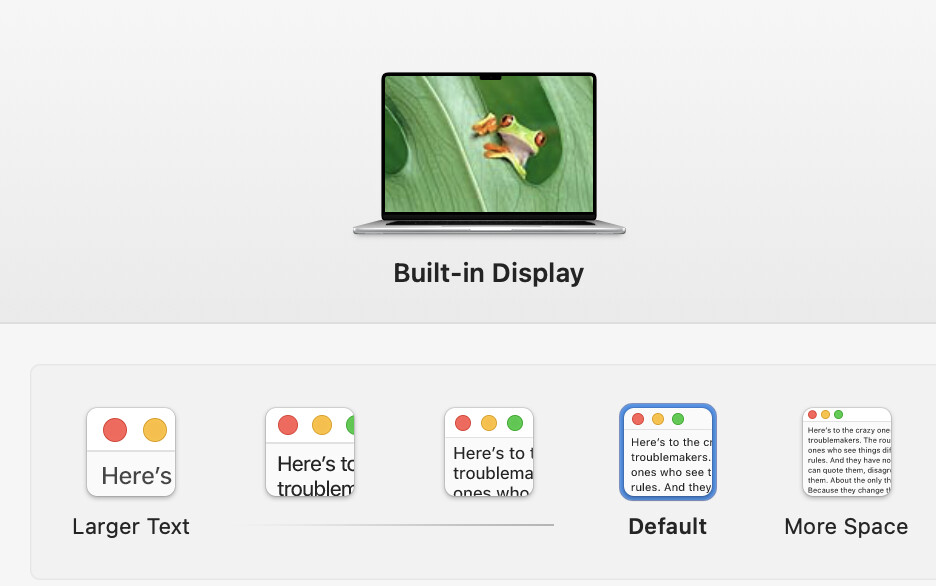
You can change the screen resolution and see if you like the alternatives. Apple Icon (upper left) → System Settings → Displays. Mine set for “Default” on a MacBook Air 15” and I am happy with that. You can perhaps pick what they call “Larger Text”:
Gosh, thanks for the speedy reply, and for the bonus Apple support. That worked! Apologies for it being a system query and not a Scrivener one after all. (I’m only a year or so into being a Mac user too!)
 (I’m only a year or so into being a Mac user too!)