My footnotes used to show up at bottom of the same page. However, I was having other problems with a highly customized format I had made a few years back. So I went to use the standard Paperback 6x9 format, which did solve those other problems. However, now I cannot get footnotes on the same page. Instead, they show up at the bottom of the NEXT page, even when I allow widows and orphans in footnotes in the standard Paperback 6x9 format to PDF. (Sound of me tearing my hair out.) Unfortunately, I also erased my custom format. I have spent hours today searching on Google for a solution. Nothing I have found fixes it. I’ve even tried putting less space at the tops of new-chapter pages. I tried using a smaller font (6pt) and single-spacing.
Hi.
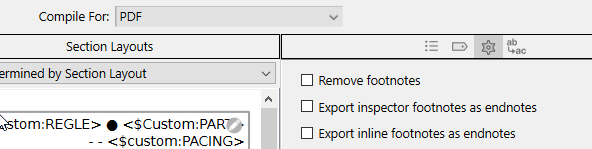
Did you check see if perhaps they are turned into endnotes ?
Does it look so, chapter/section-wise?

Hi Vincent_Vincent,
Thanks for the suggestion.
Both of those boxes are not checked – exactly like you have in the illustration. I have 10 footnotes across 265 pages and 35-ish chapters. If the footnote should appear on page N (that’s where it is in the manuscript), it gets compiled onto page N+1. For all of those 10 footnotes. Regardless of whether the footnoted place is near the top or bottom or middle of the page.
Update. This “compiling footnote on page N+1” issue is present in the generic Paperback 6x9 format, but not in the generic Paperback 5x8ish format. The 5x8ish format puts the footnote at the bottom of the same page. This suggests a problem (bug?) with the generic 6x9 format itself. I will try rebooting my computer sometime later this week and see if that fixes the problem.
Bummer. The generic 6x9 isn’t messing up on a different file. So that’s not the problem after all.
Use the 5x8 and tweak the page size to 6x9 ?
Do you see the same problem if you compile to another format, such as RTF or Word?
Thank you for checking the 5x8 format. That indicates not a “bug” in the format – Compile Formats are too stupid to have this kind of bug – but that there is a page size dependent issue in the underlying text.
One thing to check is to see if the Format → Paragraph → Keep With Next setting is on for paragraphs in the vicinity of the first footnote with the problem. That setting can cause all kinds of weird text flow issues because it prevents Scrivener from breaking pages normally.
1 Like
LOL = awesome idea. Will do if nothing else works. 
Both RTF and DOCX have correct placement of the footnotes. Same page.
However, I will doublecheck the Format → Paragraph → Keep with Next, because I found that very confusing. I have turned that both on and off more than once over the course of writing this. Which has been more than a 2-year project.
If DOCX is correct, one option would be to create the PDF from Word instead of directly from Scrivener.
In general, our PDF engine is often not the best choice if you want “publication ready” output.
1 Like
Keep with Next is Off – for that entire chapter, which is the first in the book. I double-checked all paragraph content before that as well (eg title page, TOC), and nothing has Keep with Next.
I don’t have/use MS Word. I use Open Office, which does not play well with docx.
Compile for: Print has same problem as PDF.
Curiously, when I try the generic 6x9 format with a different file, the footnotes appear on the correct page. So it’s something I’ve done with this particular project.
I want a PDF that I can put on the web and either link to it or sell it.
RTF should do perfectly.
You could also first try Zap Gremlins.
Compiling for Print just generates a PDF and then sends it to the printer. So yes, it would behave the same way.
I’d be happy to take a look at the project. Please open a support ticket, here:
https://www.literatureandlatte.com/contact-us
1 Like
Yup, I zapped the gremlins too.
I’m sending an email to scrivener-mac. Or at least I’m trying to. The file is 25Mb, lots of images (cartoons).
That’s probably too big for our mail system. Feel free to send a file-sharing link instead.
Alternatively, make a duplicate of the project and strip out everything not relevant to the bug. For instance, if the bug appear in Chapter 1, we don’t need to see Chapters 3-20. Make sure the problem persists in the duplicate, then send it along.
FYI, check your image dimensions. Images can have a distorting effect on the positioning of the text around them, similar to the Keep With Next command.
Just wanted to let you know I got your support request. I’m going to ask some of the other team members to have a look, so it may take a day or two.
1 Like
Thanks! Day or two is fine. I’m moderately confident about the image dimensions. I made all of them 1500 px wide and 1132 px tall. At 300 dpi that is 5 in wide and 3.77 in tall. Except cover image. Hmmm. Could that be the problem? I’ll try compiling without that… tomorrow. I’m having a sleepless night.
Removing the cover image did not solve the problem. 
However, removing the table of contents and the <$BLANK_PAGE> from the short file did solve the problem. Investigating further… AHA!!!
Putting <$BLANK_PAGE> back in – all is well. Footnote compiles onto the correct page.
Putting a new TOC onto the existing Contents page in the FrontMatter’s Paperback folder – all is well!
I had put the TOC onto a “regular” text page which I then “labeled” as a Contents page when compiling. Apparently that was the problem? Seeing if I can recreate that problem… NOPE!
Okay, so removing the TOC from my big manuscript apparently solves the problem. Possibly I did something wonky to that TOC.
Bottom line = yay! problem solved. And possibly a small data point added to your collection of “what can cause a weird problem while compiling”.
2 Likes