Footnotes next to each other

Ok. I didn’t get all of that as it doesn’t really relate to anything I’ve ever done (as I said, I am a novelist, and one with minimal needs on top of that), but if ultimately LL’s staff told you to reformat post compile in another app, I’m afraid that this undoubtedly means there is no way to do it in Scrivener.
:man_shrugging:

As for posting screenshots, it shouldn’t take much longer before you can do so.

I can totally see how Scrivener would be helpful as a novelist and much better than Word, if you wanted to rough outline your book, create chapters, move things around, etc. I published a collection of essays and a very non-technical book for some other people and moved the Word files they made into Vellum to make print and kindle outputs. As a writer, having these files all together would have been preferable.

I’ve published several graphics-intensive books using both InDesign and Madcap Flare, but neither is really good for the actual writing. Neither interfaces with Grammarly and aren’t really writer-friendly. Scrivener, like Word, can use Grammarly.

For technical books, I used Framemaker for years and then switched to XeLaTeX, which is incredibly powerful if you set it up correctly. However, it shows its age when you want to create an ePub output. You often need to change how graphics and tables are placed on the page to match the ePub, and that makes a non-elegant printed look.

I use OxygenXML extensively, but it takes a bit of time to set up and is not worth the bother for simpler writing. That is where I see Scrivener fit in. Framemaker wasn’t bad for that, but it requires Parallels and shows it age for multisourcing.

I prefer not to visualize myself trying to write a book without it.
It is simply a must.
When I finally came across Scrivener a good couple years back, I just couldn’t believe my luck that someone was actually smart enough to have designed a software exactly like what a writer actually needs… yWriter came close, but… well… no. (Thinking back at how I was actually using Evernote to write my books (I craved that freely split, move & reorder thing), and how that app was what I figured to be my best option (and it was, unaware that I was of Scrivener), I laugh.)

I might be wrong, but for the purpose of your project, perhaps Scrivener is still the best way to go as far a developing the content is concerned… (?)
(Note that I am not affiliated with LL, and that it doesn’t make any difference for me whether you use Scrivener or not. – Meant in a positive way. (Also note that LL’s staff are really not the push for a sale type. Which is another positive thing.))
It is pretty hard to go wrong with them. Or with the software altogether.

There are so many ways to set things up for later tweaks, that I am pretty certain (once you perhaps figure out Scrivener a tad more) that you’ll be able to work in a fashion that will make your compile a piece of cake to “fix” later on in some other app.
It is like golf: you don’t drive with a putter. (Meaning: use Scrivener to get there as far as the content is concerned, enjoy how great Scrivener is as regard to that, then, having your compiled version in hand (perhaps with the replacements “cues” already in place), finish up in whatever other app fits your needs – the putter.)

3 Likes

@IsleofGough, have you looked into the possibilities of the Scrivener → Markdown → Pandoc/Quarto workflow?

Like @Vincent_Vincent, I’m not involved in the kind of book creation you are in, but if I were, I’d be looking at that workflow. Check posts particularly by @nontroppo.

HTH :slight_smile:

Mark

2 Likes

As for the original question, I would try—I won’t have time to try myself until tomorrow evening or Monday—using the default asterisk footnote markers, separating them with a “zero-width space”, which is Unicode U+200B or UTF-8 E2 80 8B, but I leave it up to you as to how to enter it. But on the Mac, if you click on the circle with three dots symbol above the list on the left of the Emoji and Symbols Dialog, you can choose “Customise list” and add “Unicode” and you’ll find it there, so you can add it to favourites to make it easily accessible.

:smile:

Mark

Hi IsleofGough,

Just curious … are your using Scrivener+LaTeX?

Thanks,
scrive
:thinking:

Jumping in, I’m am bit “spoiled” with Scrivener+LaTeX. I use the Scrivener-provided template for a lot of my deliverable documents (not publicly published but for private clients). The built-in features and succinct instructions (at top of Binder) are really terrific and fit-for-purpose. I’ve needed only a few tweaks to the LaTeX features which are now set in my own template. Hence most of my time is rightly spent on writing and creating and not compiling.

My hunch, without me investigating further, you can do your own tweaks to the Scrivener-created *.tex file, thus creating your own template, to make the footnotes be as you want.

I’ve not looked into Pandoc stuff. But a lot of people (from evidence in this forum) use that tact and maybe someday I’ll get the energy to explore.

1 Like

Thank you for the replies. I’ve not tried Scrivener with LaTeX, but I’ll check it out. When I do the sort of work that is best done in XeLaTeX, I write directly into LaTeX. I’ve rarely had to move things from another program into LaTeX, and I don’t remember what I used. I tried Pandoc a few times for translating LaTeX to other programs, and those files required a lot of cleanup. The process wasn’t very satisfying.

How does Scrivener handle LaTeX packages? Here is a typical publication I did in LaTeX and the packages it required:

\usepackage[inner=1.125in, outer=1in, top=1in, bottom=1in]{geometry}
\usepackage[parfill]{parskip}
\usepackage{graphicx}
\usepackage{amssymb}
\usepackage{array}
\usepackage{placeins}
\usepackage{cite}
\usepackage{wrapfig}
\usepackage[etex]{adjustbox}
\usepackage{mwe}
\usepackage{index}
\usepackage[table]{xcolor}
\usepackage{titlesec}
\usepackage{blindtext}
\usepackage[english]{babel}
\usepackage[math]{mathspec}

I do most of my writing myself but have also helped colleagues, friends, and family get their work published. I’m not too fond of Word and successfully avoided it for decades, using AmiPro initially and later Framemaker. But Word has become such a universal exchange format that I succumbed and now use it reluctantly to type memos and letters. I personally never use it for writing a book. I did collaborative technical work in the past, but not so much now. I used Framemaker and Flare for that, but if I were to do it now, I would use Paligo (which is pretty expensive).

Most of the time that I do work for others, I receive Word Files. If I don’t want to spend a lot of time with them, I use Vellum. It is very limited but can put together several chapters and create a decent print and ePub output if they are pretty simple and don’t need fine tuning of graphics.

For more complicated work or times I’ve needed translation, the Word files get moved either into Flare, Oxygen, or InDesign.

For my own projects, I need something for multisourcing. I frequently need outputs in Word, PDFx, small pdf files, ePub and occasionally web. I am a sloppy writer and need to edit dozens of times, which makes correcting in multiple formats tedious. The instability of Word for longer documents makes it a non-starter, but if I send what I’ve written to others for proofreading, they generally want a copy in Word.

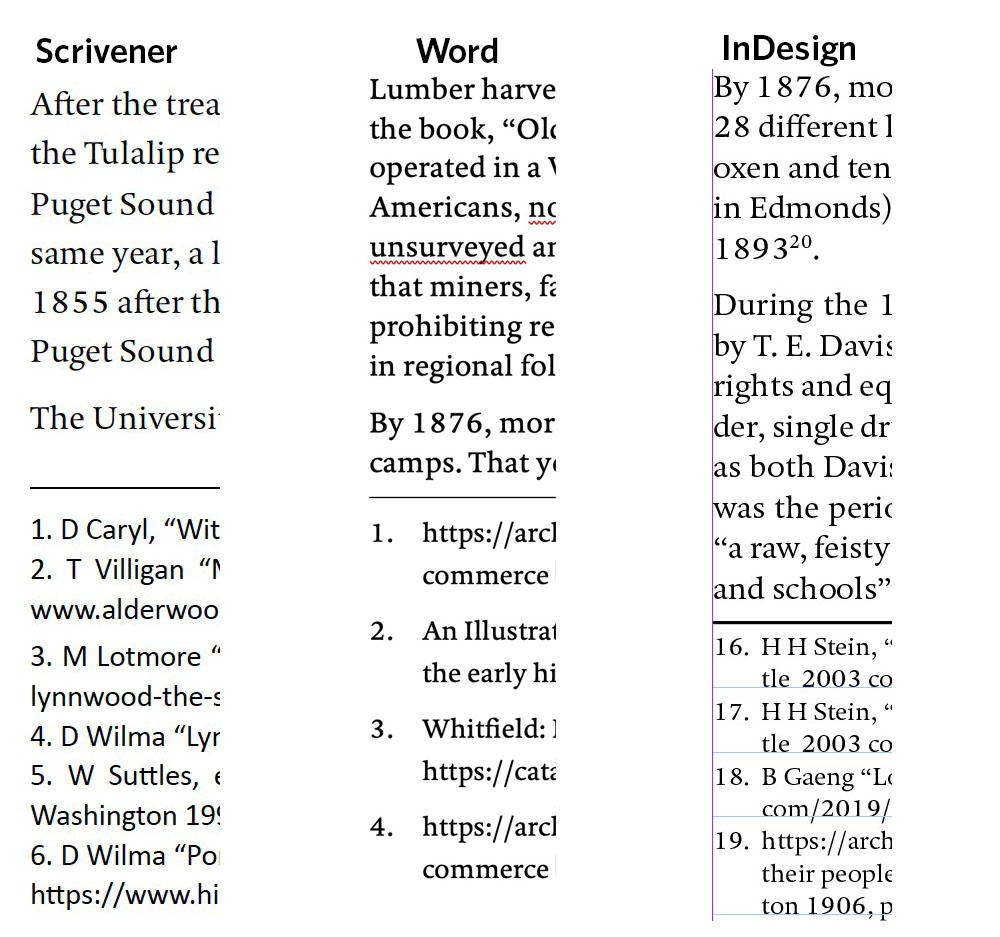
But back to the original question: here is how footnotes appear in Word vs Scribner when compiled for pdf:

A lot is done by Scrivener for you, but loading your packags and settings is completely in your control. That’s the beauty of what Scrivener has done for you.

There are settings in the Text Layout Format settings in compile. I also have in the “Front Matter” a document holding my own set of package loads and settings.

I can only suggest you create a simple test document based on Scrivener’s LaTeX template, read the concise documentation, and give it a go. I use “texmaker” to compile the *.tex file created by Scrivener.

I do no writing in a LaTeX editor as some of the “cool kids” do, but I like to spend my time more productively writing in Scrivener. :wink:

Word is not controlling the format of the footnotes. You are. There is a style in Word called “Footnote Text” for which there is a default format, but you can change it to what you want. You are in charge of it. I don’t know about InDesign, but probably you can control it. For Scrivener, see discussion above, I guess but as I use LaTeX for any document complex enough to have footnotes, again I can control.

You are correct that Word and InDesign assign paragraph formats to footnotes. In Scrivener, I’ve only been able to alter the character format for footnotes, as changing the paragraph format affects the text where the footnote marker is placed (unlike the other programs).

Things get tricky with single sourcing, as ePubs need to handle footnotes differently than printed formats (as there is no real “bottom of the page”). In programs like Flare and Oxygen that can use CSS, one has a separate specification for paragraph formatting depending on if the output is for print or ePub/web.

If you compile from Scriv to Word, your footnotes still won’t look like your Word example, even if you have them set so in your Word Normal template. First, Scrivener-generated word docs don’t invoke your normal template — but you can make some quick headway by copying all from the Scriv generated and pasting it into a fresh Word doc.
Also, if memory serves, those needed initial tab characters for the footnote alignment get eaten by Scriv, so you need to add them in manually after.
Having to go in after and manually impose my Footnote Text and Footnote Reference styles onto the footnotes and each of their references is a pet peeve with me. Not to mention having to add in those tabs after the fact.

2 Likes