I’ve followed some formatting suggestions here, but I’m not getting anywhere. I’ve have cut and pasted text from a Google doc, and now my Scrivener project has different fonts and different margins. I’ve tried to adjust the project settings and thought I had set it back to the default, but nothing changed. I would love some help—thanks!
When you have either Scrivener > Settings > Editing > Formatting set (for all new projects) or Project > Project Settings… > Formatting (with Use different formatting for documents in this project ticked on), what you have set only applies to New documents.
To apply your settings to what you have alkready entered (in this case what you pasted in from Google docs) you need to select it all by selecting Draft/Manuscript in the Binder, going into Scrivenings mode (Cmd-1), clicking in the editor and Cmd-A. Then go to Documents > Convert > Text to Default Formatting…
That should result in all your text having the formatting you have set.
As you have pasted in from Google docs, I would recommend selecting all the text again and choosing Edit > Text Tidying > Zap Gremlins to remove any stray weird bits of code left over from Google docs.
Hope that helps.

Mark
4 Likes
And also @ Lizofistanbul, lest we forget, welcome to the Scrivener Forums!
-gr
Hi Mark,
Thank you for your help, I don’t see “Document > Convert though I do see the Text to Default Formatting, which I set. But the Google portion is still not resetting. I don’t see the Edit >Text Tidying > Zap Gremlins. It said my version was current, so I’m not sure why I’m not seeing these prompts. Thank you, Liz
Thank you, gr! Happy to be here. 
Hi Liz.
I’m afraid I won’t be able to get back to one of my computers till tomorrow afternoon (10:30 p.m. here in the UK), so I’ll post screenshots to help you unless someone gets in first.
Mark
Hi Liz,
I’ll give it a crack since I’m here now, but others on this forum are way better than me.
When I can’t find a command, I go to Help on the menu bar, then start typing what I think the command is that I want. Such as:
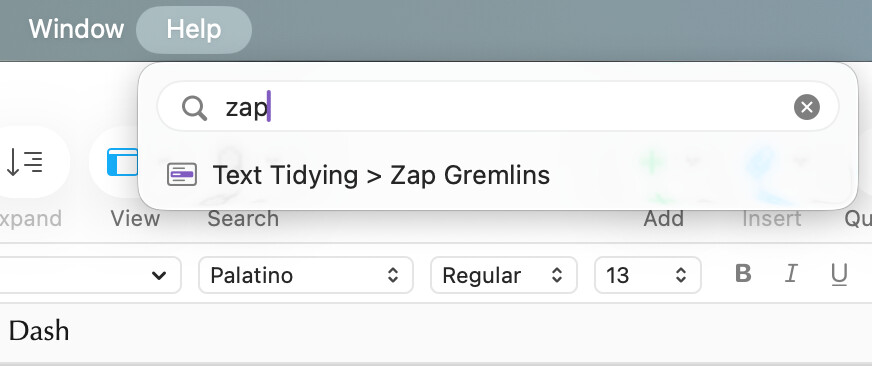
Select all the text in the document by holding down cmd then tapping a, then go to the Zap Gremlins.
To change a document to default formatting:
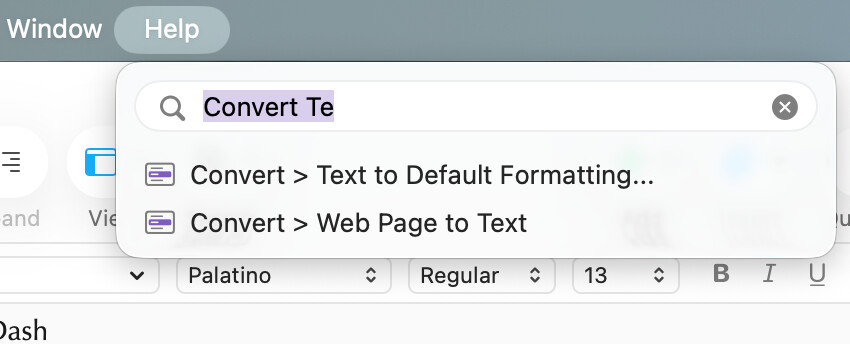
Hope this helps.
2 Likes